

Transitioning to a hot desking model can optimize office space and increase employee flexibility. However, determining the right number of desks to accommodate a flexible workforce can be challenging. Switching to a hybrid work model is not an easy choice. It means finding a balance between giving employees more freedom and the costs of office space. One of the first things that business leaders and HR professionals need to think about is how many desks they really need.
Getting this number wrong can have serious effects. If you have too many desks, you’re paying for space that isn’t being used. Not enough desks make workers angry, lower productivity, and break trust in the hybrid policy. This guide gives you a data-driven, reliable way to figure out how many desks you need, moving you from guesswork to a strategic advantage.
Aside from looking at the main ideas behind the desk-sharing ratio, you’ll learn how to calculate it, track it, and adjust it over time. It’s not just about the numbers; it’s about creating a work environment that works for your employees and your business.

Contents
- 1 What Is a Desk Sharing Ratio?
- 2 How to Calculate Desk Sharing Ratio (Formula + Example)
- 3 Occupancy Calculation for Hot Desking
- 4 How to Track Hot Desk Usage Over Time
- 5 Hot Desking Model vs Desk Hoteling
- 6 Hot Desking Statistics and Industry Trends
- 7 How Much Office Space Per Employee Do You Need?
- 8 Real-World Hot Desking Examples
- 9 Step-by-Step to Calculate The Number of Desks
- 9.1 Step 1: Understand Your Workforce and Work Patterns
- 9.2 Step 2: Analyze Space Utilization Data
- 9.3 Step 3: Determine Peak Usage
- 9.4 Step 4: Calculate the Desk-to-Employee Ratio
- 9.5 Step 5: Apply a Buffer for Flexibility
- 9.6 Step 6: Consider Different Workspace Types
- 9.7 Step 7: Validate with a Pilot Program
- 9.8 Step 8: Continuously Monitor and Adjust
- 10 Example Calculation
- 11 Simplify Desk Planning with a Smart Desk Ratio Calculator
- 12 Conclusion
- 13 FAQ’s About Hot Desking Ratios
What Is a Desk Sharing Ratio?
A desk sharing ratio is the core planning metric used in hybrid offices to determine how many employees share a single physical desk. It defines the relationship between total workforce size and available desks.
You need to know what the core metric means before you can figure anything out. The desk-sharing ratio is the most important measure for any flexible office. It represents the relationship between your total workforce and the number of physical desks available to them.
This ratio moves away from the old 1:1 model of dedicated seating since it accepts that not everyone will be in the office at the same time. Understanding this ratio is the first step toward efficient space management and significant cost savings. It forms the bedrock of all subsequent capacity planning.
Desk sharing ratio is often confused with other metrics, but its purpose is distinct. It is a planning target, not a measure of real-time activity. It answers the question: “How many people are we designing this office to support?” This foundational knowledge helps you avoid over-investing in furniture you do not need.
Desk-to-Person Ratio Meaning in Hybrid Offices
The desk-to-person ratio is a simple formula expressed as employees per desk. In a traditional office, this ratio was 1:1. In a hybrid model, it changes to something like 3:1 or 4:1, meaning three or four employees share a single desk.
This desk-to-employee ratio hybrid workplace calculation provides a high-level target. It is your starting point for planning office capacity based on expected attendance. A ratio of 4:1 suggests you expect only 25% of your staff in the office on a given day.
Desk Sharing Ratio vs Desk Utilization
Desk sharing ratio and desk utilization are related but distinct workplace metrics. The ratio is a forward-looking planning target, while utilization measures actual desk usage over time.
It is vital to distinguish between the desk sharing ratio and desk utilization. The ratio is your planned target, set before employees arrive. Desk utilization is the actual measurement of how those desks are used over time.
Utilization data reveals the real-world performance of your planned ratio. You might plan for a 4:1 ratio, but the occupancy calculation might show peak-day usage at 60%. This comparison between your planned ratio and real usage data is where true optimization begins.
How to Calculate Desk Sharing Ratio (Formula + Example)
Calculating the desk sharing ratio means determining how many desks are required based on workforce size and expected peak attendance. It converts attendance assumptions into physical workspace requirements. You need a way to reliably figure out the desk-sharing ratio for your business. The process is simple, but you need to be honest about how your workers act.
You will need two important pieces of information: how many employees you have and how many people you expect to show up each day. The expected attendance rate is the most important variable in this case. It requires you to make an informed assumption about how many days per week your average employee will be in the office.

Desk Sharing Ratio Formula
The desk sharing ratio formula calculates employees per desk by dividing total employees by available desks. It provides the numeric foundation for hot desking capacity planning.
The formula itself is elegantly simple. Desk Sharing Ratio = Total Employees ÷ Number of Desks. This equation gives you the target number of employees per desk.
However, to find the desk number you need, you must rearrange the formula. To figure out how many desks you need, multiply the number of employees you have by the percentage of people you expect to be there at the busiest time of day. This tells you how many desks you need, which is the minimum number of physical seats.
What Does 60% Attendance Mean in Practice?
A common target for many hybrid offices is 60% attendance on peak days. But what does 60 percent attendance mean in a real-world context? It usually translates to employees coming in three days per week on average.
With this 60/40 office ratio setup, 60% of your staff will be there on your busiest days. So, you only need enough desks for that 60% peak, not for all of your employees. If you have 100 employees and a 60% peak, you need 60 desks, which means that each desk will be shared by 1.7 people.
Occupancy Calculation for Hot Desking
The desk sharing ratio tells you what you should aim for, but occupancy calculation for hot desking makes that goal a reality every day. Occupancy is the real-time number of desks that are occupied. Tracking this helps you understand if your planned ratio is working.
This moves your strategy from static planning to dynamic management. You start to notice patterns and get a better idea of how much space you really have. This knowledge is power when it comes time to renew a lease or plan a redesign.
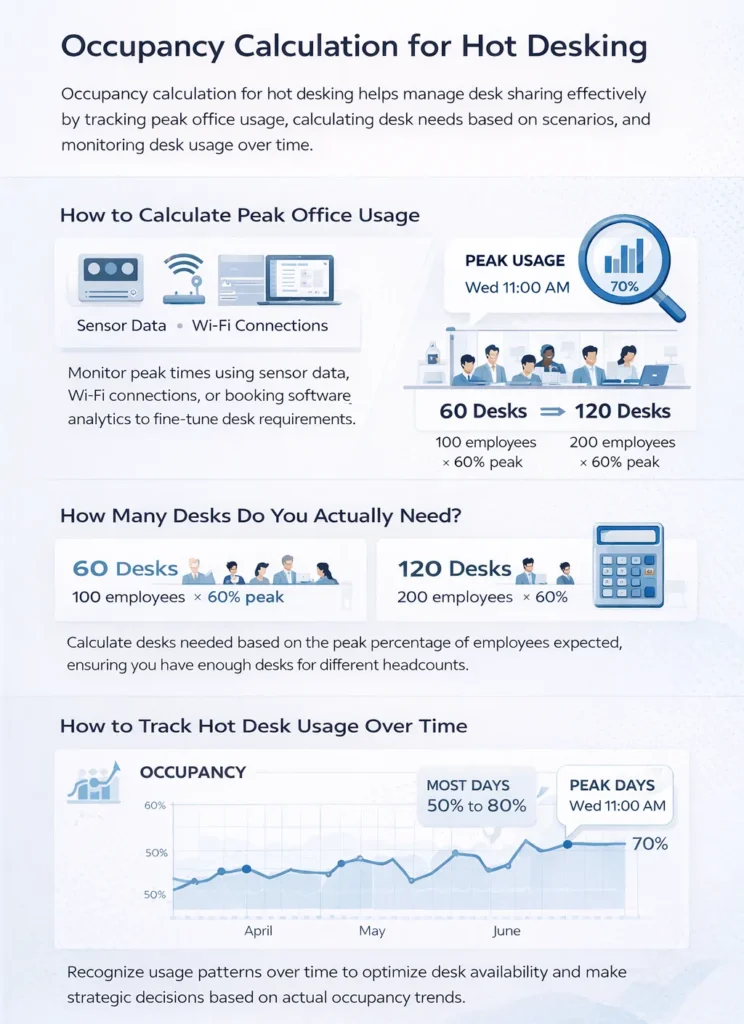
- How to Calculate Peak Office Usage
Peak usage is the highest number of people in the office at a single time. To find it, you need to ask: Can I see peak office usage times? The answer is yes, by using sensor data, Wi-Fi connections, or booking software analytics.
This data reveals your true capacity needs. You might find your peak is on Wednesday at 11 AM with 70 people. If you only have 60 desks, you have a problem. This insight forces a policy adjustment or a rethinking of your office space occupancy calculator assumptions.
- How Many Desks Do You Actually Need?
So, how many desks do you need for your specific company? Let’s use scenario-based examples to clarify. For 100 employees expecting a 60% peak, the math suggests you need 60 desks.
For 200 employees with the same 60% peak, you would need 120 desks. This answers the common query of how many desks or how many desks? for growing companies. The formula scales directly with your headcount, provided your attendance assumptions remain accurate.
How to Track Hot Desk Usage Over Time
Calculating your initial desk need is just the beginning. How do I keep track of how many people use hot desks over time? That’s the real question for long-term success. As employees’ behavior changes, static calculations become less useful.
Keeping track of things all the time will help you change and improve your office strategy. It makes sure that your space stays useful and meets the needs of real people. This is the shift from a one-time project to a process that happens all the time.
- Measuring Desk Utilization with Analytics
The number of desks that are used over a certain amount of time is called desk utilization. By measuring this, you can find patterns like the daily usage rate. For instance, it could be high on Tuesdays and Thursdays. You can also see the days that are the busiest for you.
Furthermore, good analytics reveal underused zones within your office. One wing might always be empty, even when the building is full. This information can help you make the most of every square foot by turning that space into a place for collaboration or focused work.
- Using Hot Desk Booking Software to Monitor Capacity
The best way to find this out is to use technology. You can use hot desk booking software for free, but dedicated platforms give you more information. These systems keep track of who books which desk and when.
These hot desking solutions show you how much space is available in real time. They show you exactly how your desk usage patterns are changing. This turns raw data into useful information that you can use to plan your work.
Hot Desking Model vs Desk Hoteling
For implementation, it’s important to know the difference between desk hoteling and hot desking. They are often used interchangeably, but they are two different ways of thinking about flexible work. Your choice will affect how employees feel and how well you manage space.
This comparison will help you choose the best approach for the culture of your company. It makes sure that the system you choose works with how your teams like to work. If you make an informed choice here, you won’t have any problems with adoption or friction in the future.
- What Does Hot Desking Mean?
What does hot-desking mean in real life? As soon as an employee arrives, they can choose any available desk. Freedom and spontaneity are the main ideas.
The hot desking meaning is rooted in flexibility and serendipitous interaction. It encourages people to sit with different colleagues each day. This model works best in places where people trust each other and work together.
- When to Use Each Model
There is a clear choice between desk hoteling and hot desking. Desk hoteling is a reservation-based system. Employees book a specific desk or workspace in advance, guaranteeing they have a spot.
Use desk hoteling when you have a higher desk sharing ratio and need to ensure capacity for everyone. Use hot desking when you have ample space and want to maximize chance encounters. Your choice depends entirely on your specific needs and culture.
Hot Desking Statistics and Industry Trends
To build a convincing business case, you need data that supports your recommendations. Statistics on hot desking show how common this practice has become. It proves that your suggested strategy is not an experiment, but rather a standard in the industry.
These trends can help you plan your business from the outside. They help stakeholders find out what other successful businesses are doing. This information gives your proposals more weight and credibility.
- How Many Offices Use Hot-Desking?
Research consistently shows that a significant majority of modern offices have adopted some form of flexibility. Asking how many offices use hot-desking reveals that it is now the norm in sectors like tech and finance. The prevalence answers the question, “How often do people use hot desks?”
Reports from industry groups often talk about the good things that are making this happen. For example, UK reports data on hot desking benefits often point to lower costs and better teamwork. These numbers help explain why you should spend money on a new system.
How Much Office Space Per Employee Do You Need?
The desk sharing ratio directly impacts your total space requirements. The question of how much office space per employee needs to factor in shared desks. You are no longer allocating a fixed square footage to one person.
Instead, you calculate total space based on peak occupancy and the variety of spaces needed. This includes desks, but also meeting rooms, quiet areas, and places to hang out. This all-encompassing view makes sure that your office can handle all types of work.
- How to Calculate Office Space
To calculate office space for a hybrid model, start with your peak desk count. Then, add the square footage for all shared amenities. You must also know how to measure desks and the pathways around them.
This is more complex than the old model of rows of identical cubicles. You’re not just making a sea of furniture; you’re making an ecosystem. The goal is to make a space that feels big even when it’s full.
Real-World Hot Desking Examples
Theory is important, but examples help you understand the idea. Looking at examples of hot desking from businesses of different sizes helps you understand how the math works. It shows you what success looks like in practice.
These applied scenarios help your team visualize the end result. They connect the spreadsheet to the real-life experience of hot desking in an office. This clarity is important for getting both employees and leaders on board.

Small Business Example
Consider a small business with 50 employees. They adopt a 2-3 days per week hybrid model with a 60% peak attendance. Their calculation shows they need 30 desks.
Desk Requirement Calculation
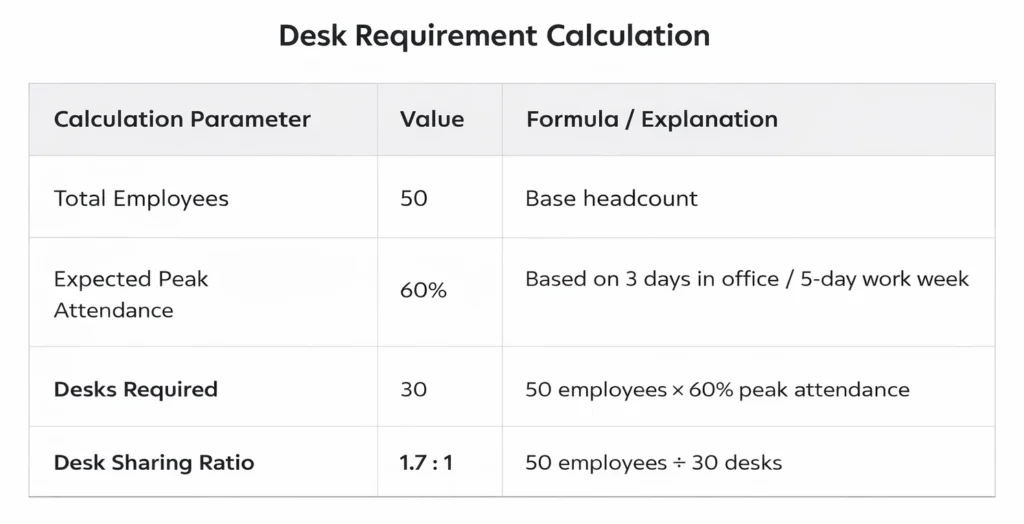
An accurate desk requirement calculation is the first step in making any hybrid workplace strategy work. For our small business with 50 employees, we used the standard formula with a 60 percent attendance rate based on the team’s three-day in-office schedule.
This calculation showed that the company only needs 30 physical workstations instead of 50 because 1.7 employees share each desk. This hybrid workplace calculation of the desk-to-employee ratio shows that knowing when your busiest times are is the most important thing you can do to make sure your office is the right size.
Office Space & Cost Comparison
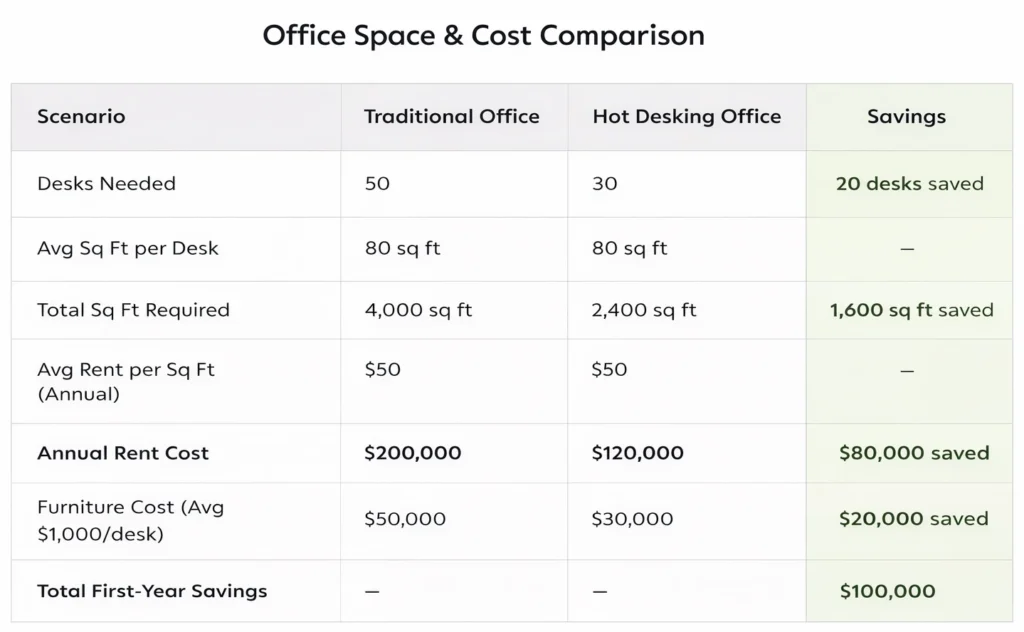
When we compare the financial implications, the office space and cost comparison reveal dramatic savings under the hot desking model. The traditional approach requiring 50 desks would consume 4,000 square feet at an annual rent of $200,000, plus $50,000 in furniture costs.
By contrast, the hot desking model needs only 2,400 square feet for 30 desks, slashing annual rent to $120,000 and furniture expenses to $30,000. This occupancy calculation for hot desking demonstrates a remarkable $100,000 in first-year savings while maintaining a vibrant, functional hot desk workspace that accommodates everyone comfortably on peak days without feeling empty during quieter periods.
200-Person Hybrid Example
A 200-person marketing firm plans for a similar 60% peak, requiring 120 desks.
Desk Requirement Calculation
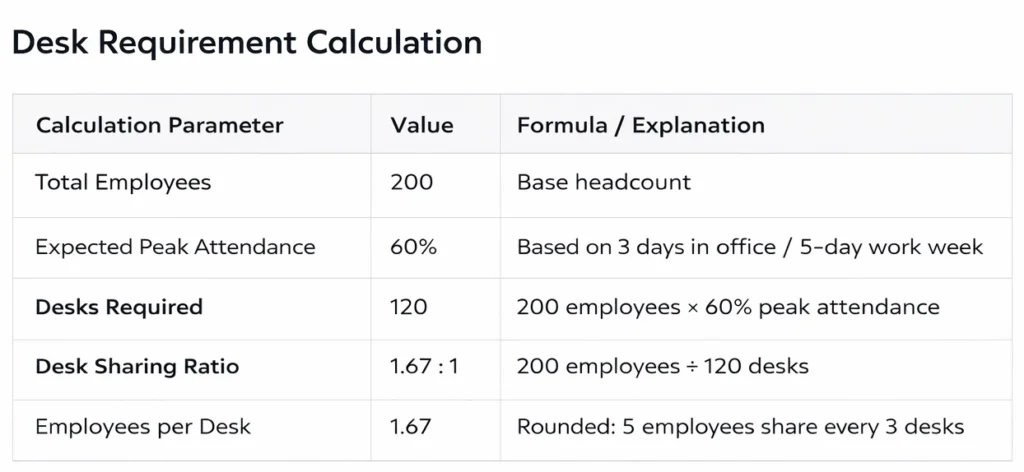
Accurate desk-need calculations are the first step in any successful hybrid workplace strategy. We used the standard formula for our 200-person marketing firm example, which was based on the team’s three-day in-office schedule and a 60% attendance rate.
This calculation showed that there are 1.67 employees per desk, which means the company only needs 120 physical workstations instead of 200. This hybrid workplace calculation of the desk-to-employee ratio shows that the most important thing you can do to avoid wasting space is to know when your peak attendance times are.
Cost Comparison: Traditional vs Hot Desking
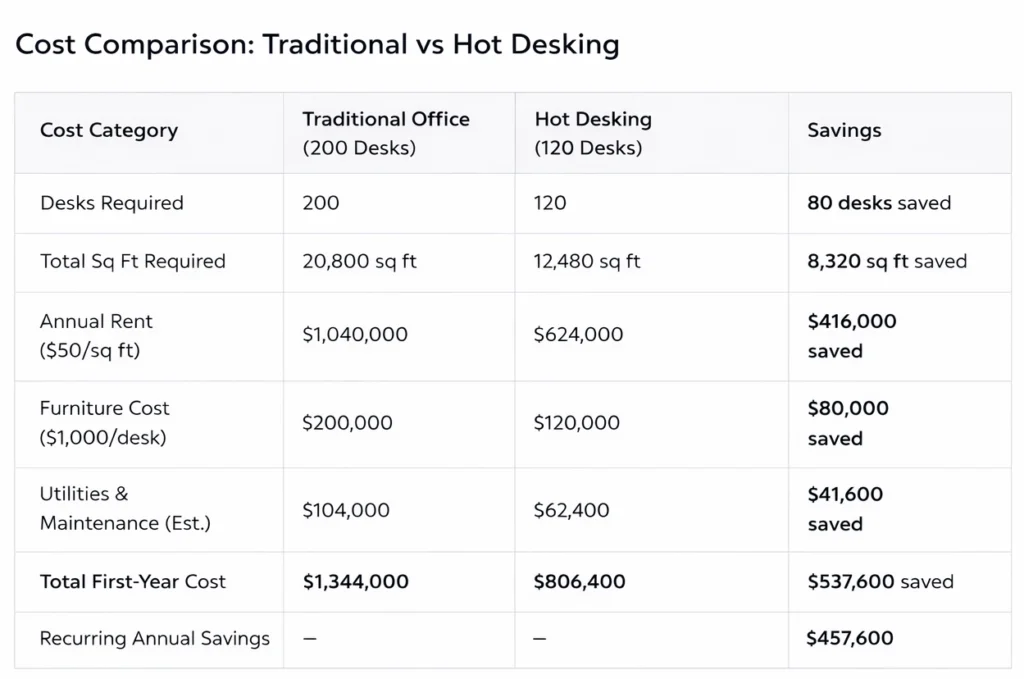
It becomes clear right away that the hot desking model is better for the office space and cost than the traditional model. The old way of doing things, which needed 200 desks, would take up 20,800 square feet and cost $1,040,000 a year in rent and $200,000 for furniture.
The hot desking model, on the other hand, only needs 12,480 square feet for 120 desks. This cuts the cost of rent to $624,000 a year and the cost of furniture to $120,000 a year. This shows that the company will save $416,000 a year on rent alone.
Step-by-Step to Calculate The Number of Desks
A step-by-step approach to calculating the number of desks needed for hot desking in your office.
Step 1: Understand Your Workforce and Work Patterns
The first step is to gather detailed information about your workforce and their work patterns. Consider the following factors:
- Total Number of Employees: Know the total number of employees who will be using the office space.
- Work Schedules: Analyze employee work schedules to understand peak office usage times. This includes full-time, part-time, remote, and hybrid workers.
- Employee Attendance Rates: Estimate the average attendance rate. For instance, if employees typically work in the office 3 days a week, the attendance rate is approximately 60%.
Step 2: Analyze Space Utilization Data
Use space utilization data to understand current desk usage patterns. This data can be collected through:
- Workplace Surveys: Conduct surveys to gather information on how often employees use their desks and their preferences.
- Occupancy Sensors: Install sensors to track real-time desk usage and peak occupancy times.
- Desk Booking Systems: Analyze data from any existing desk booking software to identify trends and patterns.
Step 3: Determine Peak Usage
Identify the peak usage periods when the highest number of employees are in the office simultaneously. This helps in planning for the maximum number of desks required. For example:
- Daily Peaks: Identify the busiest days of the week.
- Hourly Peaks: Determine peak hours during the day.
Step 4: Calculate the Desk-to-Employee Ratio
Based on the information gathered, calculate the desk-to-employee ratio. This ratio indicates the number of desks needed per employee. A common starting point is to use a 0.8:1 ratio, meaning for every 10 employees, 8 desks are provided. However, this ratio can be adjusted based on your specific data.
Step 5: Apply a Buffer for Flexibility
Adding a buffer ensures that desks are available even during unexpected peaks. A typical buffer ranges from 10% to 20% of the calculated desks. For example, if your calculation suggests 80 desks, adding a 10% buffer would mean providing 88 desks.
Step 6: Consider Different Workspace Types
Not all work requires a traditional desk. Consider a mix of workspaces to cater to different needs:
- Quiet Zones: For focused work.
- Collaborative Areas: For team meetings and collaborative tasks.
- Breakout Spaces: For informal meetings or relaxation.
Step 7: Validate with a Pilot Program
Before fully implementing hot desking, run a pilot program to validate your calculations. Monitor desk usage during the pilot and adjust the number of desks as needed based on real-world data.
Step 8: Continuously Monitor and Adjust
Hot desking needs can change over time, so it’s essential to continuously monitor desk usage and adjust the number of desks accordingly. Use the following methods:
- Regular Surveys: Conduct regular employee surveys to get feedback on desk availability and preferences.
- Utilization Reports: Analyze ongoing data from desk booking systems and occupancy sensors.

Example Calculation
Let’s walk through an example calculation for an office with 100 employees.
- Total Number of Employees: 100
- Average Attendance Rate: 60% (employees work in the office 3 days a week)
- Estimated Peak Usage: 60 employees (60% of 100)
Assuming a desk-to-employee ratio of 0.8:1:
- Number of Desks Needed: 60 employees x 0.8 = 48 desks
Adding a 10% buffer:
- Total Desks Needed: 48 desks + 10% buffer (4.8 desks) = 53 desks
Considering different workspace types and a pilot program might lead to slight adjustments, but this provides a solid starting point.
Simplify Desk Planning with a Smart Desk Ratio Calculator
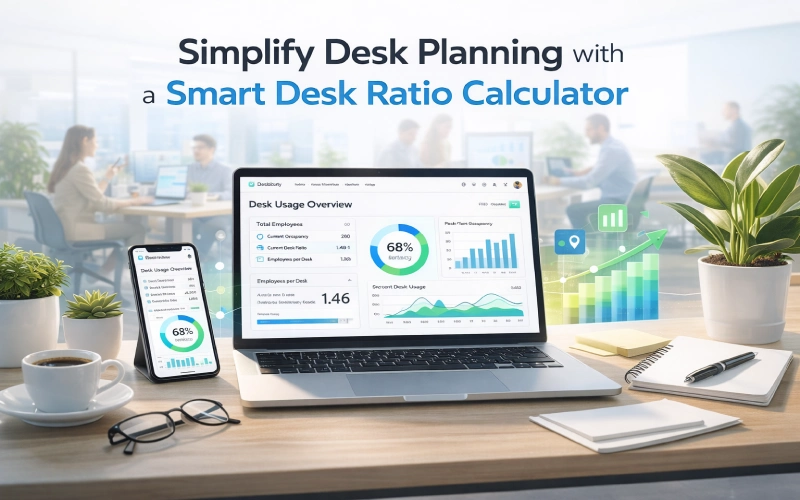
Planning your office capacity doesn’t have to be a manual guesswork exercise. You can simplify the entire process with a dynamic tool. A desk sharing ratio calculator removes the complexity from your initial planning.
However, a static calculator is just the first step. You need a system that grows with your business in order to really master your space. This is when it becomes necessary to go from a basic calculator to an all-in-one platform.
Real-Time Usage Tracking
Othership offers a solution that is much more than just a calculator for how many people can fit in an office. Our platform offers real-time tracking of your hot desk capacity and usage patterns. You get live data, not just static spreadsheets.
This transforms your hybrid workplace calculation from an annual event into a continuous insight. You will always know if your desk-sharing ratio is still the right one for your team. Stop making guesses and start knowing with data that is correct and up to date.
Monitor and Adjust with Confidence
With Othership, you get a powerful tool for planning capacity in the modern office. You can keep an eye on your desk ratio and see exactly how your space is being used. This lets you change your policy or floor plan before something goes wrong.
You need our desk ratio monitoring system to stay flexible. It gives you the confidence to change your habits and the needs of your business as they change. Book a demo today to find out how Othership can change how you run your business.
Conclusion
Calculating the number of desks needed for hot desking involves understanding your workforce, analyzing space utilization data, and planning for peak usage with a buffer. By following these steps and continuously monitoring desk usage, you can create a flexible and efficient hot desking environment that meets your employees’ needs.
For more insights and tips on optimizing your workspace use the button below to get a free consultation.
FAQ’s About Hot Desking Ratios
1. What is a desk-to-employee ratio?
The goal is to have a certain number of employees share one physical desk in a flexible office. A 3:1 ratio, for example, means that three people share one desk. This is based on how many people are expected to attend hybrid events, not how many people are actually there.
2. How many desks do I need for 100 employees?
You need 60 desks if you think that 60% of your staff will be in the office on busy days. This is based on the idea that each employee works in the office three days a week. Your specific number may change depending on how often your team actually shows up.
3. What is desk utilization?
Desk utilization is a way to find out how often your desks are actually being used. To figure it out, you compare the number of desks that are occupied to the total number of desks that are available over a certain period of time. This information can help you figure out if your office is being used well.
4. What is hot desking vs hoteling?
Hot desking is a way to choose a place to work that doesn’t have a set desk. In hoteling, employees book a specific desk ahead of time. The choice depends on whether your culture values spontaneity or guaranteed seating.
5. Can I see peak office usage times?
Yes, you can identify peak times by using various tracking methods. These include desk booking software, Wi-Fi connection data, or physical sensors. This information is very important for checking your first guesses about how many people will share a desk.
6. What is a 60/40 office setup?
In this hybrid work model, 60% of employees work in the office and 40% work from home. This usually means that workers come in three days a week. It’s a common goal to figure out the first desk-sharing ratio.


You must be logged in to post a comment.