

Hybrid work is no longer a question that is being determined by small businesses today. That question has been answered. The practical question of 2026 is a challenge: how to ensure that hybrid work is predictable, visible, and manageable without putting strain on lean teams with fragmented software.
Hybrid work often begins informally in small businesses, with employees working from home on certain days, shared desks, on-demand meeting rooms, and occasional in-office visitors. This flexibility feels liberating at first and allows teams to move quickly without rigid structure. Over time, however, cracks appear in the form of missed meetings, unused booked spaces, and confusion about who is coming into the office and when.
This article will explore how hybrid workplace tools, hybrid work tools, and hybrid workplace software function as a unified system in small business environments. It explains why hybrid work often breaks down without the right infrastructure, what core tools are actually required, and how a unified hybrid work platform simplifies operations.
Contents
- 1 What Are Hybrid Workplace Tools for Small Businesses?
- 2 Why Hybrid Work Breaks Down in Small Businesses Without the Right Tools
- 3 Core Hybrid Workplace Tools Every Small Business Needs
- 4 Why Small Businesses Benefit from an All-in-One Hybrid Workplace Platform
- 5 How Othership Supports Hybrid Work for Small Businesses
- 6 Hybrid Workplace Tools: Small Businesses Commonly Compare
- 7 How to Choose the Right Hybrid Workplace Tools for a Small Business
- 8 Conclusion: The Right Hybrid Workplace Tools for Small Businesses
- 9 FAQs: Hybrid Workplace Tools
- 9.1 1. What are hybrid workplace tools for small businesses?
- 9.2 2. Do small businesses really need desk booking software?
- 9.3 3. What’s the difference between hybrid work tools and hybrid work platforms?
- 9.4 4. Can one tool manage desks, meeting rooms, and visitors?
- 9.5 5. How much does hybrid workplace software cost for SMBs?
- 9.6 6. Is it better to use multiple tools or one hybrid workplace solution?
What Are Hybrid Workplace Tools for Small Businesses?
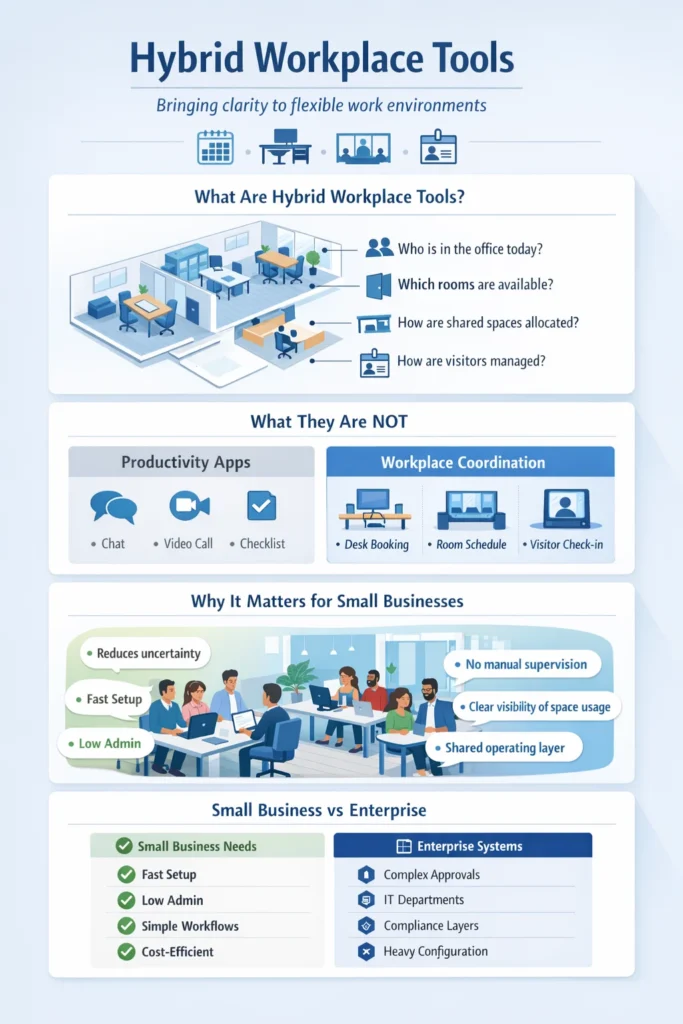
Hybrid workplace tools help small businesses manage where people work, when they come into shared spaces, and how physical resources are used. In contrast to generic productivity applications, these tools are at the operational layer of the work environment, influencing daily coordination, but not individual productivity.
Hybrid work is not about organizing the global workforce or complicated policy implementation for small businesses. It is about clarity. The teams must understand who is going to be in the room, which desks will be occupied, whether the meeting room is available, and how visitors will enter the office, all without manual supervision.
Hybrid working tools and technology for hybrid work are optional enhancements and a digital infrastructure. They substitute informal presumptions with common sense, which allows hybrid work to grow.
Hybrid Workplace Tools Definition (SMB Context)
In a small business environment, many people believe that hybrid workplace technology refers to individual productivity or communication, but in today’s time, hybrid workplace technology can now work as the software that manages physical workplace coordination. These tools answer practical questions such as:
- Who plans to be in the office today?
- Which rooms are available?
- How are shared spaces allocated fairly?
- What about visitor registration and their expectation?
Hybrid work software and software for hybrid working qualify as workplace tools only when they directly manage space, presence, or access. Remote work may be supported by messaging applications, task managers, and video conferencing platforms, but these tools do not control the physical work environment.
This difference is significant to small businesses. Hybrid workplace tools are not about adding features; they are about reducing uncertainty. They develop a common operating layer that enables flexible working without having to rely on guesses, memory, or constant communication via chat.
How Small Business Hybrid Needs Differ from Enterprises
Hybrid work does not affect small businesses in the same way as it affects large enterprises. Enterprise-focused hybrid office tools and hybrid office software are often designed for scale, compliance, and departmental complexity. Although these systems are powerful, they often seem bloated or incompatible with smaller teams.
- Small companies usually demand:
- Faster setup and adoption
- Reduced administrative expenses.
- Clear, intuitive workflows
- Cost-efficient pricing models.
Enterprise-level hybrid workplace systems can take the form of special workplace administrators, IT departments, or stratified approvals. These resources are hardly available to small businesses. Rather, hybrid tools should be out of the box, meaning they provide teams with self-service without requiring significant setup.
This is the reason simplicity in the system is more important than having baseless features. The most effective hybrid workplace tools for small businesses focus on coordination, making it easy to see what is happening without enforcing rigid rules.
Why Hybrid Work Breaks Down in Small Businesses Without the Right Tools
The failure of hybrid work is not because teams do not favor flexibility. It does not work as the friction of operations that silently builds up. Without proper hybrid workplace tools, small businesses rely on informal processes that cannot scale beyond a handful of people.
The typical problems of hybrid work are the lack of clarity regarding attendance, poor use of space, and inconsistency when it comes to visitors. In the long run, these problems will reduce productivity and frustration, even in situations when the team is culturally aligned.
This issue is more of an operational matter rather than cultural. Hybrid work is not predictable without hybrid working software that plays with space and presence.
Visibility Gaps in Hybrid Offices
Lack of visibility is one of the first problems that small businesses have to deal with. The people in the team are not aware of the person who will be in the office on any particular day. Space needs are unpredictable to managers. Meetings are made without the knowledge of whether people are going to be on the ground.
These gaps stem from the absence of hybrid office tools and hybrid workplace technology that provide shared awareness. Attendance information stored in personal calendars or even chat messages will become disjointed and unreliable.
In the absence of visibility, teams communicate too much to compensate or even cease coordination. This doubt negates the flexibility that hybrid work is supposed to offer.
Space Conflicts and Resource Waste
Shared resources are more difficult to manage as the hybrid attendance changes since desks are taken on an informal basis. Conference rooms are either overbooked or are not utilized since nobody is aware of their availability. Over time, frustration grows.
Space conflicts are likely to prevail without the appropriate the best room booking software or desk booking software. Teams either come to realize that no desks are available or stay out of the office to avoid the mess.
For small businesses, this inefficiency becomes costly. Flexible Office space is a high cost, and inefficient utilization directly affects return on investment. Hybrid workplace tools exist to solve this—not by enforcing rigid schedules, but by making space usage visible and fair.
Core Hybrid Workplace Tools Every Small Business Needs
Hybrid work works best when all the tools have their distinct roles in the system. Instead of thinking in terms of products, small businesses benefit from understanding hybrid workplace tools as interconnected components of a broader hybrid work platform. Each tool addresses a specific coordination challenge, but their real value emerges when they work together as hybrid workplace software.

Desk Booking Software for Flexible Seating
The desk booking software assists small businesses with flexible seating, avoiding any confusion. Not all people must have permanent desks in hybrid teams. Nevertheless, individuals still desire the comfort of knowing that they will have a place to sit when they arrive.
Desk booking also brings predictability to the hybrid working software. Employees are able to schedule their office days with a lot of assurance, knowing that they have a workplace. This ensures fairness since desk hoarding is avoided and space is efficiently shared.
Other resources that are highly contested in a hybrid office include meeting rooms. In the absence of appropriate room booking software, availability is not known, resulting in duplicate bookings or rooms left unutilized.
Within hybrid office software, meeting room booking tools provide real-time visibility into shared spaces. There is no need to use informal agreements and fragmented calendars to organize work in teams. This understanding minimizes distractions, enhances the reliability of meetings, and ensures that shared spaces are utilized as intended.
Visitor Management Software for Hybrid Offices
Hybrid work also alters the way that visitors engage with offices. Visitors can come during the days when the hosts are not present, or when there are no front desks. The Best Visitor management software helps to manage this challenge by building predictable and secure visitor workflows.
Visitor management, as one of the hybrid workplace solutions, makes registration, compliance, and communication easier. It enables small enterprises to be friendly without the need to have them under manual control. Notably, the tools of modern visitors presuppose flexibility, not a traditional guest desk, which makes them appropriate in a hybrid setting.
Hybrid Workspace Management Software
At the system level, hybrid workspace management brings desks, rooms, and visitors together under one operational view. Instead of managing each element separately, a hybrid work platform connects them into a cohesive experience.
This unified approach is what transforms individual tools into hybrid workplace software. It enables small entrepreneurs to know how individuals make use of space over time, develop designs, and also enhance expansion without complicating it.
Here, the importance of integration can be seen: when hybrid tools are created to be compatible, they work best.
Hybrid Workspace Management Software
Why Small Businesses Benefit from an All-in-One Hybrid Workplace Platform
Small businesses are at a crossroads as hybrid work matures. They already have a number of tools, calendars, spreadsheets, chat messages, and possibly a booking app, but coordination remains disjointed. It is at this point that teams often discover that hybrid work does not fail due to people but rather systems being disconnected.
An all-in-one hybrid work platform brings structure to this fragmentation. A single platform does not handle desks, rooms, or visitors separately but rather as interconnected components of a single operating environment.
In a system view, hybrid work solutions are effective when they minimize inter-tool handoffs. Any additional application adds friction: a new user experience, a new truth. In small companies with a small administration, this tool sprawl is not sustainable. A unified hybrid work platform simplifies daily operations by aligning people and space within one system.

Systems vs Fragmented Hybrid Tools
Fragmented hybrid workplace tools often emerge organically. A seating conflict is overcome by adding a desk booking app. Subsequently, a room booking tool is used to deal with chaos in meetings. A visitor system is also brought in with respect to compliance. They both address a limited problem, but neither sees the workplace in its entirety.
This fragmentation forms blind spots because meeting schedules are not indicated in desk bookings. There is no relationship between visitor arrivals and host availability. The data associated with office usage resides in distinct dashboards, and it becomes hard to discern trends or make future plans.
By contrast, systems-based hybrid workplace solutions are systems with shared context. Office attendance is represented by desk availability. Meeting room utilization is correlated with occupancy. Visitor workflows will fit in with the office schedules.
How Othership Supports Hybrid Work for Small Businesses
The concept of a single platform is easier to measure as soon as the necessity to have a single system is established. Othership is designed as a hybrid workplace software that brings core hybrid functions together without overwhelming small teams.
Rather than positioning itself as a collection of features, Othership operates as a hybrid workspace management software. It facilitates the movement of individuals by helping them move within a common area before they come, during their stay, and whenever they are working together.
As one set of hybrid office tools, Othership covers:
- Desk reservation of flexible seats.
- Cloud-based meeting room booking in common areas.
- Hybrid office visitor management.
- Long-term work space planning.
The fact that these functions exist in a single system enables small businesses to be seen together, without having to operate on several tools. A single operational layer allows teams to plan office days, book space, and have visitors.
Notably, this method does not impose strict regulations. Othership allows flexibility and predictability, which is a necessary balance in small teams that are in hybrid work settings.
Hybrid Workplace Tools: Small Businesses Commonly Compare
During evaluation, small businesses often compare hybrid workplace tools based on immediate needs. These tools are often very good in their respective categories, but most often are designed as a standalone solution. Commonly compared hybrid work software includes:
- OfficeRnD is often used for space and membership management.
- Skedda specializes in room booking and reservation.
- GetOfficely, with an eye on desk reservation of hybrid teams.
- Envoy, Visitor management, and entrance to workplace access.
- Archie provides features of workplace experience.
- Robin is space-scheduling and analytics-oriented.
- Kisi, which is in the physical access control field.
- Wrike is a tool for project and work coordination.
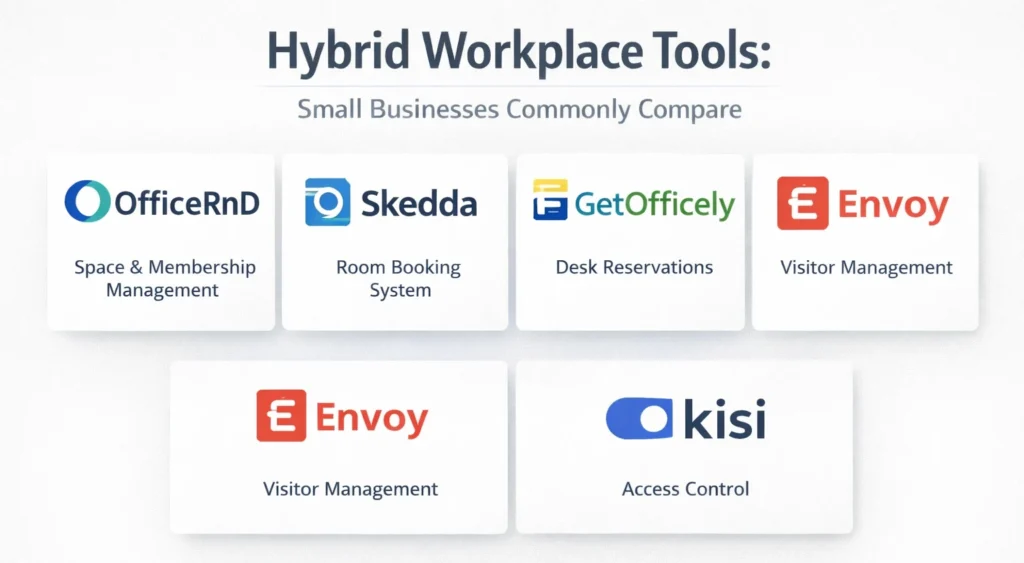
All these tools cover a particular layer of operations. As an example, desk booking solutions are adept at coordinating the seating process, whereas visitor applications concentrate on compliance and arrival processes.
Small businesses generally evaluate such tools when attempting to address one pain point. However, in the long run, handling various systems would eventually bring teams into the same dilemma: a lack of visibility.
This is where businesses begin to consider whether hybrid workplace tools should function independently—or as part of a single hybrid work platform.
How to Choose the Right Hybrid Workplace Tools for a Small Business
Choosing the right hybrid workplace tools requires shifting focus from features to outcomes. Instead of posing the question of what each tool can do, decision-makers can be advantaged by posing the question of how the tools will work together as the business expands. Actual evaluative questions are:
- Does this tool enhance people and spatial visibility?
- Will employees embrace it without a struggle?
- Does it scale with alterations in hybrid attendance patterns?
- Is it lessening administrative effort or increasing it?
Small businesses need to think about how they might coordinate in the future when analyzing hybrid working software, not only about contemporary issues. Working in a hybrid environment develops, and the tools are not to change regularly.
Integration is another important consideration. Synchronized tools or those that need manual updating tend to create the same friction that they are supposed to eliminate. These dependencies are reduced in a cohesive system.
However, at the end of the day, the correct option coincides with the reality of how hybrid work works in real life- not what it appears to be when compared to other features on a chart.
Conclusion: The Right Hybrid Workplace Tools for Small Businesses
Hybrid work can be successful when it is structurally supported. For small businesses, hybrid workplace tools are no longer optional add-ons—they are core operational infrastructure.
Hybrid tools are managed in a system, rather than in a stack, which is the most effective approach. Visibility, coordination, and space management work best when they are unified under a single hybrid work platform.
With the future of hybrid work still developing, small companies that invest in system-level solutions will spend fewer hours on managing the logistics and more on growth. Solutions such as Othership demonstrate the same way desks, rooms, visitors, and workspaces can exist in a single coherent system – without complexity or tool sprawl.
It is not about the urgency, but clarity: hybrid work functions most effectively in cases where the tools supporting it are made to work together.
Ready to simplify your hybrid workplace? Book a demo to see how Othership unifies desk booking, meeting rooms, and visitor management in one seamless platform.
FAQs: Hybrid Workplace Tools
1. What are hybrid workplace tools for small businesses?
Hybrid work tools are useful in assisting small businesses to control the location of employees, their arrival at the office, and the utilization of shared areas. They work at the coordination level and enhance visibility and mitigate uncertainty between desks, rooms, and visitors.
2. Do small businesses really need desk booking software?
Yes, the best desk booking software brings a degree of predictability to a flexible seating area and prevents confusion and desk hoarding. It will allow a fair distribution of space and make employees certain that when they come there will be a place to work.
3. What’s the difference between hybrid work tools and hybrid work platforms?
The hybrid work tools usually address particular issues such as desk booking or visitor registration. A hybrid work platform links these tools into a single system that coordinates space, presence, and access.
4. Can one tool manage desks, meeting rooms, and visitors?
Yes, it is true that hybrid workspace management software can unify desks and meeting rooms and visitor workflows in a single operation. Othership platforms combine these functions to minimize fragmentation and enhance workplace visibility.
5. How much does hybrid workplace software cost for SMBs?
The article highlights cost effective pricing models tailored to the needs of small enterprises. SMBs usually seek solutions that avoid excessive administrative overhead at an affordable cost, and are easy to implement.
6. Is it better to use multiple tools or one hybrid workplace solution?
The application of various standalone tools tends to bring about blind spots and partial data. A unified hybrid workplace solution will eliminate friction as desks, rooms, and visitors all fall under a single system.


You must be logged in to post a comment.