

Visitor management has existed for decades. Paper logbooks, manual sign-ins, and check-ins with a receptionist were among the early forms of workplace systems, which were simple to use. These processes formed the foundation of visitor management, but they were slow, inaccurate, and difficult to scale.
As digital transformation accelerated, workplaces started upgrading the visitor management process. Companies required better documentation, automation, and increased visibility. This brought about the emergence of modern systems that enhance the tracking and management of guests by organizations.
Throughout this article, we will explore the definition of visitor management, how modern systems work, and why the shift to digital tools continues to grow. We will also discover the technologies under the present platforms and how they are being used to facilitate safe and effective workplaces.
Explore how Othership streamlines guest operations with a modern platform that simplifies check-ins and supports hybrid work in organizations.
Contents
- 1 What is Visitor Management?
- 2 What is a Visitor Management System?
- 3 How Does a Visitor Management System Work?
- 4 What Modern Visitor Management Means Today
- 5 Why Workplaces Need a Smarter Visitor Management System
- 6 Essential Features of an Effective Visitor Management Solution
- 7 Creating a Clear and Practical Visitor Policy
- 8 Improving the Visitor Experience From Arrival to Exit
- 9 Different Types of Visitor Management Systems
- 10 Visitor Management for Hybrid and Flexible Workspaces
- 11 Common Use Cases & Applications Across Industries
- 12 Hardware Needed for Visitor Management Systems.
- 13 Integration With Workplace and Security Systems
- 14 How Automation and AI Improve Visitor Management
- 15 Challenges and Considerations Before Implementing a VMS
- 16 Choosing the Right Visitor Management System
- 17 The Future of Visitor Management in Smart Workplaces
- 18 Transform your Management in Smart workplaces
- 19 Conclusion: Turning Every Meeting Into a Strategic Advantage
- 20 FAQ: Visitor Management System
- 20.1 What does a productive meeting really mean?
- 20.2 What are the best ways to improve meeting productivity?
- 20.3 How do I make my team meetings more effective?
- 20.4 How can I make business meetings shorter but still productive?
- 20.5 What is the best way to start an effective meeting?
- 20.6 How do I reduce back-to-back meetings?
What is Visitor Management?
Visitor management is the process of identifying, registering, and tracking people who enter a workplace or facility but are not employees. It helps organizations know who is on-site, why they are visiting, and when they arrive and leave. This process improves security while ensuring a smooth and professional experience for guests.
Visitor management typically includes collecting visitor details, notifying the host, issuing badges, and recording entry and exit times. Many modern workplaces now use digital visitor management systems to replace manual sign-in books and manage visitors more efficiently.
What is a Visitor Management System?
A visitor management system is a tool that helps organizations record, track, and manage guests entering a building. The visitor management definition continues to evolve as workplaces adopt smarter technology.

A VMS provides structured workflows that make the visitor management process more consistent and secure. Many organizations now use visitor tracking software to replace manual sign-ins and improve visibility. These tools work alongside broader visitor management solutions to give teams more control over who enters their spaces.
How Does a Visitor Management System Work?
A VMS visitor management system works by digitizing the process of registering, verifying, and tracking visitors from arrival to departure.
A visitor management system VMS helps organizations manage every stage of the guest journey. These systems are used to automate pre-registration, check-in, approvals, and documentation. A VMS visitor management system improves accuracy and security by replacing manual processes.
Many organizations now rely on an automated visitor management system to manage identity checks, notifications, and logs. A visitor sign-in system allows visitors to check in using kiosks, mobile devices, or reception-assisted workflows. Visitor check-in software is also used by teams to monitor real-time action and keep all parties compliant.
Try Othership Visitor Management System today to automate check-ins, enhance security, and modernize your workplace.
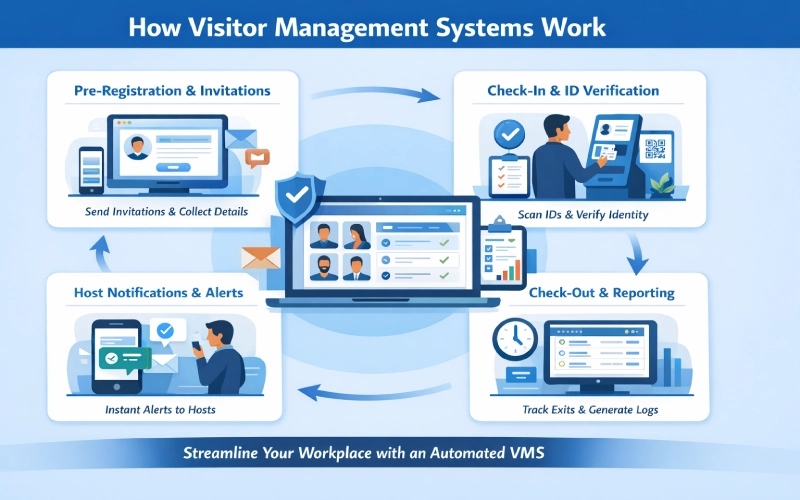
Pre-Registration and Invitation Workflows
Employees are able to invite guests prior to their arrival. This step uses pre-registration visitor management to collect information, approvals, and necessary documents. Pre-registration saves on waiting time. This assists teams in checking identities and issuing badges or authorization.
Visitor Check-In and Identity Verification
When a guest enters, the system searches his or her identity. A visitor identification system can scan IDs, documents, or QR codes. This is done to minimize the risk and provide compliance. It also provides an effective record of each visitor.
Host Notifications and Real-Time Alerts
Visitor systems automatically notify hosts when their guests arrive. These real-time alerts help ensure timely meetings and improve communication between visitors and employees. These host alerts are sent through SMS, email, or mobile apps.
Added security and reliability, many modern platforms now utilise Telegram OTP to deliver encrypted one-time passwords or arrival alerts, offering a more secure alternative to traditional SMS that is resistant to SIM-swapping attacks.
Visitor notifications ensure that both hosts and administrators remain informed about arrivals, departures, and required approvals.
Check-Out, Audit Trails, and Reporting
As soon as a visitor exits, the system captures the time of exit, and logs are updated. An audit trail keeps detailed records of all guest activity. Organizations also monitor visitor activity logs for safety, compliance, and insights.
Visitor Check-In Options: Kiosks, Touchless & Mobile
Modern visitor systems support multiple check-in methods to accommodate different workplace needs. These options include kiosks, mobile sign-ins, and contactless workflows.
Self-Service Kiosks and Tablet Check-Ins
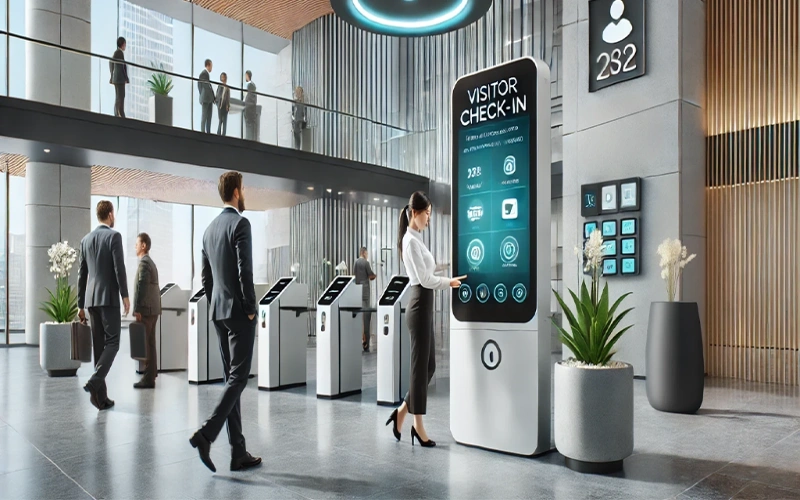
Self-service kiosks and tablets allow visitors to complete the check-in process independently. These devices reduce reception workload and streamline visitor registration.
QR Codes and Mobile-First Sign-Ins
QR codes allow visitors to check in quickly using their smartphones. Mobile-first check-ins reduce wait times and create a smoother arrival experience.
Contactless and Touchless Visitor Flows
Contactless visitor flows minimize physical interaction by allowing visitors to complete check-ins digitally. These workflows support both convenience and workplace health standards.
Benefits of Multi-Channel Check-In Options
Offering multiple check-in methods improves accessibility and flexibility for different visitor types. It also helps organizations manage visitor traffic more efficiently.
What Modern Visitor Management Means Today
Modern visitor management represents a shift from basic check-in procedures to complete workplace automation. Organizations have become required to have visibility, real-time insights, and an easy guest’ experience. A digital visitor management system helps teams manage arrivals across hybrid schedules, security needs, and compliance requirements.
Businesses look for visitor management solutions that fit their workflows and integrate with building systems. For organisations with unique security and compliance needs, a custom software development team can help connect visitor check-in flows with access control, directory services, and internal approval logic to create a smoother, fully integrated experience. Many workplaces also adopt smart visitor management tools that offer predictive, connected features.
Many workplaces also adopt smart visitor management tools that offer predictive, connected features.
How Visitor Management Has Evolved in the Digital Workplace
The development of hybrid work and digital operations altered expectations. Modern environments rely on digital workplace visitor management to streamline every step of the guest journey. This shift reflects the larger evolution of visitor systems, moving from manual processes to cloud-based and automated platforms.
The Shift From Manual Logs to Smart Workplace Systems
This shift refers to the transition from traditional paper visitor logs to digital systems that automate and improve visitor tracking. The use of old paper logs led to mistakes, time wastage, and loopholes. Businesses needed accurate data, audit trails, and reliable reporting. This led to digital visitor logs, which collect information automatically and securely.
Organizations also adopted a visitor tracking system to help verify identities, monitor activity, and maintain compliance. Smart systems minimize the possibility of human error, enable immediate access to records, and facilitate real-time alerts.
Why Visitor Expectations Have Changed
Visitor expectations have changed as workplaces adopt faster, more digital, and more convenient ways to manage guest arrivals.
Customers now demand a polished visitor experience rather than long queues or confusing processes. Health and safety concerns also increased demand for touchless visitor management, which reduces unnecessary contact. This change has become the foundation of the workflow at organizations, which provide fast check-in, automated invitation, and mobile check-in possibilities.
Why Workplaces Need a Smarter Visitor Management System
Modern workplaces need a smarter visitor management system to manage security, improve operational efficiency, and maintain accurate visitor records. As workplaces become more dynamic, organizations require better visibility and control over who enters their facilities.
Security, efficiency, and compliance are the expectations placed on organizations. This makes the benefits of a visitor management system technology more important than ever. An intelligent VMS assists teams with access control, less administration effort, and records.
These visitor management system advantages give organizations clear visibility into on-site activity. The purpose of visitor management extends to safety, productivity, and professionalism. When implemented well, the visitor management system benefits include faster operations, better coordination, and stronger compliance.

Common Challenges With Traditional Check-In Processes
Traditional check-in methods rely on manual processes that can slow down reception workflows and reduce visibility of visitor activity. These systems often lack accuracy, real-time tracking, and efficient record management.
Paper-based check-ins cause a bottleneck and administrative load. Paper records cause discrepancies and information loss. These manual visitor logs also make it difficult to track who is in the building during emergencies.
Hybrid Work and Increased Visitor Complexity
Hybrid work environments introduce unpredictable visitor patterns and varying on-site schedules. Visitor management systems help organizations coordinate arrivals and maintain visibility across dynamic workplace operations.
Safety, Compliance, and Operational Pressures
Companies need to adhere to strict data, identity checking, and emergency preparedness laws. Compliance visitor management ensures that records, approvals, and sign-ins meet regulatory standards. Many workplaces also use visitor ID verification for contractors, vendors, and visitors who require deeper screening.
Essential Features of an Effective Visitor Management Solution
Contemporary systems have a wide range of tools to facilitate operations at the workplace. Many organizations prioritize visitor management system features that enhance security and provide real-time insights.
A visitor management system app helps teams monitor activity from mobile devices. Some companies adopt a full visitor management platform that integrates with existing systems. Choosing the best visitor management software depends on operational needs, compliance requirements, and the complexity of the workspace.
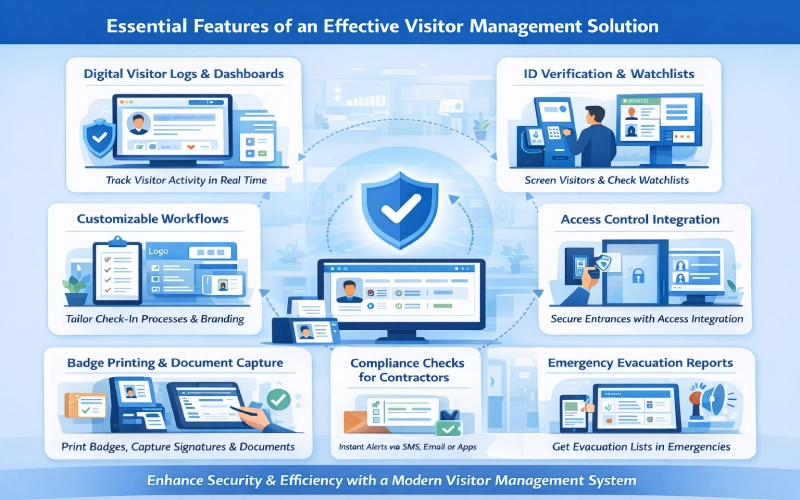
Digital Visitor Logs and Real-Time Dashboards
There are digital records of every visitor that are stored in digital logs. Dashboards give instant information on the number of people on-site. They assist security teams in making decisions.
Customizable Workflows and Branding
Custom workflow enables organizations to customize the process of check-in. This will incorporate forms, document requirements, screening questions, and branded interfaces. Organizations can also use a business card maker to provide attendees with personalized contact materials.
Host Notifications and Communication Tools
The tools of communication contribute to quicker coordination. Auto messages save time and keep the hosts updated with information regarding their visitors.
Badge Printing, Signatures, and Document Capture
Badges recognize the visitor and enhance security. Document capture and signatures assist businesses in meeting contractual and non-consent agreements and safety standards.
Strengthening Security With Screening and Access Control
Integrating access control and visitor management ensures only authorized people can enter. Many companies connect their visitor management system access control tools to building systems. This creates safer environments and maintains strict visitor access management throughout the visitor journey.
Visitor ID Verification and Watchlist Checks
ID screening helps to avoid unauthorized access. Watchlist checks are another added component of security, as they indicate restrictive or high-risk persons.
Compliance Checks for Contractors and Vendors
Contractor monitoring must have compliance records. There are a lot of systems that check certifications and expiration dates. This will lessen liability and ensure operational safety.
Integrating Access Control for Secure Entry
Integration of access controls enables visitors to be issued temporary credentials. It makes sure that access rights get out of date once the visit is over.
Emergency Response and Evacuation Reporting
Evacuation dashboards indicate the occupants of the building during an emergency. The information helps achieve quick and precise headcounts and risk-free responses.
Creating a Clear and Practical Visitor Policy
Organizations benefit from a detailed, documented set of visitor management guidelines. A good visitor management procedure establishes expectations, responsibilities, and compliance rules. A good visitor policy clarifies to employees and visitors the security measures and procedures.
What Your Visitor Policy Should Include
Visitors’ policy sets out the authorization procedures, identification procedures, and rules on safety and privacy.
Roles and Responsibilities for Staff and Visitors
There is a clear definition of expectations in this section. Employees are aware of when to grant entry. Visitors have an idea of the behavior and documentation requirements.
Legal, Compliance, and Privacy Considerations
Businesses should comply with data protection regulations. Policies facilitate good record keeping, consent, and secrecy.
How to Communicate and Implement the Policy
Policies ought to be readily available and communicated. Regular updates and training can help to make sure that it is adopted consistently.
Improving the Visitor Experience From Arrival to Exit
Organizations have shifted focus to hospitality and operational flow. Enhancing guest management helps create a smoother journey for every visitor. A strong visitor experience reduces confusion, wait times, and security friction. Mapping the entire visitor journey enables workplaces to enhance all the interactions, i.e. arrival to exit.

Designing a Smooth and Professional Arrival Process
Firms have a clear arrival process that forms the first impression. There is signage, directions, and the guided check-in procedures to make the visitors feel secure. Professionalism and delays are minimized through automated working processes.
Reducing Wait Times and Front Desk Bottlenecks
Automation eliminates redundant processes at the reception. QR codes, pre-registration, and digital forms reduce the crowding. This contributes to quicker check-in and enhancement of the working process.
Hospitality and Branding Touchpoints
There is a refined look of branded screens, welcome messages, and clear instructions. These factors support professionalism and increase trust.
Enhancing the Overall Guest Journey
An easy departure is no less important than the entry. Easy check out procedures, automatic notifications, and assistance of the staff oriented final impression. Superior visitor travels promote enhanced work relations.
Different Types of Visitor Management Systems
The choice of systems used in organizations is based on their size or the level of security requirements and infrastructure. Various types of visitor management systems support different environments.
Large enterprises may choose enterprise visitor management tools for multiple locations. Smaller offices often prefer a simple visitor management system for office operations. This segment makes comparisons between significant categories.
On-Premise Visitor Management Systems
On-premise data storage is localized. They provide great control and high security. These solutions can be applicable in controlled industries that have strict compliance concerns.
Cloud-Based and SaaS Visitor Solutions
Cloud systems are available, scalable, and can be deployed easily. Auto-updates are made automatically. They endorse remote controls and hybrid workplaces. To ensure these environments run reliably, top cloud observability tools provide real-time insight into system performance, helping teams quickly detect issues and maintain seamless operations.
Enterprise-Grade and Multi-Site Systems
The platforms serve thousands of visitors in lots of places. Central dashboards enable the organizations to have standardized processes in all offices.
Industry-Specific Visitor Management Tools
There are industries, e.g., healthcare, manufacturing, and logistics, that need specialized workflows. Systems that are industry-oriented have high-level compliance, contractor checks, or high security.
Visitor Management for Hybrid and Flexible Workspaces
Flexible work has complicated the operations. Organizations require mechanisms that accommodate changing schedules and traffic levels. Hybrid workspace visitor management tools help teams manage unpredictable volumes. Coworking hubs are based on a coworking visitor system to keep order within the shared spaces.

- Managing Guest Flow in Dynamic Work Environments
The traffic of visitors varies day to day in hybrid systems. There should be systems that will be able to accommodate changing guests, rotating teams, and shared desks.
- Supporting Hot Desking, Coworking, and Shared Spaces
The shared work models generate uncontrolled traffic. Visitor systems assist in the management of desk assignments, access to meetings, and the routing of guests.
- Coordinating Visitors With Hybrid Workforce Schedules
Hybrid work demands that one knows who is present onsite. Scheduling of the capacity is done in a coordinated manner to avoid overcrowding.
Common Use Cases & Applications Across Industries
The VMS tools are essential in the various sectors due to various reasons. A visitor management system for logistics controls high-volume traffic. Visitor management for schools improves safety and compliance. Visitor management in hospitals protects patients and staff.
- Corporate Offices and Professional Workplaces
VMS tools are utilized to make offices more professional, facilitate check-ins, and keep them secure. They also endorse hybrid operations effectively.
- Logistics, Industrial and Manufacturing Environments
Drivers, contractors, and vendors are tracked in facilities. They enforce strict safety rules and maintain detailed audit trails.
Schools, Hospitals, and Public Institutions.
Institutions use visitor screening for safety. They verify identities and ensure only authorized guests enter restricted areas. Visitor screening is used in institutions as a measure of security to confirm identities and allow entry of authorized guests only to restricted areas.
Multi-Tenant Buildings and Enterprise Campuses
Large campuses have entry points that are spread in large numbers and use a unified system. This guarantees standard working processes and security levels.
Hardware Needed for Visitor Management Systems.
The tools of today are based on trusted hardware. A visitor management kiosk supports self-service check-ins. Additional hardware for visitor systems includes tablets, scanners, and printers. Badge printers are commonly used in conjunction with workflow in the organization. A Digital signage kiosk solution extend this setup even further. These kiosks guide visitors with clear on-screen instructions, display safety guidelines, wayfinding information, or real-time announcements, and create a more intuitive, professional first impression from the moment someone walks in.
- Tablets, Kiosks, and Self-Service Devices
These gadgets will take visitors through the check-in processes. Forms and instructions are placed there, as well as online contracts.
- Printers, Scanners, and Verification Tools
Visitor badges are prepared by printers. IDs are verified, and required documents are taken by scanners.
- Access Control Hardware and Badge Systems
Access devices control secure entry. Temporary badges are provided so that the visitor gains access to authorized areas only.
Integration With Workplace and Security Systems
Related environments must have integrated tools. An integrated visitor management system works with access control, directory services, property management, and even ai real estate solution that can use intelligent data analysis to manage building access, identify usage patterns, and enable real-time decision-making for secure facilities
Access control integrations improve safety and automate credentials. Workplace management tools are also used by organizations to deal with hybrid operations, meeting rooms, and team member schedules.

Access Control and Building Security Platforms
Dynamisms determine building access. They automate access to doors and manual approvals.
Directory Services and Employee Databases
These integrations check hosts and reconcile user information. Onboarding and user management are simplified.
Meeting Room Booking & Workspace Management Tools
Appointments by visitors are connected to the schedules of meetings. This makes the coordination more fluent, and conflicts are minimized.
IoT Sensors and Workplace Analytics
The sensors monitor occupancy, space utilization, and movement. Analytics assists teams in making decisions based on facts.
How Automation and AI Improve Visitor Management
AI increases speed, accuracy, and visibility. AI visitor management tools support predictive routing and automated approvals. Most companies use automated workflow VMS technology to eliminate redundancy and enhance compliance.
Predictive Insights and Smart Visitor Routing
AI anticipates the best traffic and assists in offering directions to visitors. This helps to decrease congestion and enhance flow.
Automated Workflows and Approval Logic
Rules are automated so that approvals are done in the same way. It will minimize the number of steps needed by hand and accelerate sign-ins.
AI-Enhanced Identity and Security Screening
AI assists in breaking down abnormalities, identity, and enhancing security. It also reduces human error.
Intelligent Reporting and Performance Analytics.
Smart analytics are based on the identification of patterns, risks, and opportunities. Such experiences enhance operations in the long run.
Challenges and Considerations Before Implementing a VMS
To be deployed, organizations should take into account a number of issues. Visitor management risks include data privacy, integration complexity, and adoption challenges. There are numerous VMS deployment challenges encountered in many teams in terms of scale, training, and infrastructure.

Data Privacy and Security Risks
The information of visitors should be managed in a responsible manner. Enterprises require safe storage, a permission process, and definite retention guidelines.
Cost, Scalability, and Deployment Requirements
There are different systems that are cost-effective and technologically demanding. Some aspects that need to be thought about by teams include long-term development, operating in more than one location, and continuous support.
Change Management and Employee Adoption
The workers must be trained appropriately. Workflows are easier to use and communicate thus enhancing adoption.
Ensuring Reliability Across Multiple Locations
Multi-site environments need to be reliable in terms of performance. They have to align the data and deal with unstable network conditions.
Choosing the Right Visitor Management System
Selecting the best visitor management system is a strategic decision that affects security, operations, compliance, and visitor experience. Due to the overlapping features found in many visitor management vendors, organizations need to consider solutions according to the long-term value and not the superficial functionality.
The best VMS must be able to scale with the expansion of the business as well as support a hybrid operation, and fit well with the existing workplace infrastructure. Visitors take check-in to be fast and intuitive, whilst internal teams need strong oversight, reporting, and compliance tools. These two lenses can be used to evaluate systems to ensure value is brought by the solution to both guests and administrators.
Comparing Vendors and Pricing Models
In the selection of visitor management vendors, the cost structures tend to differ greatly. Others are purchased on a per-location basis, others on a per-visitor basis, and others make visitor management part of larger workplace offerings. The knowledge of these models will enable organizations to prevent the occurrence of hidden costs as their needs increase.
The Future of Visitor Management in Smart Workplaces
The further development of visitor management is closely linked to the evolution of the contemporary working environment. The visitor management systems have become part of intelligent workplaces as companies become flexible, automated, and data-driven in their decision-making process. These systems are no longer independent units; they unite the individuals, spaces and security into one united digital environment.
Visitor management is a contributing factor to this balance as it automatically validates identity, synchronizes visitor access with occupancy data, and facilitates the creation of dynamic workplace policies. With the growing expectations, visitor systems should be able to provide speed, accuracy, and adaptability without adding to the administrative workload.

AI-Driven Access and Intelligent Automation
Artificial intelligence is transforming the manner in which visitors are handled. With the help of AI workflows, visitors can be approved or flagged automatically depending on the predefined guidelines, which minimizes manual checking and ensures the security level. To coordinate these automated decisions effectively, a multi agent framework enables multiple AI components to collaborate in real time, improving accuracy, scalability, and overall system reliability.
Biometrics, Facial Recognition, and Security Evolution
A biometric system is finding its way into high-security and business environments. Facial recognition, fingerprint scanners, and touchless authentication save the use of physical badges and enhance the accuracy of identity. The tools allow a substantial reduction of the threat of unauthorized access or identity fraud.
Deeper Integrations With Smart Building Systems
A integrations allow a visitor to navigate through a facility with ease without human interference.
As an example, it is possible to give a visitor, who is pre-registered, access credentials validating the use of doors, elevators, and meeting rooms within specified approved timeframes. Such a degree of control minimizes the security gaps, consuming convenience- major pillars of smart workplace technology.
Transform your Management in Smart workplaces
A new visitor management software is much more than a replacement for a paper sign-in sheet. It provides a safe, effective, and stable working experience to all individuals who come to the workforce. Organizations can save time on bottlenecks at the front desk by automating check-ins, identity checks, and approvals, and receive real-time data on onsite activity.
The trends in the constantly evolving workplaces have made the adoption of flexible and intelligent visitor management solutions a necessity. It is a core process to create more secure, efficient, and more connected workplaces. Learn how the visitor management functions of Othership can help you in managing your workplace in the present and make it future-ready.
Conclusion: Turning Every Meeting Into a Strategic Advantage
Efficient operations don’t stop at better meetings; they start the moment someone enters your workplace. When visitor flows are organized, secure, and frictionless, teams stay focused, decisions move faster, and collaboration improves naturally. The principles discussed in this guide, clarity, accountability, and smart processes, apply just as strongly to how you manage guests, vendors, and partners.
Now it’s time to put those best practices into action. Visitor Management Software helps you streamline check-ins, improve workplace security, and create a professional first impression at scale. Transform daily visits from an operational burden into a strategic asset that supports productivity, compliance, and modern workplace experiences. Get started with Othership Visitor Management Software and take control of every workplace interaction.
FAQ: Visitor Management System
What does a productive meeting really mean?
An effective meeting is defined as a meeting in which there are well-defined goals, discussions are always on point, and results are action-oriented. It does not waste time on irrelevant issues, and every member is sure of what to expect next.
What are the best ways to improve meeting productivity?
The first step to making meetings more productive is to prepare: establish a purpose of meetings, distribute the agenda, distribute roles, and action items.
How do I make my team meetings more effective?
During team meetings, focus on congruency, problem-solving, and decision-making, rather than discussing status. Be visual, the arrangement of discussions and participation is an effective way of ensuring the meeting is worthwhile.
How can I make business meetings shorter but still productive?
Reduce the meeting time, maintain the agenda, avoid derailing of the topics, and record the decisions in real-time. Separate business meetings will be shorter, hence clearer thinking and more energy.
What is the best way to start an effective meeting?
Begin by giving a brief overview of the agenda, the purpose of the meeting, and the expected outcome of the meeting. This grounds and keeps everyone on track during the conversation.
How do I reduce back-to-back meetings?
Establish company-wide meeting slots, plan buffer periods, and promote asynchronous communication. Cutting down the number of back-to-back meetings will provide the teams with additional room to think and create.


You must be logged in to post a comment.