

Visitor management has existed for decades. Paper logbooks, manual sign-ins, and check-ins with a receptionist were among the early forms of workplace systems, which were simple to use.
These processes formed the foundation of visitor management, but they were slow, inaccurate, and difficult to scale.
As digital transformation accelerated, workplaces started upgrading the visitor management process. Companies required better documentation, automation, and increased visibility.
This led to the emergence of modern systems that enhance organizations’ tracking and management of guests.
Throughout this article, we will explore the definition of visitor management, how modern systems work, and why the shift to digital tools continues to grow.
We will also explore the technologies underpinning the current platforms and how they are used to facilitate safe and effective workplaces.
Explore how Othership streamlines guest operations with a modern platform that simplifies check-ins and supports hybrid work in organizations.
Contents
- 1 What is Visitor Management?
- 2 What is a Visitor Management System?
- 3 Who Counts as a Visitor? Understanding Visitor Types
- 4 How Does a Visitor Management System Work?
- 5 What Modern Visitor Management Means Today
- 6 Why Workplaces Need a Smarter Visitor Management System
- 7 Essential Features of an Effective Visitor Management Solution
- 8 Creating a Clear and Practical Visitor Policy
- 9 Improving the Visitor Experience From Arrival to Exit
- 10 Different Types of Visitor Management Systems
- 11 Visitor Management for Hybrid and Flexible Workspaces
- 12 Common Use Cases & Applications Across Industries
- 13 Hardware Needed for Visitor Management Systems.
- 14 Integration With Workplace and Security Systems
- 15 How Automation and AI Improve Visitor Management
- 16 ROI and Business Case for Investing in a VMS
- 17 Challenges and Considerations Before Implementing a VMS
- 18 Choosing the Right Visitor Management System
- 19 The Future of Visitor Management in Smart Workplaces
- 20 Transform your Management in Smart workplaces
- 21 Conclusion
- 22 FAQ: Visitor Management System
- 22.1 What is the difference between a visitor management system and an access control system?
- 22.2 How long should visitor records be retained?
- 22.3 Can a visitor management system work without internet access?
- 22.4 What visitor data does a VMS collect, and is it secure?
- 22.5 How does a visitor management system handle returning visitors?
- 22.6 What is pre-registration in visitor management, and why does it matter?
- 22.7 Do visitor management systems integrate with Microsoft Teams or Slack?
What is Visitor Management?
Visitor management is the process of identifying, registering, and tracking people who enter a workplace or facility but are not employees.
It helps organizations know who is on-site, why they are visiting, and when they arrive and leave.
This process improves security while ensuring a smooth and professional experience for guests.
Visitor management typically includes collecting visitor details, notifying the host, issuing badges, and recording entry and exit times.
Many modern workplaces now use digital visitor management systems to replace manual sign-in books and manage visitors more efficiently.
What is a Visitor Management System?
A visitor management system (VMS) is a software platform that helps organizations record, track, and manage everyone who enters their facilities. The definition has evolved significantly as workplaces have adopted smarter technology.

A VMS provides structured workflows that make the visitor management process more consistent and secure. Many organizations now use visitor tracking software to replace manual sign-ins and improve visibility.
These tools work alongside broader visitor management solutions to give teams more control over who enters their spaces.
Who Counts as a Visitor? Understanding Visitor Types
One of the most important steps in designing an effective visitor management process is recognizing that not all visitors are the same. Organizations typically deal with several distinct visitor types, each with different access requirements, documentation needs, and security considerations.
Clients and business guests are the most common types in corporate environments. They are typically invited by an employee, may require NDA signing, and should receive a polished, branded check-in experience that reflects well on the organization.
Contractors and tradespeople often need additional credential verification.
A plumber working on a building system, an IT technician servicing server infrastructure, or an elevator maintenance crew each carries compliance obligations, insurance certificates, trade licenses, or site induction records that your visitor management system should be able to capture and validate before granting access.
Vendors and delivery personnel move quickly and frequently. They need a streamlined check-in process that does not slow down operations, with access limited strictly to receiving areas or loading docks.
Interview candidates are guests who may be unfamiliar with your office and arriving under some anxiety. A smooth, automated check-in process with clear wayfinding makes a strong first impression at a critical moment.
VIP guests, board members, and executives may warrant a customized welcome flow with dedicated host notification and premium reception treatment.
Recurring visitors and return guests deserve recognition. A strong VMS will auto-populate returning visitor fields, eliminating the friction of re-entering information on every visit.
Understanding these distinctions allows you to build visitor workflows that are appropriately tailored rather than one-size-fits-all, which is both a security improvement and a hospitality upgrade.
How Does a Visitor Management System Work?
A visitor management system digitizes the process of registering, verifying, and tracking visitors from arrival to departure.
Rather than relying on a receptionist to manually record each interaction, the system handles identity collection, verification, notifications, badge issuance, and reporting through automated workflows.
A visitor management system VMS helps organizations manage every stage of the guest journey. These systems automate pre-registration, check-in, approvals, and documentation.
A VMS visitor management system improves accuracy and security by replacing manual processes.
Many organizations now rely on automated visitor management systems to handle identity checks, notifications, and logs.
A visitor sign-in system allows visitors to check in using kiosks, mobile devices, or reception-assisted workflows. Visitor check-in software is also used by teams to monitor real-time activity and ensure all parties remain compliant.
Here is how the full process works, step by step.
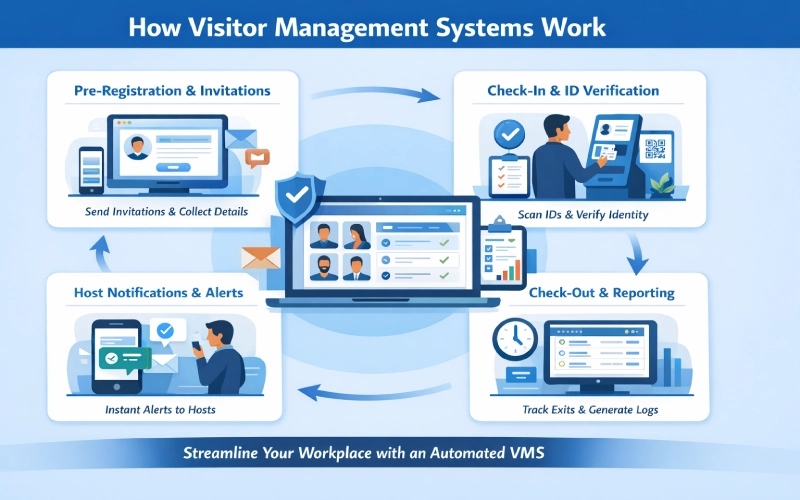
Pre-Registration and Invitation Workflows
The visitor journey begins before anyone arrives at your door.
Employees invite guests through the VMS platform, triggering a pre-registration workflow that collects the visitor’s name, company, purpose of visit, expected arrival time, and any required documentation or agreements. This information is stored in the system before the visit.
Pre-registration delivers several advantages. It allows security teams to screen visitors in advance, flag watchlist matches before anyone reaches the lobby, and prepare host notifications so that no one is caught off guard by an unannounced arrival.
It also dramatically shortens the check-in process on the day of the visit, since most data collection has already occurred.
Visitor Check-In and Identity Verification
When a guest enters, the system verifies their identity. A visitor identification system can scan IDs, documents, or QR codes. This is done to minimize the risk and provide compliance. It also provides an effective record of each visitor.
Host Notifications and Real-Time Alerts
As soon as a visitor completes check-in, the system alerts the relevant host through their preferred communication channel, SMS, email, Slack, Microsoft Teams, or a mobile app notification. This eliminates the need for a receptionist to manually locate and contact an employee, reduces lobby wait times, and ensures that meetings start on time
Added security and reliability, many modern platforms now utilise Telegram OTP to deliver encrypted one-time passwords or arrival alerts, offering a more secure alternative to traditional SMS that is resistant to SIM-swapping attacks.
Visitor notifications ensure that both hosts and administrators remain informed about arrivals, departures, and required approvals.
Badge Printing and Temporary Access Credentials
A printed visitor badge serves as the most visible form of visitor identification in a physical workspace.
Modern VMS platforms trigger automatic badge printing at check-in, producing a label that typically includes the visitor’s name, photo, host name, date, visit purpose, and an access zone indicator.
This makes it easy for employees and security personnel to identify who belongs where at a glance.
For integrated environments, the VMS can also issue temporary digital access credentials, allowing visitors to enter approved areas through access-controlled doors without requiring manual badge activation by a security guard.
Check-Out, Audit Trails, and Reporting
As soon as a visitor exits, the system captures the time of exit and updates the logs. An audit trail keeps detailed records of all guest activity. Organizations also monitor visitor activity logs for safety, compliance, and insights.
Visitor Check-In Options: Kiosks, Touchless & Mobile
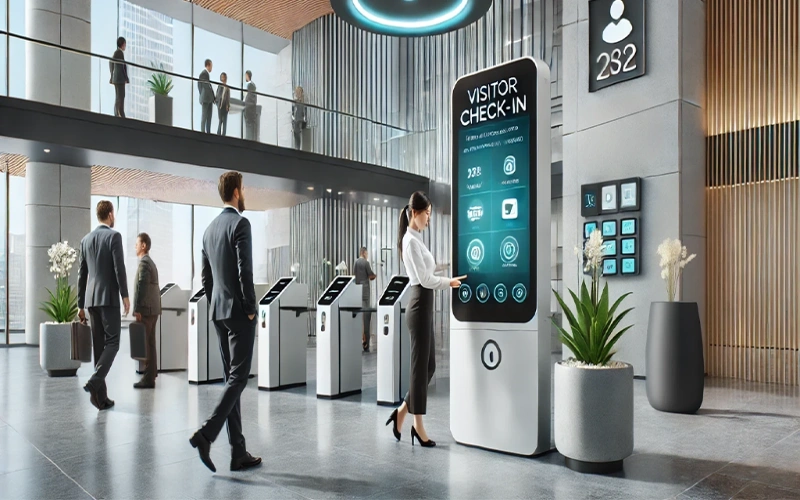
Modern visitor systems support multiple check-in methods to accommodate different workplace needs. Self-service kiosks and tablet-mounted check-in stations allow visitors to complete the entire process independently, reducing reception workload and freeing staff for higher-value tasks.
QR code-based mobile check-ins allow visitors to begin the process on their own smartphones before they even enter the building, further cutting lobby wait times.
Contactless and touchless workflows, which gained significant adoption during the pandemic, remain popular as a hygiene-conscious and frictionless option.
Offering multiple check-in channels improves accessibility, reduces bottlenecks, and allows organizations to match their check-in experience to their specific security and hospitality requirements.
Try Othership Visitor Management System today to automate check-ins, enhance security, and modernize your workplace.
What Modern Visitor Management Means Today
Modern visitor management represents a shift from basic check-in procedures to complete workplace automation. Organizations are required to provide visibility, real-time insights, and an easy guest experience.
A digital visitor management system helps teams manage arrivals across hybrid schedules, security needs, and compliance requirements.
Businesses look for visitor management solutions that fit their workflows and integrate with building systems.
For organizations with unique security and compliance needs, a custom software development team can help connect visitor check-in flows with access control, directory services, and internal approval logic to create a smoother, fully integrated experience.
Many workplaces also adopt smart visitor management tools that offer predictive, connected features.
Many workplaces also adopt smart visitor management tools that offer predictive, connected features.
How Visitor Management Has Evolved in the Digital Workplace
The development of hybrid work and digital operations altered expectations. Modern environments rely on digital workplace visitor management to streamline every step of the guest journey. This shift reflects the broader evolution of visitor systems, moving from manual processes to cloud-based, automated platforms.
The Shift From Manual Logs to Smart Workplace Systems
This shift refers to the transition from traditional paper visitor logs to digital systems that automate and improve visitor tracking. The use of old paper logs led to mistakes, time wastage, and loopholes.
Businesses needed accurate data, audit trails, and reliable reporting. This led to digital visitor logs that automatically and securely collect information.
Organizations also adopted a visitor-tracking system to verify identities, monitor activity, and maintain compliance. Smart systems minimize the possibility of human error, enable immediate access to records, and facilitate real-time alerts.
Why Visitor Expectations Have Changed
Visitor expectations have changed as workplaces adopt faster, more digital, and more convenient ways to manage guest arrivals.
Customers now demand a polished visitor experience rather than long queues or confusing processes. Health and safety concerns also increased demand for touchless visitor management, which reduces unnecessary contact. This change has become the foundation of workflows in organizations, enabling fast check-in, automated invitations, and mobile check-in.
Why Workplaces Need a Smarter Visitor Management System
Modern workplaces need a smarter visitor management system to manage security, improve operational efficiency, and maintain accurate visitor records. As workplaces become more dynamic, organizations require better visibility and control over who enters their facilities.
Security, efficiency, and compliance are the expectations placed on organizations. This underscores the benefits of visitor management system technology. An intelligent VMS assists teams with access control, less administrative effort, and records.
These advantages of a visitor management system give organizations clear visibility into on-site activity. The purpose of visitor management extends to safety, productivity, and professionalism.
When implemented well, the benefits of a visitor management system include faster operations, better coordination, and stronger compliance.

Common Challenges With Traditional Check-In Processes: Traditional check-in methods rely on manual processes that can slow down reception workflows and reduce visibility of visitor activity. These systems often lack accuracy, real-time tracking, and efficient record management.
Paper-based check-ins create bottlenecks and administrative overhead. Paper records cause discrepancies and information loss. These manual visitor logs also make it difficult to track who is in the building during emergencies.
Hybrid Work and Increased Visitor Complexity: Hybrid work environments introduce unpredictable visitor patterns and varying on-site schedules. Visitor management systems help organizations coordinate arrivals and maintain visibility across dynamic workplace operations.
Safety, Compliance, and Operational Pressures: Companies need to adhere to strict data protection, identity verification, and emergency preparedness laws.
Compliance visitor management ensures that records, approvals, and sign-ins meet regulatory standards. Many workplaces also use visitor ID verification for contractors, vendors, and other visitors who require more thorough screening.
Essential Features of an Effective Visitor Management Solution
Contemporary systems have a wide range of tools to facilitate operations at the workplace. Many organizations prioritize visitor management system features that enhance security and provide real-time insights.
A visitor management system app helps teams monitor activity from mobile devices. Some companies adopt a full visitor management platform that integrates with existing systems.
Choosing the best visitor management software depends on operational needs, compliance requirements, and the workspace’s complexity.
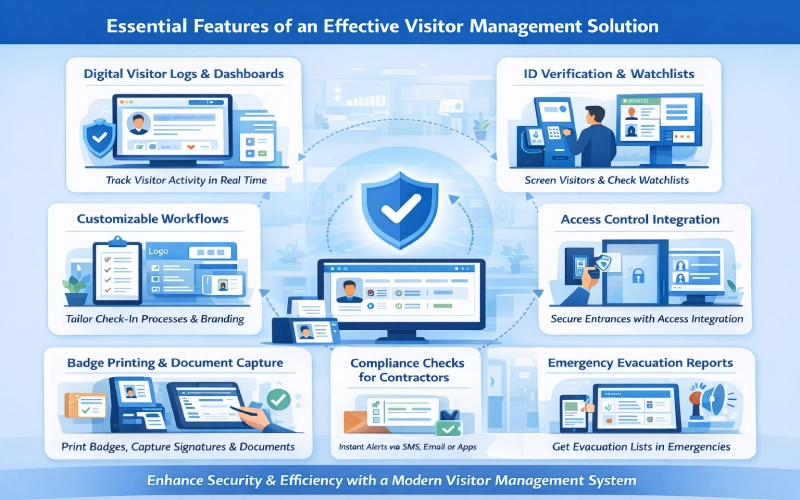
Digital Visitor Logs and Real-Time Dashboards: Every visitor interaction should be captured in a structured digital record that includes the visitor’s name, company, host, purpose of visit, check-in time, check-out time, any documents signed, and any security flags generated during the visit.
These records should be searchable, exportable, and retained in accordance with your data retention policy.
Real-time dashboards give security teams and administrators instant visibility into current building occupancy, active visitors, expected arrivals, and any unresolved alerts. During an emergency evacuation, this dashboard becomes a life-safety tool — it tells you exactly who was in the building when the alarm sounded.
Customizable Workflows and Branding: Custom workflows enable organizations to customize the check-in process. This will incorporate forms, document requirements, screening questions, and branded interfaces.
Organizations can also use a business card maker to provide attendees with personalized contact materials.
Host Notifications and Communication Tools: Automatic host notifications are one of the most straightforward improvements a VMS delivers. When a visitor completes check-in, the system immediately alerts the host through their preferred channel, SMS, email, or a workplace messaging app.
Badge Printing, Signatures, and Document Capture: Badges identify visitors and enhance security. Document capture and signatures help businesses meet contractual and non-consent agreements and safety standards.
Visitor ID Verification and Watchlist Checks: ID screening helps to avoid unauthorized access. Watchlist checks are another security component, as they identify individuals who are restricted or high-risk.
Compliance Checks for Contractors and Vendors: Contractor monitoring must have compliance records. There are many systems that check certifications and expiration dates. This will lessen liability and ensure operational safety.
Emergency Response and Evacuation Reporting: Evacuation dashboards indicate the number of occupants in the building during an emergency. The information helps achieve quick and precise headcounts and risk-free responses.
Creating a Clear and Practical Visitor Policy
A visitor management system is a tool. Its effectiveness depends heavily on the policy framework it is configured to enforce.
Organizations that implement a VMS without a clear, documented visitor policy often find that the technology amplifies inconsistency rather than eliminating it. Some employees invite visitors without pre-registration; others require it. Some locations issue badges; others do not.
What Your Visitor Policy Should Include: A strong visitor policy establishes who is considered a visitor, the types of access permitted for each visitor category, the identification required, the documents that must be signed, and what happens if a visitor is flagged by a watchlist check or denied access.
It should specify pre-registration requirements, escort rules for restricted areas, and data retention periods for visitor records.
Roles and Responsibilities for Staff and Visitors: Clarity about responsibilities prevents gaps. Employees who invite visitors should understand that they are responsible for escorting their guests in restricted areas, ensuring that visitor badges are visible throughout the visit, and notifying reception when a visitor departs.
Visitors should understand what is expected of them regarding identification, documentation, and on-site behavior.
Legal, Compliance, and Privacy Considerations: Visitor data is personal data. Under GDPR, organizations collecting visitor information must have a lawful basis for doing so, inform visitors of how their data will be used and retained, and not retain that data longer than necessary.
Your visitor policy should explicitly address these requirements, and your VMS configuration should enforce them, for example, by automatically deleting visitor records after a defined retention period.
Organizations in regulated industries will have additional sector-specific obligations. Healthcare facilities handling patient information, educational institutions managing access to student areas, and financial services firms with data-handling obligations all need to map their visitor policies to their specific compliance frameworks.
How to Communicate and Implement the Policy: A policy that exists only as a PDF on a shared drive will not be followed consistently. Visitor policies should be embedded into onboarding, referenced in team member handbooks, and built directly into the VMS workflows so that compliance is automatic rather than optional.
Regular reviews at least annually, or whenever relevant regulations change — keep the policy current and up to date.
Improving the Visitor Experience From Arrival to Exit
Security and compliance are essential, but they should not come at the cost of hospitality. The visitor experience is, in many cases, a direct extension of your brand.
A client who walks into a disorganized lobby, waits five minutes without acknowledgment, and is handed a sticky badge and a paper form to complete is already forming a negative impression of your organization before the meeting has even started.

Designing a Smooth and Professional Arrival Process: The arrival experience begins before anyone reaches your door. A pre-registration invitation with clear directions, parking information, and building access instructions sets expectations and reduces anxiety for first-time visitors.
A branded welcome screen at the check-in kiosk reinforces your organization’s identity and professionalism. Clear signage directing visitors from the entrance to the reception area reduces confusion in large buildings. For large corporate offices, Building indoor navigation into reception kiosks using platforms like MapsPeople can make it much easier for guests to find their way around large corporate offices.
The check-in process itself should take no more than a minute or two. If pre-registration has been completed, much of the information is already in the system. The visitor simply confirms their identity, takes a photo, and signs any required documents. Their host is notified automatically, and a badge is printed.
Reducing Wait Times and Front Desk Bottlenecks: Front desk bottlenecks are the most common visitor management complaint in organizations that still rely on manual or semi-manual processes.
A single receptionist handling multiple simultaneous arrivals, a phone that rings in the middle of a check-in, and a host who does not answer their notification; each of these creates delays that compound into a frustrating experience.
Automation eliminates most of these friction points. Self-service kiosks handle the check-in flow independently. QR codes allow visitors to begin the process on their own devices before they even enter the building.
Pre-registration means that visitor information is ready and waiting. Host notifications happen instantly and can be sent through multiple channels to maximize the chance of a prompt response.
Hospitality and Branding Touchpoints: Branded check-in screens displaying a personalized welcome message, “Welcome, Sarah. James is on his way to meet you,” create a memorable arrival moment at almost no additional cost.
These small touches signal that the organization pays attention to detail and values its guests.
For VIP guests, the system can trigger additional hospitality actions, such as notifying a personal assistant, adding the visitor to a meeting room booking system, or alerting catering to prepare refreshments.
Enhancing the Overall Guest Journey: The guest journey does not end at check-in. Wayfinding assistance, directions to specific floors, meeting rooms, or amenities, reduces the disorientation that many visitors feel in large or unfamiliar buildings.
Automated check-out reminders, sent when a visit is approaching its scheduled end, prompt visitors to complete their departure properly and help keep occupancy records accurate.
A smooth, well-organized departure leaves a lasting impression and shapes how they remember the entire visit.
Different Types of Visitor Management Systems
The choice of systems used in organizations is based on their size, security requirements, and infrastructure. Various types of visitor management systems support different environments.
Large enterprises may choose enterprise visitor management tools for multiple locations. Smaller offices often prefer a simple visitor management system for office operations. This segment compares significant categories.
On-Premise Visitor Management Systems: On-premise data storage is localized. They provide great control and high security. These solutions can be applicable in controlled industries with strict compliance requirements.
Cloud-Based and SaaS Visitor Solutions: Cloud systems are available, scalable, and easy to deploy. Auto-updates are made automatically. They endorse remote controls and hybrid workplaces.
To ensure these environments run reliably, top cloud observability tools provide real-time insight into system performance, helping teams quickly detect issues and maintain seamless operations.
Enterprise-Grade and Multi-Site Systems: Large enterprises managing thousands of visitors across dozens of locations require a different class of platform one that provides centralized dashboards, consistent check-in experiences across all sites, and the ability to apply global policies while allowing local customization.
Enterprise VMS platforms typically include advanced access control integration, API connectivity for custom workflows, and dedicated implementation support.
Industry-Specific Visitor Management Tools: Some industries have visitor management requirements that general-purpose platforms do not adequately address. Healthcare facilities need integration with patient management systems and strict controls around access to clinical areas.
Schools need age-appropriate communication flows and mandatory sex offender registry checks. Manufacturing and industrial sites need contractor credential management and safety induction workflows built directly into the check-in process.
Industry-specific platforms address these requirements out of the box, reducing the configuration burden on IT and compliance teams.
Visitor Management for Hybrid and Flexible Workspaces
Flexible work has complicated the operations. Organizations require mechanisms that accommodate changing schedules and traffic levels. Hybrid workspace visitor management tools help teams manage unpredictable volumes. Coworking hubs use a visitor system to maintain order in shared spaces.

Managing Guest Flow in Dynamic Work Environments: Visitor management systems designed for hybrid environments handle variable traffic without requiring proportional increases in reception staffing. Automated check-in handles the routine cases.
Pre-registration gives administrators advance notice of expected volumes. Real-time dashboards flag capacity concerns before they become problems. And integration with desk and meeting room booking systems ensures that visitor arrivals are coordinated with the availability of the employees who invited them.
Supporting Hot Desking, Coworking, and Shared Spaces: Shared workspace environments introduce additional complexity. Multiple organizations sharing a building may each have different visitor management requirements, different branding, and different security policies.
A coworking-capable visitor management system handles multi-tenant check-in flows, routes visitors to the correct tenant organization, and maintains separate visitor logs for each occupant, all through a single physical check-in infrastructure.
Coordinating Visitors With Hybrid Workforce Schedules: One of the most practical hybrid-work features of a modern VMS is its ability to flag scheduling conflicts before they become problems.
If a visitor has been invited for a day when their host is scheduled to work remotely, the system can prompt the host to either update their attendance plan or reschedule the visit, preventing the situation where a guest arrives to find their contact is not in the building.
Common Use Cases & Applications Across Industries
VMS tools are essential across sectors for various reasons. A visitor management system for logistics controls high-volume traffic. Visitor management for schools improves safety and compliance. Visitor management in hospitals protects patients and staff.
Corporate offices use VMS platforms to professionalize the guest experience, support hybrid operations, and maintain compliance records for client visits and contractor engagements.
Logistics, industrial, and manufacturing environments handle large numbers of contractors, delivery drivers, and vendor representatives, each with distinct safety and compliance requirements. These environments benefit most from credential verification, safety induction workflows, and detailed audit trails.
Schools and educational institutions face some of the most complex visitor management requirements of any sector. Student safety legislation in many jurisdictions mandates identity verification and sex offender registry checks for every adult visitor.
Purpose-built visitor management systems for education embed these checks directly into the check-in workflow, ensuring that every visitor is screened without exception.
Healthcare facilities manage a mix of patient visitors, contractors, pharmaceutical representatives, and clinical staff from partner organizations. HIPAA compliance requires strict control over who accesses clinical areas, with documented records of all access events.
Public institutions and government buildings must balance public accessibility with physical security and national security requirements. Visitor management systems in these environments typically include the most rigorous identity verification workflows, often integrated with national identity databases.
Multi-Tenant Buildings and Enterprise Campuses large campus environments and multi-tenant commercial buildings require a unified visitor management approach that serves multiple organizations through shared infrastructure while maintaining separate records, branding, and access policies for each tenant.
Modern enterprise VMS platforms handle this through tenant-specific configuration layers that allow each organization to maintain full control over their visitor experience while sharing the physical check-in hardware and network infrastructure.
Hardware Needed for Visitor Management Systems.
The software capabilities of a visitor management platform are realized through its hardware components. The specific hardware configuration will depend on visitor volumes, security requirements, and physical space constraints.
Self-service kiosks are standalone units that house a tablet or touchscreen display, a badge printer, and, in some cases, an ID scanner or camera. They allow visitors to complete the entire check-in process without assistance from a receptionist and are well-suited to high-volume environments or locations with limited front-desk staffing.
Tablets and wall-mounted displays provide a cost-effective alternative to full kiosks for locations with lower visitor volumes. They can be mounted at a reception desk or positioned on a stand near the entrance.
ID scanners and document readers capture government-issued identification documents and automatically populate visitor records, reducing manual data entry errors and speeding up the check-in process.
Badge printers produce visitor identification labels at check-in. Modern thermal badge printers can produce a finished label in seconds, making the badge-printing step nearly invisible to the visitor.
IP cameras and facial recognition hardware are deployed in high-security environments to capture visitor photos at check-in and, in some cases, to support touchless recognition-based check-in for pre-registered visitors.
Access control integration hardwired door readers, electronic locks, and intercom systems- allows the VMS to issue temporary digital access credentials to authorized visitors, eliminating the need for a security guard to manually unlock doors or escort visitors through access-controlled zones.
Integration With Workplace and Security Systems
Related environments must have integrated tools. An integrated visitor management system works with access control, directory services, property management, and even ai real estate solution that can use intelligent data analysis to manage building access, identify usage patterns, and enable real-time decision-making for secure facilities
Access control integrations improve safety and automate credentials. Workplace management tools are also used by organizations to deal with hybrid operations, meeting rooms, and team member schedules.

Access Control and Building Security Platforms: The integration between a VMS and a physical access control system is the foundation of a truly secure visitor management workflow.
When a visitor completes check-in and is granted access, the VMS can automatically provision a temporary digital credential a QR code, a mobile pass, or an RFID credential that allows the visitor to open specific doors or call specific elevators during their authorized visit window.
When the visit ends, the credential expires automatically. This eliminates the security gaps that occur when visitors are given manual passes that are never collected.
Directory Services and Employee Databases: Integration with your organization’s employee directory, Active Directory, Azure AD, Google Workspace, or a similar system, allows the VMS to verify that hosts are current employees before processing a visitor invitation.
It also ensures that host notification contact details are always current, without requiring manual updates to a separate database.
Meeting Room Booking & Workspace Management Tools: When a visitor is booked for a meeting, integrating the VMS with your meeting room booking system creates a connected workflow: the visitor’s check-in triggers a notification to the host, confirms the meeting room assignment, and updates the room display panel to show the upcoming appointment.
This coordination ensures that visitors are directed to the right location without needing to navigate a confusing floor plan on their own.
IoT Sensors and Workplace Analytics: Integration with occupancy sensors and IoT infrastructure allows the VMS to contribute to a broader workplace analytics picture.
Visitor traffic data combined with employee attendance data and space utilization metrics gives facilities managers the information they need to make evidence-based decisions about office layouts, reception staffing levels, and meeting room allocations.
How Automation and AI Improve Visitor Management
Automation has already transformed the operational efficiency of visitor management. The next wave of innovation, AI-powered capabilities, is beginning to deliver improvements in security, routing, and predictive planning that go well beyond what rule-based automation can achieve.
Predictive Insights and Smart Visitor Routing: AI systems can analyze historical visitor traffic patterns to predict peak arrival times, recommend optimal staffing schedules, and suggest check-in flow configurations that minimize wait times during busy periods.
For large campuses with multiple entry points, AI-powered routing can direct visitors to the nearest or least congested entrance, improving both the visitor experience and overall traffic distribution.
Automated Workflows and Approval Logic: Rule-based automation handles the routine cases: if a visitor’s pre-registration is complete, check them in automatically; if a watchlist check returns a match, alert the security team and pause the check-in pending review; if a contractor’s insurance certificate has expired, deny access and send a notification.
AI extends this capability by learning from historical approval decisions and flagging edge cases that fall outside clear rule boundaries for human review.
AI-Enhanced Identity and Security Screening: Computer vision systems can verify that the photo on a scanned ID matches the visitor presenting it at the kiosk. Anomaly detection algorithms can flag unusual behavior patterns, a visitor who checks in repeatedly without checking out, or who attempts access to zones outside their permitted area, for security review.
These capabilities reduce the margin for human error in security screening without adding time to the check-in process.
Intelligent Reporting and Performance Analytics: AI-powered analytics transform raw visitor data into actionable insight. Which visitor types most frequently arrive without pre-registration? Which hosts generate the highest volumes of unnotified arrivals? And which locations have the longest average check-in times?
These patterns, identified automatically by an analytics engine, allow operations teams to target their process improvements precisely rather than guessing where the bottlenecks are.
ROI and Business Case for Investing in a VMS
Organizations evaluating visitor management systems often need to justify the investment against a concrete business case. The return on investment from a well-implemented VMS typically manifests across three categories: operational cost savings, risk reduction, and reputational value.
Operational savings accrue primarily from front-desk efficiency. Studies of digital check-in adoption consistently find that automated kiosk check-in reduces the time a receptionist spends processing each visitor from three to five minutes to under thirty seconds.
Across hundreds of weekly visitors, this frees significant staff capacity for higher-value work. Pre-registration and digital document signing eliminate the paper handling, filing, and retrieval costs associated with manual visitor logs.
Risk reduction is harder to quantify but often represents the larger financial value. A single unauthorized access incident, a former employee gaining entry, a contractor accessing a restricted area without valid credentials, or a visitor gaining access to sensitive client data, can generate legal liability, regulatory penalties, and reputational damage that far exceeds the cost of a VMS platform.
The compliance documentation that a VMS generates automatically can also be decisive in the event of an audit or legal proceeding.
Reputational and relational value comes from the quality of the visitor experience. A professional, personalized, frictionless check-in process signals organizational competence and attention to detail. For client-facing organizations, this impression forms before the first substantive conversation of a visit and can subtly but meaningfully influence how the relationship develops.
When evaluating VMS pricing models, organizations should consider per-location versus per-visitor pricing structures, the cost of hardware, implementation, and training, and the long-term total cost of ownership relative to the manual staffing costs that the system will reduce or eliminate.
Challenges and Considerations Before Implementing a VMS
Implementing a visitor management system is a significant operational change. Organizations that approach it thoughtfully and plan for the common challenges experience faster adoption and stronger outcomes.

Data Privacy and Security Risks: Visitor data, names, photographs, ID documents, company affiliations, is personal data with legal implications. Organizations must establish a clear legal basis for collecting and processing this data, communicate that basis to visitors at the point of collection, and define retention periods after which visitor records are automatically purged.
Systems must be configured to protect this data against unauthorized access, and integration points with other platforms must be audited for data leakage risks.
Cost, Scalability, and Deployment Requirements: VMS platforms range from affordable SaaS tools designed for small organizations to enterprise-grade platforms with complex integration requirements and significant implementation costs.
Organizations should evaluate not just the software subscription cost but the total cost of deployment, including hardware procurement, IT configuration, staff training, and ongoing support.
Scalability is particularly important, a system that works well for one location may require significant additional investment to deploy effectively across ten.
Change Management and Employee Adoption: The most common point of failure in VMS implementations is not the technology, it is human behavior. If employees continue to invite visitors informally, bypassing the pre-registration workflow, or if reception staff revert to manual processes when the system is slow, the platform’s value is undermined.
Successful implementations invest in clear communication about why the system is being introduced, hands-on training for all relevant staff, and a structured adoption period with active monitoring and support.
Ensuring Reliability Across Multiple Locations: Multi-site deployments introduce infrastructure complexity. Network reliability, hardware maintenance, and software updates must all be managed consistently across locations that may have very different IT capabilities.
Cloud-based platforms reduce some of this burden by centralizing software management, but hardware reliability and local network performance remain considerations that require active attention.
Choosing the Right Visitor Management System
Selecting the best visitor management system is a strategic decision that affects security, operations, compliance, and visitor experience. Due to the overlapping features found in many visitor management vendors, organizations need to consider solutions according to the long-term value and not the superficial functionality.
The best VMS must be able to scale with the expansion of the business as well as support a hybrid operation, and fit well with the existing workplace infrastructure. Visitors take check-in to be fast and intuitive, whilst internal teams need strong oversight, reporting, and compliance tools.
These two lenses can be used to evaluate systems to ensure value is brought by the solution to both guests and administrators.
Comparing Vendors and Pricing Models
In the selection of visitor management vendors, the cost structures tend to differ greatly. Others are purchased on a per-location basis, others on a per-visitor basis, and others make visitor management part of larger workplace offerings. The knowledge of these models will enable organizations to prevent the occurrence of hidden costs as their needs increase.
The Future of Visitor Management in Smart Workplaces
The further development of visitor management is closely linked to the evolution of the contemporary working environment. The visitor management systems have become part of intelligent workplaces as companies become flexible, automated, and data-driven in their decision-making process.
These systems are no longer independent units; they unite the individuals, spaces and security into one united digital environment.
Visitor management is a contributing factor to this balance as it automatically validates identity, synchronizes visitor access with occupancy data, and facilitates the creation of dynamic workplace policies.
With the growing expectations, visitor systems should be able to provide speed, accuracy, and adaptability without adding to the administrative workload.

AI-Driven Access and Intelligent Automation: Artificial intelligence is transforming the manner in which visitors are handled. With the help of AI workflows, visitors can be approved or flagged automatically depending on the predefined guidelines, which minimizes manual checking and ensures the security level.
To coordinate these automated decisions effectively, a multi agent framework enables multiple AI components to collaborate in real time, improving accuracy, scalability, and overall system reliability.
Biometrics, Facial Recognition, and Security Evolution: A biometric system is finding its way into high-security and business environments. Facial recognition, fingerprint scanners, and touchless authentication save the use of physical badges and enhance the accuracy of identity. The tools allow a substantial reduction of the threat of unauthorized access or identity fraud.
Deeper Integrations With Smart Building Systems: A integrations allow a visitor to navigate through a facility with ease without human interference.
As an example, it is possible to give a visitor, who is pre-registered, access credentials validating the use of doors, elevators, and meeting rooms within specified approved timeframes.
Such a degree of control minimizes the security gaps, consuming convenience- major pillars of smart workplace technology.
Transform your Management in Smart workplaces
A new visitor management software is much more than a replacement for a paper sign-in sheet. It provides a safe, effective, and stable working experience to all individuals who come to the workforce. Organizations can save time on bottlenecks at the front desk by automating check-ins, identity checks, and approvals, and receive real-time data on onsite activity.
The trends in the constantly evolving workplaces have made the adoption of flexible and intelligent visitor management solutions a necessity. It is a core process to create more secure, efficient, and more connected workplaces. Learn how the visitor management functions of Othership can help you in managing your workplace in the present and make it future-ready.
Conclusion
Effective visitor management is no longer a back-office administrative function. It is a front-line operational capability with direct implications for security, compliance, guest experience, and organizational reputation.
The organizations that get it right, with clear policies, appropriate technology, and genuine attention to the visitor journey, turn every guest arrival into a demonstration of operational competence and professional care.
The principles that drive great visitor management are the same ones that drive great organizational performance: clarity about who is responsible for what, accountability through documented records, and smart processes that reduce friction without sacrificing rigor.
When those principles are embedded in a well-configured visitor management system, the result is a workplace that is safer, more efficient, and more impressive to everyone who walks through its doors.
Othership Visitor Management Software helps you put those principles into practice, streamlining check-ins, strengthening workplace security, and creating a professional first impression at every location, at every visit. Take control of your workplace visitor experience and turn every arrival into a strategic asset.
FAQ: Visitor Management System
What is the difference between a visitor management system and an access control system?
An access control system governs which physical doors or areas specific credentials can open. A visitor management system manages the process of identifying, registering, and tracking temporary guests who are not permanent credential holders.
The two systems work most effectively when integrated, with the VMS provisioning temporary credentials that the access control system enforces.
How long should visitor records be retained?
Retention requirements vary by jurisdiction and industry. Under GDPR, visitor data should not be held longer than necessary for the purpose it was collected.
Many organizations apply a retention period of between 30 days and 12 months for general visitor records, with longer retention for specific compliance-relevant records.
Your visitor policy should specify retention periods explicitly, and your VMS should enforce them automatically.
Can a visitor management system work without internet access?
Cloud-based VMS platforms require an internet connection to function fully. Many offer an offline mode that continues to process check-ins locally and synchronizes data when the connection is restored.
On-premise systems operate on the local network and do not require external internet connectivity. Organizations with unreliable connectivity should discuss offline capabilities with any vendor they are evaluating.
What visitor data does a VMS collect, and is it secure?
A typical VMS collects the visitor’s name, company, contact details, purpose of visit, host details, check-in and check-out times, a photo, and any documents signed at check-in. Some systems also capture ID document images.
Reputable VMS platforms encrypt this data at rest and in transit, apply role-based access controls, and undergo regular security auditing. Before selecting a platform, organizations should review its security documentation and data processing agreements.
How does a visitor management system handle returning visitors?
Most modern VMS platforms recognize returning visitors by their name, email address, or phone number and auto-populate their registration details for subsequent visits.
This speeds up the check-in process considerably for frequent visitors while still prompting them to confirm or update their information and re-sign any documents that have been updated since their last visit.
What is pre-registration in visitor management, and why does it matter?
Pre-registration is the process of collecting visitor information before the visit, typically via an invitation link sent by the host.
It matters for three reasons: it allows security screening to occur before the visitor arrives, it dramatically speeds up the check-in process on the day of the visit, and it gives administrators advance visibility into expected visitor volumes, enabling staffing and logistics to be planned accordingly.
Do visitor management systems integrate with Microsoft Teams or Slack?
Most leading VMS platforms offer native integrations with Microsoft Teams, Slack, and other workplace messaging tools.
These integrations allow host notifications to be delivered directly within the communication platform that employees already use, improving notification response rates and reducing the chance that a visitor is left waiting in the lobby because their host missed an SMS alert.


You must be logged in to post a comment.