

The contemporary work environment functions on the principle of visibility and real-time information, and this need reaches as far as the entrances of your conference rooms. In order to provide accurate and instant updates, these signs must be intrinsically linked to an intelligent scheduling engine, which is meeting room booking software.
This is an important integration, which defines the difference between a static marker and a dynamic communication tool that is process-oriented. This procedure guarantees that all employees (both permanent and transient) can instantly ensure a room of the exact status without disturbance.
Contents
- 1 Conference Room Signs: How Modern Offices Manage Meeting Visibility and Availability
- 2 What Are Conference Room Signs in Modern Workplaces?
- 3 What Information Conference Room Signs Are Expected to Show
- 4 Types of Conference Room Signs Used in Offices
- 5 Comparison, Failure Points, and the Software Connection
- 6 Digital Conference Room Signs vs Static Signs
- 7 Why Conference Room Signs Fail Without Booking Logic
- 8 How Meeting Room Booking Software Powers Conference Room Signs
- 9 Using Conference Room Signs as Part of a Workplace Scheduling System
- 10 Choosing the Right Conference Room Sign Setup for Your Office
- 11 Final Takeaway: Conference Room Signs Are Not Just Displays
- 12 Frequently Asked Questions: Conference Room Signs
- 12.1 1. What are conference room signs used for in offices?
- 12.2 2. What information should a conference room sign display?
- 12.3 3. What is the difference between static and digital conference room signs?
- 12.4 4. Why do conference room signs become inaccurate?
- 12.5 5. How do meeting room booking systems connect to conference room signs?
- 12.6 6. Are conference room signs useful in hybrid or shared offices?
- 12.7 7. Do conference room signs need to be connected to scheduling software?
Conference Room Signs: How Modern Offices Manage Meeting Visibility and Availability
A conference room sign is a critical piece of technology and design that positions your meeting spaces within the workflow of a modern organization. It has changed its primary purpose essentially to dynamic status communication as opposed to mere static identification.
These are used to avoid unwanted duplications of bookings, minimize interruptions in the workflow, as well as to efficiently and system-directed allocate high-value office space to be used. The sign provides the silent coordination, which informs all the employees who pass through the room about its state at the moment and in the future.
What Are Conference Room Signs in Modern Workplaces?
Traditionally, a conference room sign was a basic, static fixture—a metal or plastic plaque that displayed only the room’s name and perhaps its fixed capacity. It served only as a source of information, but nowadays, conference room signage is designed to be a real-time, dynamic element of the office systems.
Modern office room signage integrates with underlying scheduling systems to show the precise status of a room at any given moment. These unpredictable changes in operations transform the sign into an active system display that creates information to make quick decisions.
What Information Conference Room Signs Are Expected to Show
Transparency and visibility of room status are simply lacking in the current shared office setups. When employees look at meeting room signs, they are not just looking for the room’s name, but also for immediate and direct answers to key operational questions: “Can I use this room right now?” and “Will it be free today?
Hence, effective meeting signage provides clear, concise information to prevent confusion and maximize productivity in the workspace.

Availability and Real-Time Room Status
The most important information that a team member would want to know is the availability of a room. When a room is properly scheduled and booked through, the digital room signage should immediately inform whether the room is officially occupied or currently reserved.
This auto-updating source of data significantly lowers the confusion of the unrecorded, disorganized meetings and provides an indicator of the status of the room.
Meeting in Progress and In-Use Indicators
In-meeting sign, or the “meeting in progress” sign, is a powerful visual and behavioral signal. Its feature displays an indicator if a room is currently in use, and often highlighted with an unambiguous color like red. This serves as a conference room in use sign to prevent uninvited or accidental interruptions.
Upcoming Meetings and Reservation Visibility
Modern meeting room displays are expected to show upcoming scheduled events. A room reserved sign or conference room booking display that shows the next few upcoming reservations allows employees to assess the future availability of a specific space quickly. This enables the staff to determine whether they can hold back on a given room or turn to find another room.
Types of Conference Room Signs Used in Offices
Offices utilize different categories of conference room signage depending on their budget, aesthetic preference, and, critically, their need for real-time operational functionality. It is necessary to provide a semantic classification of such types to understand the essence of operational differences.
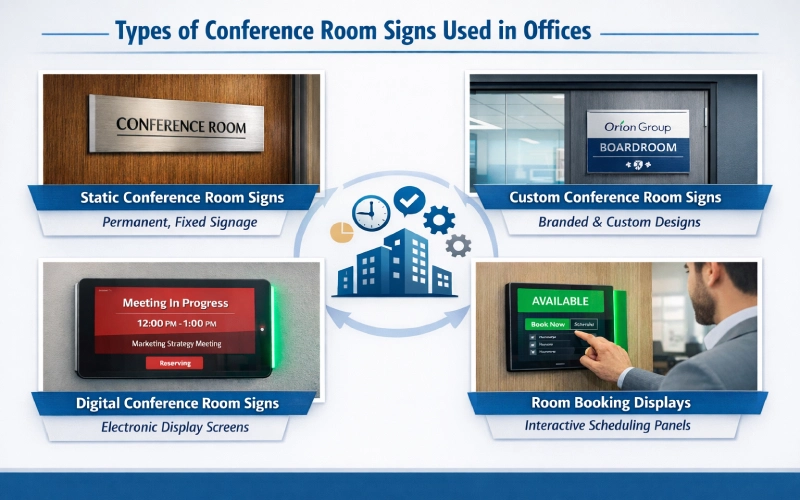
Static Conference Room Door Signs
Static conference room door signs are the most basic and traditional type of signage. These are fixed, permanent, in most cases custom-made, with engraved or printed text on them. Their weakness lies in the nature of their design; they will not be able to dynamically update, so any information about the rooms available will have to be sent by hand or simply not exist.
Custom Conference Room Signs for Offices
Custom conference room signs focus heavily on brand identity, physical aesthetic, and labeling. They are primarily used to ensure the office room signage aligns perfectly with the corporate design language and facility standards. The custom aspect of them is often related to their content, form, and set text/graphics rather than functionality.
Digital Conference Room Signs
Digital conference room signs represent the next operational step in functionality. They are basically screens or specific tablet displays that are attached to the outside of the room. The primary purpose of digital signage for conference rooms is to display dynamic information sourced from a connected system.
Conference Room Booking Displays
A conference room booking display is the most advanced and operationally integrated type of signage, as it is linked to a scheduling platform. This specific meeting room display or room booking display is a digital sign that specifically serves as the primary visual interface for the room booking software. For this purpose, organizations typically seek out the best digital signage software. Meaning, employees can make ad hoc bookings or even check-ins at the door.
Comparison, Failure Points, and the Software Connection
The functionality of digital conference room signs and static signs represents two fundamentally different operational models in the modern workplace. They lead many organizations to carefully weigh the costs and benefits of each.
Permanent labels are known as static signs, whereas dynamic communicators are known as integrated digital signs. Moreover, even the most advanced displays will not be able to serve their primary purpose in the case of faulty underlying work logic, which will directly result in the need to have a powerful integration with the scheduling software.
Digital Conference Room Signs vs Static Signs
Offices engage in a detailed comparison of digital conference room signs with static conference room signs because the choice significantly impacts daily operations and long-term space management efficiency. The main distinction in the core of operation is in the information updating mechanism. Static signs are set and forget, which saves the initial investment in materials but costs in terms of time wasted and efficiency of use.
Digital conference room signs, conversely, leverage real-time data synchronization. This implies that the digital display outside the room is updated in real time whenever the room is booked using the internal calendar system. For example, Outlook or Google Workspace.
Why Conference Room Signs Fail Without Booking Logic
The biggest reason conference room signs and meeting room signage become unreliable and fail to serve their purpose is the lack of a single, automated, real-time source of information. When a sign is separated from central room booking software, operational and process failures become virtually inevitable:
Ghost Meetings: A cancellation of a meeting, and the sign/room is not updated and discharged. When the room is not available, it seems to be unavailable, thereby causing time wastage.
Unrecorded Occupancy: This happens when a team member occupies and uses an empty room without making the booking via the central calendar system.
Scheduling Mismatch: A room is stored in one system (e.g., a handheld paper book of rooms or a personal calendar) and not on the computer system running the sign, which leads to a conflict or overbooking of a room.
How Meeting Room Booking Software Powers Conference Room Signs
Meeting room booking software acts as the central brain and the indispensable source of information that makes a conference room booking display functional and accurate. The software is an automator of the whole coordination, as opposed to the sign, which depends on manual inputs that are prone to errors:

Synchronization: When a team member schedules a meeting via their email calendar and invites the room, the meeting room booking software instantly registers the new event.
Automation: This software then immediately and automatically updates the status, which includes the meeting organizer’s name, time, and topic, directly to the associated meeting room display.
Accuracy: If a meeting is canceled, extended, or shortened in the central calendar, the software automatically transmits that change to the conference room booking display in real-time.
This process coordination ensures the sign is always accurate, real-time, and reflected to the centralized schedule to transform the room booking software from a simple scheduling tool into an essential operational technology for the workplace.
Using Conference Room Signs as Part of a Workplace Scheduling System
When digital signage for conference rooms is properly integrated, it provides several system-wide benefits that enhance coordination:
Consistent Visibility: Each and every room will be subjected to the same logic of a schedule so that it is consistent regardless of whether a team member is making a booking through his or her desktop or even communicating with the door.
Data Capture: The whole system will be able to record the utilization of the rooms based on the bookings shown on the sign, which is vital and real-time information to the facilities management and future space planning.
Operational Control: The integrated sign can impose necessary rules on booking, which include the automated release of the room back into the booking system in the event that the scheduled meeting fails to commence in time (which is often through a so-called check-in feature that is controlled completely by the underlying software).
The systems will change the emphasis on individual display management to an active management of the effective use of the space within the whole range of corporate display.
Choosing the Right Conference Room Sign Setup for Your Office
Selecting the correct conference room sign setup is an essential part of a balancing act between aesthetic preferences, project budget, and operational requirements.

High-Traffic, Dynamic Spaces: Offices with a high volume of meetings benefit the most from fully integrated digital conference room signs. The urgent requirement to have real-time and immediate information on the status is foremost to avoid wasting time and facing constant interruptions.
Low-Frequency, Static Spaces: Rooms that are very seldom used or are permanently assigned (e.g., an executive office, a file room, or a fixed training center) may only require professional custom conference room signs for basic identification, as the need for real-time status updates is minimal.
Aesthetic-First Environments: Companies that are mainly focused on interior design can also utilize high-quality, smooth digital signs, but they will not focus on their advanced functionality, but on how it would fit in with the architectural style and the branding of the company.
In the end, the best decision would always be the most friction-cutting arrangement for your employees. If frequent interruptions or disputes over room availability are common, investing in a display powered by room booking software will offer the highest return on efficiency and organizational clarity.
Final Takeaway: Conference Room Signs Are Not Just Displays
The fundamental evolution of conference room signs confirms that they are no longer just passive displays; they are the physical, interactive manifestation of an underlying operational system. The complete accuracy, day-to-day reliability, and essential real-time functionality of digital conference room signs are entirely dependent on their seamless connection to sophisticated room booking software.
This systemic way is the future of contemporary workplace management. A basic, fixed sign only displays the name of a room; a digital integrated sign displays complete visibility, efficiency, and a real-time coordination system. The sign may serve as a representation of the system output rather than a costly standalone product.
Treating the sign as such would ensure that each team member in need of a place to meet can have a more pleasant, more productive experience. The hardware is not the real and permanent worth of the sign, but the clever scheduling logic that it embodies to perfection.
Frequently Asked Questions: Conference Room Signs
1. What are conference room signs used for in offices?
Conference room signs are primarily used for room labeling, current availability status, and providing visibility to meeting schedules. Modern conference room signage ensures real-time accuracy to prevent interruptions and improve the coordination of shared spaces.
2. What information should a conference room sign display?
A modern meeting room sign should display the room’s current availability, whether it is occupied or available, if the meeting in progress sign is in use, and details about upcoming reservations. Showing the next event serves as a room reserved sign and helps staff coordinate future space needs.
3. What is the difference between static and digital conference room signs?
Static conference room signs are fixed plaques that require manual updates or are permanently labeled, offering no real-time status. Digital conference room signs, powered by scheduling software, automatically reflect the live room status. This makes digital signage for conference rooms more effective for high-traffic, dynamic environments.
4. Why do conference room signs become inaccurate?
Conference room signage becomes inaccurate when it is not synced with a central scheduling system. This leads to the information becoming unreliable due to human error, such as failing to manually update the status or scheduling a meeting outside of the formal system, causing a meeting signage mismatch.
5. How do meeting room booking systems connect to conference room signs?
The meeting room booking system acts as the central data source. The software registers all scheduled meetings and automatically sends the resulting room status, including availability and meeting details, to the conference room booking display or meeting room display mounted at the door.
Yes, conference room signs are essential in hybrid or shared offices. The unpredictable nature of usage and schedules in these environments requires the real-time visibility and status communication provided by a digital room signage solution to effectively manage coordination and ensure fair access to space.
7. Do conference room signs need to be connected to scheduling software?
For optimal function and complete reliability, conference room signs should absolutely be connected to a scheduling system like meeting room booking software or room booking software. In the absence of this connection, the sign is not able to show the live, real-time availability that today’s office business demands.
Ready to turn conference room signs into a real-time system?
Explore Othership.com now and make it easier to organize your schedule and provide your teams with immediate visibility of all the meeting areas.


You must be logged in to post a comment.