

Meetings take time, and when room scheduling is messy, with double bookings and no-shows, that time is lost. The modern office is hybrid, fast-moving, and full of moving parts. People can roam between floors and buildings.
Visitors arrive, plans change, and someone always needs a screen that actually works. That chaos is exactly what meeting room booking tools are built to calm.
A reliable meeting room booking system becomes your source of truth. It shows room availability in real time, blocks conflicts before they happen, and releases empty rooms when no one turns up.
The right meeting room booking software integrates with your calendars, chat apps, and door displays, so booking a room feels like sending a message.
Meanwhile, meeting room management software gives operations and IT the data they’ve been missing: which spaces are loved, which sit idle, and what to fix next. In other words, meeting room scheduling software aligns people, rooms, and most importantly, rules.
This guide will explain what a booking platform is, how it works behind the scenes, and which features actually matter. We’ll cover benefits, common headaches, selection criteria, the difference between basic and smart meeting room booking systems, and what’s next with AI and sensors. You’ll also see how an intentional setup saves money and frustration while making the office feel calmer.
If you manage a workplace or want meetings to start on time, you’re in the right place.

Contents
- 1 What Is a Meeting Room Booking System?
- 2 Basic vs. Smart Meeting Room Booking Systems: What’s the Difference?
- 3 How Meeting Room Booking Software Works
- 4 Why Businesses Need a Meeting Room Booking System
- 5 Key Features of a Great Meeting Room Booking Software
- 5.1 1. Real-Time Room Availability & Search
- 5.2 2) Calendar Integration (Google, Outlook, Office 365)
- 5.3 3) Smart Room Displays & Check-Ins
- 5.4 4) Permissions, Access Control & Resource Allocation
- 5.5 5) Analytics & Usage Reports
- 5.6 6) Scalability, Cloud Access & Mobile Apps
- 5.7 7) Customization & Branding
- 5.8 8) Reliability & Offline Modes
- 5.9 9) Security, Identity, and Audit
- 6 Benefits of Using Meeting Room Booking Systems
- 7 Visitor and Meeting Room Management
- 8 How Conference Centers and Large Offices Manage Bookings
- 9 How Large Companies Manage Room Bookings Across Campuses
- 10 Implementing a Meeting Room Booking System
- 11 Common Challenges in Meeting Room Management
- 12 How to Choose the Best Meeting Room Booking System
- 13 Future of Meeting Room Booking Software
- 14 Conclusion
- 15 Meeting Room Booking Software FAQs
- 15.1 How does meeting room booking software improve workplace efficiency?
- 15.2 What is the difference between basic and smart meeting room booking systems?
- 15.3 How does automated room release for no-shows work?
- 15.4 Is it possible to track room usage and generate reports?
- 15.5 Can meeting room booking software integrate with other workplace tools?
- 15.6 What should you consider when choosing meeting room booking software?
- 15.7 Can meeting room booking software support multiple locations?
- 15.8 How secure is meeting room booking software?
- 15.9 Are mobile applications available for meeting room booking software?
- 15.10 What is a room reservation system for companies?
- 15.11 How do I set up an online room booking system?
- 15.12 What is the best meeting room booking system for UK offices?
What Is a Meeting Room Booking System?
A meeting room booking system is software that lets people find, reserve, and manage rooms and resources with live availability, rules, and analytics. It replaces email ping-pong with automated booking, confirmations, and utilization insights.
Think of it as a room-booking system with guardrails. Employees can search by capacity, layout, or equipment, then reserve a time that works for them. Policies like buffers, approvals, and booking windows will kick in automatically.
After that, the platform sends confirmations, reminders, and nudges. If nobody checks in, the space is released so another team can use it. For admins, dashboards show demand, no-shows, and peak hours.
The terms “meeting room booking system” and “meeting room booking software” are often used interchangeably, but there is a subtle difference worth noting.
A meeting room booking system is a broader concept that encompasses the policies, processes, hardware, and digital tools that govern how rooms are reserved and used.
Meeting room booking software is the specific platform or tool that powers the digital side: the calendar sync, the booking interface, and the analytics dashboard.
Manual vs. automated
Manual scheduling means spreadsheets, shared inboxes, or a whiteboard at the front desk. That can work for a tiny office with one meeting room. But as soon as you add more rooms, hybrid days, or visitors, manual methods buckle.
Automated meeting room booking system software, on the other hand, watches calendars, enforces rules, and prevents overbooking without a human referee. It’s less drama and more focus.
Who uses it?
Office managers, facilities teams, IT, security, executive assistants, and every team member who needs a room. Hybrid and growing teams rely on a single source of truth, especially when people switch between remote and on-site.
If you’ve ever asked, “What is a room booking system?” the practical answer is this: it’s the easiest way to coordinate shared spaces and resources so meetings start on time and rooms don’t sit empty.
Basic vs. Smart Meeting Room Booking Systems: What’s the Difference?
One of the most common questions workplace teams ask is: what’s the difference between a basic and a smart meeting room booking system? It’s a fair question, and the answer shapes which solution is right for your organization.
Basic meeting room booking systems handle the essentials: a shared calendar, a list of available rooms, and a simple reservation form. They reduce double bookings and give employees visibility into who has which room.
For small offices with a handful of spaces and predictable schedules, a basic system can be completely adequate. However, they typically lack automation, analytics, and real-time responsiveness.
Smart meeting room booking systems go further in several meaningful ways:
- Automated room release: If no one checks in within a grace period, a smart system automatically releases the room, making it instantly available to others. Basic systems require a human to notice and manually free the space.
- Occupancy sensing: Smart systems integrate with IoT sensors, PIR motion detectors, CO₂ monitors, and badge readers to verify whether a room is actually occupied, not just nominally booked. This eliminates ghost meetings at scale.
- AI-assisted scheduling: Smart platforms learn usage patterns and proactively suggest room sizes, times, and setups based on attendee count, meeting type, and historical behavior.
- Real-time calendar sync: Two-way, live integration with Google Workspace, Microsoft 365, and Exchange means that changes in Outlook are reflected instantly in the booking platform, no lag, no stale data.
- Policy enforcement: Booking windows, minimum attendee requirements, approval workflows, and buffer times all run automatically, without admin intervention.
- Advanced analytics: Smart systems provide utilization curves, peak hour reports, no-show rates, and per-amenity demand tracking—data that shapes real estate and facilities decisions.
For most hybrid offices managing more than five rooms or operating across multiple floors or locations, the investment in a smart meeting room booking system quickly pays off in reclaimed hours and better space decisions.
How Meeting Room Booking Software Works
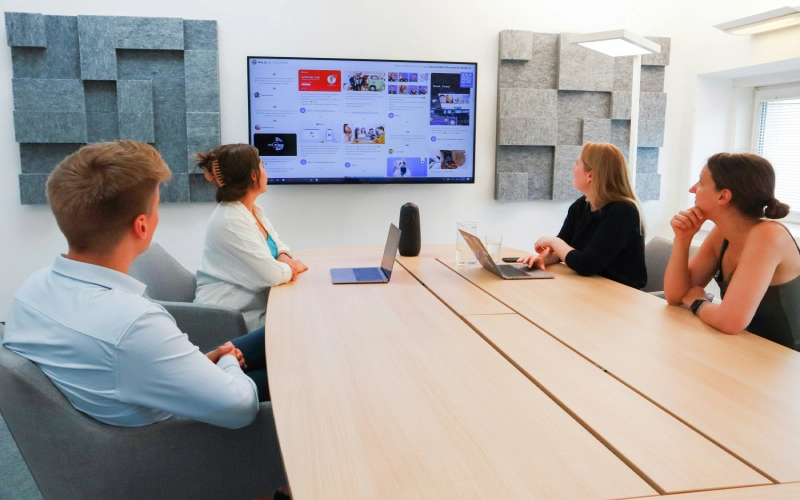
Users search for rooms, reserve a slot, get a confirmation, and then check in at the start time. The meeting room scheduler syncs with calendars, signage, and chat apps. Admins can set policies while the system auto-releases unused rooms.
A Simple Four-Step Flow
- Search: Open the room scheduler on the web or mobile, then filter by capacity, location, accessibility, or equipment. The system shows real-time room availability.
- Reserve: Choose a slot; the platform validates conflicts and applies buffers or approvals. Add services like catering or A/V if needed.
- Confirm: Everyone gets an invite through email or the meeting room booking app. Ten minutes before, the meeting room schedule software pings attendees.
- Check in: Tap a door display or your phone. If nobody checks in, the space is released after a short grace period.
The Meeting Room Booking Workflow in Practice
Understanding the workflow end-to-end helps teams adopt the system confidently. The meeting room booking workflow typically looks like this:
- An employee opens the booking platform (web, mobile, or integrated within Slack/Teams).
- They filter rooms by date, time, attendee count, floor, and required equipment.
- They select a room and confirm the booking. The system checks for conflicts and applies any approval rules in real time.
- A calendar invite is generated and sent to all attendees.
- On the day of the meeting, attendees receive a reminder. The assigned person checks in via door display or mobile app.
- If no check-in occurs within the defined grace period, the room is automatically released and becomes bookable by others.
- After the meeting, the system logs occupancy data for analytics and reporting.
This workflow makes the correct behavior the easy behavior, and that consistency is what makes a meeting room scheduling system succeed at scale.
What’s working behind the scenes?
Calendar Sync: Two-way integration with Google, Exchange, or Microsoft 365 keeps everything aligned.
Notifications: Slack/Teams alerts reduce missed starts.
Signage & Sensors: Tablets show status; sensors verify occupancy and help tackle ghost meetings.
Access Control: Badges or mobile keys can unlock the room only during the booked window.
Directory & Roles: SSO and SCIM automatically provision the correct permissions.
A quick example:
You open the room scheduling tool, search “6 people + video,” and see three options across two floors. You pick the closer one, add a whiteboard, and hit the book. The meeting room scheduler adds the meeting to everyone’s calendars.
At the start time, you tap to check in on the door tablet. Later, facilities reviews, analytics, and notices sustained demand for 6-8 person rooms. They split a large conference room into two huddle spaces. That’s thoughtful meeting room booking software in action.
Why Businesses Need a Meeting Room Booking System
Without a meeting room scheduling solution, organizations face double bookings, ghost meetings, and underused spaces. A modern room scheduling software setup cuts waste and centralizes rules in a resource reservation system that everyone trusts.
Common Workplace Issues:
Double-bookings: Two teams believe they own the same room. One loses, tempers spike, and the meeting derails.
No-shows: The room sits “busy” in calendars but empty in reality. Others can’t grab it.
Underuse and mismatch: Large rooms host tiny meetings while small rooms overflow.
Manual overhead: Admins juggle calendars; IT gets edge-case support requests.
No data: Leaders guess about space needs, which means they buy too much or too little of the wrong thing.
The Cost of Unmanaged Rooms:
It’s not just frustration. A floor with 10 rooms can lose dozens of hours every week to ghost meetings and friction. That clearly impacts project speed and visitor experience and makes real estate plans fuzzy.
When leaders can’t see real demand, they overspend or underinvest.
Research from office furniture supplier Steelcase found that 40% of in-office employees waste up to 30 minutes a day looking for meeting space, that’s 10 hours per month per person.
How a System Helps Across Teams:
Operations & Facilities: Cleaners get accurate schedules; catering aligns with actual bookings; inventory planning uses data, not gut.
IT: With a central resource reservation system, policies live in one place. Fewer support tickets, clearer ownership.
HR & People: New hires ramp faster because the process is obvious. Accessibility instructions sit with each room.
Team Leads: Clear guidance on booking windows and minimum attendees for larger rooms.
The meeting room booking process matters:
When booking is predictable —search, reserve, confirm, check in—people focus on the meeting instead of the logistics.
More decisions get made, there are fewer last-minute room scrambles, and the workplace finally feels as coordinated as your product roadmaps.
Key Features of a Great Meeting Room Booking Software
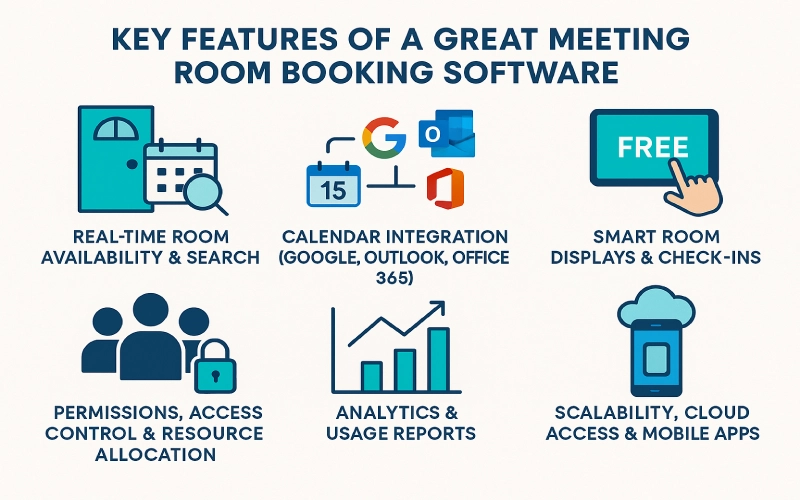
Look for room booking system features that include strong calendar sync, live availability, door displays, role-based policies, analytics, and mobile access.
The best meeting room scheduling software supports conference room booking system hardware and secure identity integrations end-to-end.
1. Real-Time Room Availability & Search
Accurate room availability is non-negotiable. The room reservation system should filter by capacity, floor, building, amenities (camera, HDMI, assistive listening), and accessibility notes.
Search must also respect policies, like prep buffers, cleanup windows, and exception lists, so it never suggests an impossible slot. Bonus points for natural-language queries like “tomorrow, 2-3 pm, 10 people, video.”
2) Calendar Integration (Google, Outlook, Office 365)
Two-way sync keeps everything consistent. If someone moves a meeting in Outlook, the conference room booking system updates immediately.
For a meeting room booking system, Office 365 deployments, validate Microsoft Graph scopes, resource mailbox mapping, recurring event handling, and Teams Room devices.
For Google, confirm Room Resources and secondary calendars stay in perfect lockstep. Good sync makes the booking tool feel invisible.
3) Smart Room Displays & Check-Ins
Door tablets show status: free, in use, starting soon. People can book on the spot, extend, or check in.
If nobody checks in, the conference room system auto-releases the room after a grace period. Sensors (PIR, BLE) provide backup verification. They also eliminate ghost meetings without nagging.
4) Permissions, Access Control & Resource Allocation
A robust resource reservation system supports granular roles: team member, contractor, vendor, and visitor. Some rooms require approvals; executive spaces might be bookable only by EAs.
Tie reservations to access control so doors unlock only during the booked window. For specialized gear, bundle resources with the room so the room booking system travels with its equipment (e.g., a PTZ camera kit or translation headsets).
5) Analytics & Usage Reports
Great meeting room reservation software turns activity into insight. It tracks booking lead time, check-in compliance, auto-releases, peak hours by headcount, and amenity demand.
It also compares actual, sensor-verified occupancy with what was scheduled. Together, these metrics guide floor plans, construction choices, and policy tweaks, so you know when to split a large room, add phone booths, or retire that forgotten projector.
6) Scalability, Cloud Access & Mobile Apps
Hybrid work requires flexible access. An online meeting room booking system should work across the web, mobile devices, and signage without a VPN. Moreover, it should support multiple locations, time zones, and languages.
The meeting room booking app should make fast booking a reflex; two taps and done. From this, we see why meeting room scheduling software is helpful because of speed, simplicity, and reach.
7) Customization & Branding
Add your brand to displays and the web app. Provide per-room instructions (“HDMI 2, not HDMI 1,” “camera auto-frames”).
Small touches like designing QR codes reduce support pings and make the meeting room scheduling solution feel like part of your office, not a bolt-on.
Consider aligning these customizations with your overall brand architecture models to ensure consistency across all touchpoints and strengthen your company’s visual identity.
8) Reliability & Offline Modes
Networks fail. The conference room booking system should cache upcoming bookings and allow check-ins for a short period when the connection drops. Once online, it reconciles changes. This kind of reliability helps maintain trust.
9) Security, Identity, and Audit
Expect SSO, SCIM provisioning, role-based permissions, and exportable audit logs. For regulated environments, confirm data residency and retention controls. Good security turns the meeting room booking system from “another app” into part of your core stack.
Benefits of Using Meeting Room Booking Systems
The best meeting room booking system improves collaboration, maximizes space, and reveals actionable data. Choosing the best room booking software accelerates decision-making, reduces real estate waste, and improves team member and visitor experiences.
Improved Collaboration and Productivity
Fewer “is this room free?” messages. Meetings start on time because the right equipment is in the right place. Teams spend less energy hunting for space and more on the work itself. Even a lightweight room scheduling software rollout creates smoother days.
Space Optimization and Cost Efficiency
Data reveals truths: your 12-person rooms host mostly 4-person meetings. Or your huddle rooms are overbooked on Tuesdays.
With a mature meeting room scheduling solution, you’ll right-size the room mix, reduce unneeded space, and reallocate budget toward what people actually use.
Data Transparency for Workplace Leaders
Facilities get clean utilization curves. IT tracks device uptime and signage health. Meanwhile, HR sees on-site patterns by day and team.
With this visibility, leaders can defend budgets and prioritize changes based on facts, and this is how the meeting room booking systems prove their worth.
Better Employee and Visitor Experience
Guests receive directions and Wi-Fi ahead of time, and hosts get check-in reminders. Accessibility notes are also visible at booking time, not hidden in a manual.
With that, polite and predictable experiences reflect well on your brand.
Supports Hybrid Work and Flexibility
We know that some days are slammed; others are quiet. And things like booking windows, minimum attendees for large rooms, and auto-release adapt dynamically.
The best meeting room booking system makes hybrid attendance feel smooth, not spiky, and respects both planned and spontaneous collaboration. The calling side has to keep up too, because a meeting only feels even when the person dialling in is as easy to reach as everyone in the room. A cloud phone system quietly handles that. One work number, and the call finds them at the kitchen table, on a train, or at the desk they grabbed that afternoon, so nobody’s chasing anyone down when it’s time to start.
Less Admin Overhead
When rules live in the tool, admins stop being referees. Approval also routes automatically. There are templates for standard formats, such as daily standups, customer demos, and training sessions.
Therefore, IT sees fewer tickets because the meeting room booking system answers fundamental questions on the spot.
Culture and Fairness
Clear, shared rules feel fair. The best room booking software enforces them consistently; there are no secret shortcuts or hidden calendars. And that subtle fairness reduces friction across teams and locations.
Visitor and Meeting Room Management
Visitor management is one of the most overlooked dimensions of a meeting room booking system, but it’s among the most important for creating a professional, secure workplace experience.
When a visitor books an external meeting, the room reservation system should automatically trigger a visitor pre-registration flow.
Before arrival, guests receive directions, parking instructions, Wi-Fi credentials, and a digital sign-in link. The host is notified when the visitor checks in at the front desk.
Access is scoped precisely to the booked meeting room and time window—nothing more.
Good visitor and meeting room management integration means:
- Visitors never wander unescorted through secure areas
- Hosts aren’t surprised by early arrivals
- Reception isn’t overwhelmed with walk-ins during busy periods
- All visitor activity is logged and auditable for compliance
For offices in regulated industries, finance, legal, and healthcare, this combination of visitor management and room booking is not optional; it’s a compliance requirement. For everyone else, it’s simply a mark of a well-run workplace.
Security stays tight. The experience stays friendly.
How Conference Centers and Large Offices Manage Bookings
Conference centers and multi-floor office campuses face a distinct set of challenges that smaller workplaces don’t.
They operate at higher volume, with more room types, more user roles, and more complex policies.
Understanding how they approach booking management provides insights into best practices for any growing organization.
How Conference Centers Manage Bookings
Conference centers typically deal with external clients, which adds layers that internal-only booking systems don’t need: client-facing reservation portals, payment processing, catering coordination, A/V setup confirmation, and NDAs or access agreements.
A conference booking management system for this context must support:
- Named client accounts with their own booking portals
- Room holds and provisional reservations pending contract sign-off
- Service bundling (room + catering + AV + tech support in one reservation)
- Automated invoicing and billing integration
- Capacity-based pricing and time-block rules
- A post-event feedback loop linked to the booking record
How Large Companies Manage Room Bookings Across Campuses
For corporate offices spanning multiple buildings, the challenge is governance at scale. How do you ensure consistent policy across a London HQ, a New York office, and a Singapore hub, without creating a patchwork of different tools and rules?
The answer is a centralized meeting room booking management system with location-level customization. Global admins set the framework: booking lead times, approval tiers, data retention policies, and integration standards.
Local admins configure room-level detail: per-room instructions, floor-specific catering vendors, and regional calendar integration settings.
Corporate and enterprise meeting room booking systems also tend to require deeper identity management: Azure AD or Okta SSO, SCIM-based user provisioning, department-level room access controls, and detailed audit logs for security teams.
Implementing a Meeting Room Booking System
Implementing a meeting room booking system is a project that rewards careful planning. Organizations that rush the rollout—connecting the software without thought for policy, change management, or integration testing—tend to see low adoption and a return to the old chaos within months.
Steps to Implement an Efficient Room Booking System
Step 1 — Audit your current state: Before touching any software, map your room inventory. Document capacity, equipment, accessibility status, and current booking rules for every space. Identify which rooms are constantly fought over and which sit empty.
Step 2 — Define your policies: Decide on booking windows (how far in advance can rooms be reserved?), grace periods for check-ins, auto-release timelines, approval requirements for sensitive spaces, and any minimum attendee thresholds for large rooms.
Step 3 — Choose your platform: Evaluate platforms against your calendar ecosystem (Google or Microsoft), your hardware preferences, your integration requirements (Slack, Teams, access control, visitor management), and your analytics needs. Run a pilot with 2–3 departments before signing.
Step 4 — Configure integrations: Connect the system to your calendar platform, identity provider (SSO/SCIM), chat tools, and any physical hardware (door displays, sensors, access control panels). Test recurring event handling and edge cases—same-day bookings, back-to-back rooms, multi-day reservations.
Step 5 — Set up hardware: Install door tablets or e-paper displays, pair them with the system, and test check-in flows on every device. Document a “Plan B” for each room in case of display failure—a simple QR code linking to the room’s booking page is enough.
Step 6 — Run change management: Appoint floor champions for each department. Run short, practical demos. Share a one-page quick-start guide. Communicate the new process during onboarding for new hires so the system becomes the default from day one.
Step 7 — Monitor and iterate: In the first 30 days, track adoption rates, check-in compliance, and auto-release frequency. Use analytics to identify rooms that are still being bypassed or policies that are causing friction. Make small adjustments and share wins, “we reclaimed 22 hours of meeting space last week”—to reinforce the value.
How to Set Up an Online Room Booking System
For organizations choosing a cloud- or web-based meeting room booking system, setup is considerably faster than with on-premises alternatives.
Most SaaS platforms can be provisioned in hours, with calendar sync, user directory integration, and basic room configuration completed in a single day.
Hardware installation and policy tuning typically add a week or two. Full organizational rollout, including training and change management, usually takes 4–6 weeks for mid-sized companies.
Common Challenges in Meeting Room Management
Even with a meeting room reservation system, issues crop up: underuse vs. overbooking, no-shows, device hiccups, unclear policies, and visitor friction.
But with robust room scheduling solutions, problems are addressed through automation, training, and clear ownership.

Underutilization and Overbooking (At the Same Time)
Popular rooms are slammed while others nap. Solve this by tagging every space with capacity, layout, and equipment, and by steering small meetings into small rooms, visual cues on the meeting rooms reservation system help, like filters, recommendations, and gentle limits.
Meeting No-Shows
Ghost meetings waste time and money. Add check-ins with a short grace period, auto-release no-shows, and send light Slack or Teams nudges.
Share weekly reclaimed-hours metrics so the results are visible. If done well, this setup pays for itself.
Technology or Display Failures
If door tablets die, confidence drops. Choose conference room booking systems with device health monitoring and offline modes.
Keep a simple “Plan B” at each door—a QR code to the room’s booking page is low-tech insurance that works.
Policy and Access Confusion
Who can book the boardroom? How far in advance? What about contractors?
Put these rules directly into the meeting room booking system so they’re enforced automatically. And communicate them during onboarding so no one learns by breaking them.
Visitor and Security Management
Guests shouldn’t wander or wait. Integrate visitor pre-registration with your room scheduling solutions so check-in is swift, hosts are notified, and access is scoped to the meeting’s time and place.
Security stays tight; the experience stays friendly.
Change Fatigue
Tools come and go. To protect adoption, appoint floor champions, run short demos, and highlight early wins, like “we freed 22 hours last week.” It’s easier to love the room scheduling software when you can see what it gives back.
How to Choose the Best Meeting Room Booking System
Picking the best meeting room booking system means balancing budget, integrations, UX, and scale.
Compare each conference room booking system by sync depth, analytics, automation, and support. Pilot with real teams before signing.
Factors to Consider
Integrations: Calendars, identity, chat, sensors, and access control. For the meeting room booking system software, verify API stability and real-time updates under load.
User Experience: Two taps to book. Clear error states. Helpful empty states that suggest alternatives, not dead ends.
Administration: Policy engine, delegated roles, room grouping, SCIM, and audit logs.
Security: SSO, data residency options, and retention controls.
Hardware: Door displays, Teams/Zoom Rooms, sensor support, and remote management.
Support & Change Management: Documentation, training templates, migration playbooks, and realistic implementation timelines.
Meeting Room Booking System Selection Criteria: Key Factors
When evaluating vendors, apply these selection criteria as a structured framework:
- Does the system offer proven two-way calendar sync, including recurring events?
- Does it support automated room release for no-shows across both mobile and signage?
- Are policies, buffers, booking windows, minimum attendees, and approvals fully configurable?
- Does it include device fleet management with health status monitoring?
- Is pricing transparent, with a clear implementation plan and realistic go-live timeline?
- Does the roadmap align with your anticipated growth (more rooms, more sites, more users)?
- Can you export data via CSV or API for use in your BI tools?
- Is there a sandbox or staging environment for testing new rules before deploying them?
Run a pilot with two or three departments for a month. Measure reclaimed hours, booking speed, and adoption rates. The system that wins the pilot earns the full rollout.
Cloud vs. On-Premise
Cloud wins for most teams because an online meeting room booking system deploys quickly and scales easily.
On-premises solutions may be necessary in strict environments, but be prepared for higher maintenance and longer rollouts.
Hybrid setups, such as on-prem calendars with a cloud room-scheduling tool UI, require careful planning.
Why Scalability, Analytics, and Automation Matter
New floors open, hybrid policies evolve, and leadership asks for the latest reports. The meeting room booking system you choose should scale to more sites without reinventing policies.
Automation, such as auto-release, reminders, and approvals, removes the friction nobody wants to manage manually.
Over time, robust analytics separate a decent tool from the best room booking software.
A Practical Vendor Checklist
- Proven two-way calendar sync (recurring events included)
- Check-ins and auto-release across signage and mobile
- Policy coverage (buffers, booking windows, minimum attendees, approvals)
- Device fleet management with health status
- Transparent pricing and implementation plan
- Clear roadmap and customer references
- CSV/API data export for BI
- Sandboxes for testing new rules
Run a pilot with two or three departments for a month. Measure reclaimed hours, booking speed, and adoption. The winner earns the rollout.
Future of Meeting Room Booking Software
Next-gen meeting room scheduling software will predict needs, not just record them.
So expect AI suggestions, IoT occupancy verification, and sustainability tracking, all in one meeting room scheduling solution delivered through an online meeting room booking system.
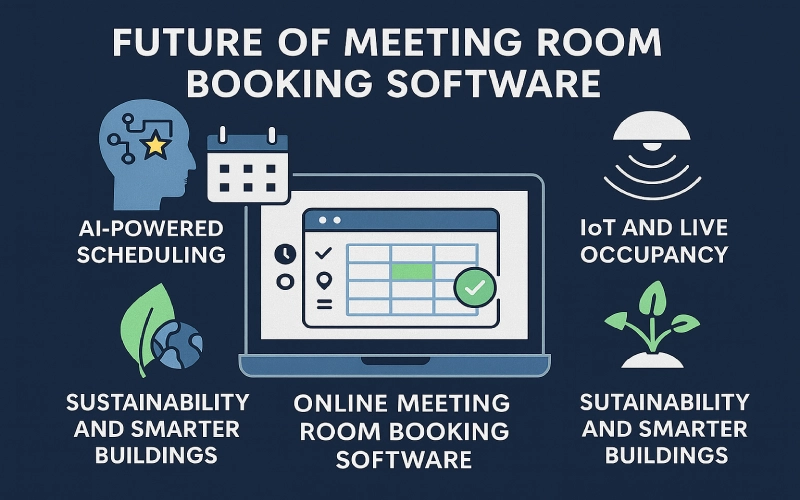
AI-powered scheduling
The software will notice patterns (e.g., weekly team rituals, cross-timezone overlaps, preferred rooms) and propose slots that minimize travel and context-switching.
It’ll also recommend alternative rooms when a key attendee switches to remote, automatically adjusting the size and equipment.
IoT and live occupancy
Sensors will validate whether people actually showed up and how many.
That data will refine search results in real time: “Four people on average have used this 10-person room; consider a smaller space.”
With trustworthy signals, the room reservation system will cut waste without scolding anyone.
Sustainability and smarter buildings
Expect energy metrics per booked hour, CO₂ and noise indicators, and HVAC schedules linked to actual occupancy rather than calendar-based estimates.
Leaders will tune floor layouts with confidence rather than gut feel.
Security and identity at the edge
As buildings get smarter, access rules will align more closely with bookings.
A reservation in the meeting room booking system might grant door access from five minutes before the start to five minutes after the end. It’s cleaner, safer, and automatic.
Human-first design
Despite the tech behind them, the best tools feel lighter, not heavier; they simplify choices, automate routine tasks, and let people focus on work.
They’ll also reduce clicks, anticipate intent, and keep your calendar as the daily hub. It definitely aims to be invisible, predictive, and kind to busy people.
Conclusion
A modern meeting room booking system simplifies reservations, reduces waste, and gives leaders real visibility.
With strong meeting room scheduling software and a reliable room reservation system, you’ll run a calmer, more innovative, and more efficient workplace.
Every office has the same core problem: people, rooms, and time pulling in different directions.
The fix isn’t more policy emails. It’s actually a system that makes the correct behavior the easy behavior: search, reserve, confirm, check in.
Good tools prevent double-booking, release no-shows, and show where space design needs a tune-up. And they do all that without drama.
If you’re evaluating options, favor deep calendar sync, clear mobile flows, dependable displays, and analytics that answer fundamental questions.
Choose a platform that grows with you and automates the tasks nobody wants to manage manually.
Then make it a habit: weekly utilization reviews, minor policy tweaks, and a simple rollout playbook for new teams.
Ready to turn chaos into clarity? Explore Othership’s meeting room booking software and see how a thoughtfully designed system upgrades collaboration from day one.
Meeting Room Booking Software FAQs
Here are some commonly asked questions about meeting room booking software and how it works in modern workplaces.
How does meeting room booking software improve workplace efficiency?
Meeting room booking software removes the guesswork from scheduling. Instead of back-and-forth emails or hallway conversations, employees see real-time availability, book the right room instantly, and avoid conflicts.
Automated confirmations, reminders, and check-ins keep meetings on track and eliminate wasted time from no-shows or double bookings.
What is the difference between basic and smart meeting room booking systems?
Basic systems handle reservations and calendar visibility.
Smart meeting room booking systems go further: they auto-release rooms when no one checks in, integrate with occupancy sensors to detect actual usage, use AI to suggest optimal rooms, enforce complex policies automatically, and generate analytics that drive real estate decisions.
For most offices managing more than five rooms, a smart system pays for itself quickly.
How does automated room release for no-shows work?
When a room is booked but nobody checks in within the defined grace period—typically 5–15 minutes, the system automatically cancels the reservation and marks the room as available again. Other teams can book it immediately.
This eliminates ghost meetings and dramatically reduces the number of empty rooms that appear occupied on the calendar.
Some systems also send a Slack or Teams notification to the original booker so the release is transparent.
Is it possible to track room usage and generate reports?
Yes. Meeting room booking software provides analytics showing how spaces are actually used: room utilization rates, peak hours, no-show rates, and demand by room size or equipment type.
When combined with sensor or check-in data, these insights support better space planning and more confident real estate decisions.
Can meeting room booking software integrate with other workplace tools?
Yes. Most modern meeting room booking systems integrate with Google Calendar, Microsoft Outlook and Office 365, Teams, Slack, access control platforms, visitor management systems, and IoT sensors.
These integrations keep bookings synchronized across systems so schedules stay accurate without extra manual steps.
What should you consider when choosing meeting room booking software?
The key factors are calendar compatibility, scalability across locations, policy configurability, reporting capabilities, hardware support, security (SSO, data residency, audit logs), and the quality of onboarding and ongoing support.
Always run a pilot with real teams before making a final decision.
Can meeting room booking software support multiple locations?
Yes. Most enterprise-grade meeting room booking systems are designed for multi-site organizations.
They let you manage rooms across offices, floors, and campuses from a single interface while still applying location-specific rules and policies.
How secure is meeting room booking software?
Reputable platforms include single sign-on, role-based access controls, encrypted data in transit and at rest, and detailed audit logs.
These controls ensure that only authorized users can book rooms and that all activity is traceable. For organizations in regulated industries, look for configurable data residency and retention settings.
Are mobile applications available for meeting room booking software?
Yes. Most solutions include a mobile app that lets users search for rooms, book spaces, check in, and receive reminders from their phones—making it easy to manage meetings while moving between locations or working in a hybrid arrangement.
What is a room reservation system for companies?
A room reservation system for companies is a centralized platform that manages the booking and use of shared spaces, meeting rooms, conference rooms, boardrooms, training rooms, and collaborative areas, across an organization.
It enforces booking policies, integrates with corporate calendars and identity systems, and provides analytics to help facilities and operations teams make data-driven space decisions.
How do I set up an online room booking system?
Start by auditing your room inventory and documenting your booking policies. Choose a cloud-based platform that integrates with your calendar system (Google or Microsoft 365).
Configure room profiles, set up user access via SSO, install door displays or other hardware, and run a pilot with a small group before a full organizational rollout.
Most cloud platforms can be live within days; full adoption typically takes 4–6 weeks with proper change management.
What is the best meeting room booking system for UK offices?
UK offices should look for systems that support GDPR-compliant data residency in the EU/UK, integrate with UK-standard calendar platforms (typically Microsoft 365 or Google Workspace), and offer local customer support.
Many global platforms, including those used widely across North America and Europe, offer UK-specific data residency options and dedicated UK support teams.
Evaluate based on your organization’s size, calendar ecosystem, and compliance requirements.


You must be logged in to post a comment.