

A common workplace problem occurs when two teams arrive at the same conference room at the same time. Both meetings are disrupted, creating confusion and wasted time. This frustration is usually caused by a simple scheduling mistake known as double booking.
Double bookings waste valuable time and fray employee nerves. Teams must search for another location that causes work to be delayed. The disorganized situation reveals an important operational weakness that affects numerous businesses.
The blog will examine the meanings of double booking, its reasons, and its effects. We position a dedicated meeting room booking system as the essential long-term fix. Our guide follows a clear definition, reasoning, and resolution framework.
Contents
- 1 What Is Double Booking in Meeting Rooms?
- 2 What Is Double-Booking Scheduling?
- 3 Why Double Bookings Happen in Shared Meeting Room Environments
- 4 When Is Double Booking Often Used — and Why It Fails for Meeting Rooms
- 5 How Double Bookings Affect Workplace Productivity and Experience
- 6 How a Meeting Room Booking System Prevents Double Bookings
- 7 Meeting Room Booking Software vs Manual Scheduling Tools
- 8 Best Practices to Reduce Double Bookings Without Software
- 9 Conclusion: Preventing Double Bookings Requires a System, Not Workarounds
- 10 FAQs: To Prevent Double Booking
- 10.1 1. How do you prevent double booking in shared meeting rooms?
- 10.2 2. What causes double booking in meeting room scheduling?
- 10.3 3. What is the meaning of a double-booked meeting in the workplace?
- 10.4 4. How does meeting room booking software prevent double bookings?
- 10.5 5. How can organizations stop double booking on shared room calendars?
- 10.6 6. What is double booking scheduling, and why doesn’t it work for meeting rooms?
- 10.7 7. How can meeting room scheduling software prevent booking conflicts?
- 10.8 8. What role does automation play in reducing human errors in room reservations?
- 10.9 9. How can booking rules and permissions restrict double bookings?
- 10.10 10. What features should a meeting room management system have to avoid conflicts?
- 10.11 11. Can calendar tools like Microsoft Bookings cause double booking issues?
- 10.12 12. How does centralized booking reservation software improve room visibility?
- 10.13 13. Why do manual scheduling processes lead to double-booked meeting rooms?
- 10.14 14. How can meeting room software integrate with workplace calendars?
- 10.15 15. Can Othership help organizations eliminate double booking at scale?
What Is Double Booking in Meeting Rooms?
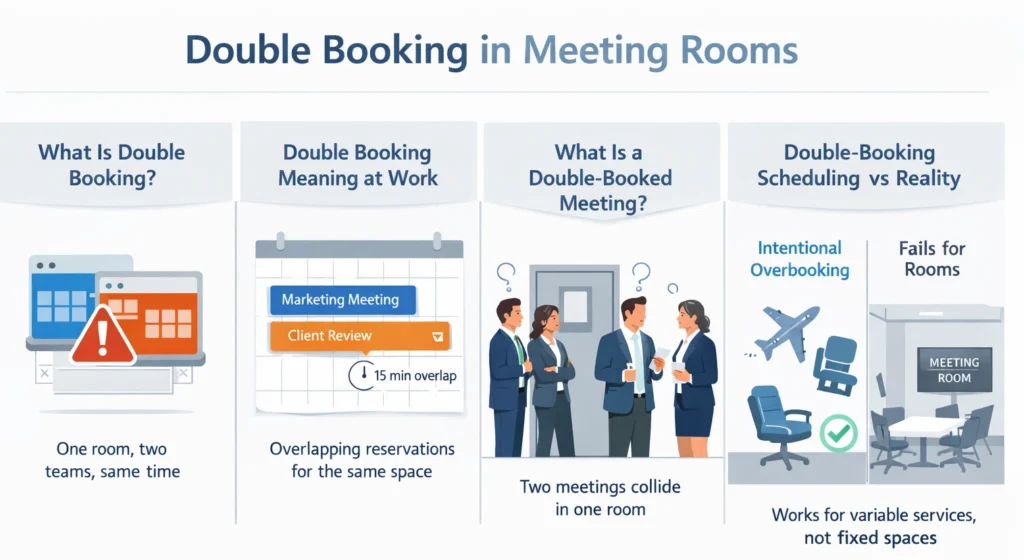
A double booking happens when the same resource is reserved by two parties at the same time. In office environments, this usually involves a shared meeting room assigned to multiple groups simultaneously. The result is an immediate and unavoidable conflict—both teams believe their reservation is valid—leading to disrupted schedules and lost productivity.
The issue is specific to shared, finite resources like conference rooms. It is not about overbooking a service professional’s time. A double booking directly pits two teams against one another for the same four walls.
Double Bookings: Meaning in Workplace Scheduling
The double booking’s meaning in an office refers to overlapping reservations for an identical room and time slot. The calendar shows two confirmed meetings occupying one space.
This overlap can be partial or complete, but the conflict remains. Even a fifteen-minute overrun can cause a cascade of delays. Understanding this double-booked meaning is the first step toward prevention.
What Is a Double-Booked Meeting?
A double-booked meeting is the tangible result of this calendar error, with two separate meetings scheduled in one room concurrently. For example, a marketing brainstorm and a client review collide unexpectedly.
This scenario forces an awkward and time-consuming negotiation. One group must choose between two options, which require them to leave the room or find an alternative space immediately.
What Is Double-Booking Scheduling?
What is double booking scheduling as a broader concept? It is intentionally overbooking resources as a risk management method. Some industries use this strategy to maximize utilization of variable assets.
This approach is a calculated gamble, not an accidental mistake. It assumes a certain percentage of cancellations will naturally occur. However, this logic fails miserably when applied to physical meeting rooms.
What Is Double-Booking Scheduling?
It is a deliberate strategy to schedule more than one appointment per slot. Businesses use it to optimize time when no-shows are statistically likely.
This method treats time as a flexible and cancellable commodity. It is common in client-facing services like consulting or healthcare. The goal is to ensure no billable hour goes unused due to a cancellation.
The scheduler accepts the risk of two clients arriving simultaneously. They then manage the conflict through prioritization or delays. This is double booking scheduling as an operational tactic.
Double Booking Scheduling Definition
A clean double booking scheduling definition is necessary. It is the intentional overallocation of a resource based on probabilistic usage. The resource is often a professional’s time rather than a physical space.
This definition hinges on the expectation of attrition. It is a planned approach, not an unplanned error. The system is designed to absorb and manage the created overlap.
Double Booking Scheduling Example
Consider a double booking scheduling example from a dental clinic. The hygienist may be booked for two cleanings at 10:00 AM. The office expects one patient to likely cancel or reschedule.
If both patients arrive, the staff will manage the wait or reschedule one. This model maximizes the hygienist’s productive chair time. This shows when double booking is often used in service industries.
Double Booking Appointments vs Room Reservations
Double booking appointments for people’s time can be managed. A consultant can apologize and offer a coffee while a client waits. Time is a fluid resource that can be stretched with service recovery.
A booking for a physical room is fundamentally different. Two teams cannot amicably share a single conference table. The finite, physical nature of a room makes coexistence impossible.
This is why the scheduling method fails for office infrastructure. You cannot put a meeting “on hold” in a hallway. A room is either occupied or available, with no middle ground.
The main reason for double-scheduling conflicts originates from systemic deficiencies instead of personal mistakes. The organizations do not have one official source that provides accurate information about room availability. This environment breeds confusion and overlapping reservations.
When systems fail, employees naturally develop their own workarounds. They might use informal channels to claim space. The well-meaning solutions result in additional double booking problems.
Understanding these causes is key to designing an effective prevention strategy. The goal is to remove the obstacles that lead to human error. A reliable process should guide employees to correct choices effortlessly.

Lack of Real-Time Room Availability Visibility
The most frequent reason for this issue is that people cannot see current operations. Employees book rooms using static calendars or spreadsheets. These tools do not update the instant a reservation is made elsewhere.
Someone may see a free slot and send a meeting invite. Another person, looking at the same outdated view, does the same. This delay in synchronization directly creates double bookings.
Double Scheduling Across Multiple Tools
Multiple schedules exist because different systems operate separate scheduling functions. A team utilizes a shared Outlook calendar to reserve room A. The other department uses Slack to reserve room B.
Missing Centralized Booking Reservation Systems
The absence of a booking reservation hub results in multiple information sources that lack a central source of accurate information. Information is scattered across emails, spreadsheets, and personal calendars. No one can be certain of a room’s true availability.
Human Error and Ungoverned Booking Permissions
Even with good intentions, human error plays a role. For example, an employee might misread a calendar date or time or they could accidentally book a room for the wrong Tuesday.
When Is Double Booking Often Used — and Why It Fails for Meeting Rooms
When is double-booking often used successfully? It thrives in appointment-based service industries. Healthcare, consulting, and salons frequently employ this model for managing client time.
These industries rely on high-value, variable-duration interactions. A no-show represents a significant loss of billable revenue. Double booking scheduling mitigates this financial risk.

When Is Double Booking Often Used?
The practice is commonly employed in client-service industries with variable appointment durations. Healthcare clinics, for instance, may book two patient consultations in the same time block.
The strategy handles the two main challenges of the business, which are frequent cancellations and last-minute schedule changes. The strategy ensures that professionals can maximize their billable work time.
Double Booking Scheduling Advantages and Disadvantages
The advantages of double booking scheduling are clear for services. It maximizes resource utilization and protects against revenue loss. It also keeps professionals fully occupied during paid hours.
The disadvantages involve client experience and operational stress. It can lead to longer wait times and perceived disrespect. Staff must constantly juggle and triage arrivals.
Why Double-Booking Doesn’t Work for Physical Meeting Spaces
The system prevents double booking of rooms because the available space cannot extend beyond its fixed capacity. The room is entirely occupied because the reservation period will last until the scheduled end time.
The situation leads to a zero-sum game in which one group continuously suffers defeats. The team that loses must find a new location, which results in time loss and interruption of their work. The business cost results in total financial loss, which offers no chance for recovery.
Tired of those awkward stand-offs at the conference room door? See How Othership Prevents Double Bookings. The solution delivers operational clarity to your business needs while it provides your team with peace of mind.
How Double Bookings Affect Workplace Productivity and Experience
The double-booked meeting establishes two distinct consequences because it results in economic damage. It affects both organizational productivity and employee satisfaction. The expenses create both measurable costs and intangible expenses.
The existing conflicts demonstrate that the workplace has reached a critical limit of operational reliability. Employees lose trust in the systems meant to support their work. The decreasing confidence results in permanent trust damage, which develops into an ongoing destructive process.

Lost Time and Delayed Meetings
The most immediate impact is pure time loss. Teams use the initial 10-15 minutes of their scheduled time to search for a different meeting space. The process reduces usable meeting duration while it extends the period required to reach decisions.
Poor Space Utilization and Inaccurate Data
Double bookings render space utilization data meaningless. Analytics will show a room was “booked” twice, but used only once. This corrupts strategic planning for real estate and resource allocation.
Employee Frustration and Experience Breakdown
Recurring scheduling conflicts cause frustration to employees. The situation shows disrespect because it demonstrates that people do not value the time and effort that others have dedicated to their work. The employee experience becomes damaged because their engagement gets interrupted by this frustration.
How a Meeting Room Booking System Prevents Double Bookings
A dedicated meeting room booking system solves this at the architectural level. It acts as the single, authoritative source of truth for all space. This centralized logic is the cornerstone of prevention.
The system transforms room booking from a free-for-all into a governed process. It is also designed to eliminate the root causes of the problem. Users are guided to available booking options and block conflicting choices.
Centralized Booking Reservation Logic
The core solution is the centralized booking reservation logic. Thus, every reservation request is routed via one unified platform. The system instantly updates global availability for all users.
This eliminates the problem of fragmented tools and delayed updates. The system marks a room as unavailable for all users because someone booked it. Then it creates a booking reservation conflict, which leads to a technical impossibility.
Real-Time Availability and Conflict Prevention
These systems display real-time availability on easy-to-view dashboards. Employees see only slots that are genuinely free for booking. The system will automatically prevent selecting an occupied time.
If a user tries to book an occupied slot, they receive an immediate warning. They are then shown alternative available rooms or times. This guidance prevents double bookings before they are ever made.
Booking Rules, Restrictions, and Approval Workflows
Sophisticated systems allow administrators to set intelligent booking rules. These can prevent a 1-person meeting from reserving a 20-person boardroom. The rules and restrictions ensure proper use, and eventually free up large spaces for the teams.
Curious what a truly frictionless workplace feels like? Explore othership’s meeting room booking software. See how it turns scheduling from a daily headache into a silent, seamless part of your team’s day.
Meeting Room Booking Software vs Manual Scheduling Tools
Meeting room booking software is designed specifically for this single purpose. The system restricts users to making only one reservation for each time slot through its database system. The system design blocks multiple reservations because it stops data access to schedule conflicts.
The shared calendar system operates as a flexible tool because it provides users with control yet lacks the capacity for strict enforcement. They allow multiple events to be placed on the same calendar slot. Their design inherently permits the conflict they are trying to avoid.
The comparison is between a dedicated system and a generalized workaround. One manages a critical resource; the other simply records wishes. This distinction is crucial for business leaders evaluating solutions.

Shared calendars lack real-time sync and conflict alerts for all users. They depend on perfect human behavior and constant manual refreshing. These are unreliable foundations for managing a shared physical asset.
Spreadsheets are even worse, offering no live updates or permissions. They become outdated the moment the first booking is made off-sheet. Using them for booking reservation tasks is an operational risk.
Why Dedicated Meeting Room Booking Software Works Better
Dedicated meeting room booking software works because it is proactive. It does not just record bookings; it actively manages availability. The system’s primary function is to prevent conflicts, not just log them.
Scheduling Tools vs Room Management Systems
Basic scheduling tools help you pick a time and comprehensive room management systems help you manage a shared asset. They include analytics, maintenance scheduling, and resource tracking beyond mere booking.
A true system considers the full lifecycle of the room. The process involves three steps, which include cleaning up after meetings, checking equipment, and reporting how the space was used. The complete system brings permanent advantages because it stops issues from happening.
Best Practices to Reduce Double Bookings Without Software
Even without software, organizations can improve with disciplined practices. Establishing clear shared room booking policies is the essential first step. Everyone must know the rules of engagement for reserving space.
These policies should define booking windows, meeting lengths, and cancellation rules. A clear guideline prevents abuse, like all-day bookings for short calls. Communication and training on these policies are critical for adherence.
Shared room booking policies might require that all bookings must be made in advance for at least 2 hours. Moreover, it may require meetings to end at least 5 minutes before the time is up and an hour to allow transition. Shared room booking policies, thus, create predictability.
Manual Confirmation and Communication Processes
Implementing a manual confirmation process is like designating a room coordinator. Teams must email this person to request a space. In turn, the coordinator checks the master calendar. This creates a single point of control. And updates the booking reservation ledger.
Why Manual Practices Don’t Scale
Manual processes may no longer be effective when the organization is getting bigger and becoming complex. A coordinator cannot handle hundreds of requests across multiple time zones. The double bookings risk increases with volume and human fatigue.
They also fail in hybrid work environments where visibility is already low. Remote employees cannot peek into a physical room to see if it’s empty. Manual systems lack the real-time, remote access that modern work requires.
Conclusion: Preventing Double Bookings Requires a System, Not Workarounds
In conclusion, double booking is a systemic problem. It demands a system-level solution. Temporary and manual fixes cannot provide reliable and long-term prevention. They merely mask the symptoms until the next conflict arises.
Investing in a proper meeting room booking system is an investment in operational integrity. It removes friction, restores employee confidence, and provides accurate data. This allows leaders to focus on their work, not their workspace logistics.
Do you want to escape the disorder of your calendar system? Book a Demo of Othership Meeting Room Booking Software. The demonstration shows you how an efficient system works to improve your team’s daily activities within 30 minutes.
FAQs: To Prevent Double Booking
The organization requires you to establish a single meeting room reservation system that all users must use as their primary reference point. The program displays current room availability while it creates automatic reservations for any times that conflict with existing bookings. It replaces manual methods that are prone to error with a governed, automated enforcement.
2. What causes double booking in meeting room scheduling?
The primary cause is using multiple disconnected tools. One of the examples is the use of separate calendars and spreadsheets. Human error and missing booking rules may also be the causes of this problem.
3. What is the meaning of a double-booked meeting in the workplace?
A double-booked meeting occurs when two different groups have confirmed reservations for the same room and time. It results in an immediate conflict. Thus, one team must relocate. This leads to lost productivity and employee frustration.
4. How does meeting room booking software prevent double bookings?
The software acts as a centralized database. It enforces one reservation per time slot andisplays live availability. It prevents users from selecting an already-booked room. Automated rules and conflict alerts stop errors before they happen.
Organizations must use an active room management system rather than passive calendars. Establish a single platform that everyone uses for all bookings. Also, implement clear booking policies.
6. What is double booking scheduling, and why doesn’t it work for meeting rooms?
Double booking scheduling is an intentional strategy to overbook appointments. This is often used by organizations / people rendering services. It is impossible for meeting rooms because physical space cannot be shared or stretched. Two groups cannot occupy the same room simultaneously.
7. How can meeting room scheduling software prevent booking conflicts?
The software prevents conflicts by using real-time synchronization across the organization. It uses rules to check for overlaps before reservations are confirmed. This design is proactive. It eliminates data lag and manual errors.
8. What role does automation play in reducing human errors in room reservations?
Automation removes the burden of manual checks. It validates every booking against a live master schedule instantaneously. This eliminates simple mistakes. Moreover, using outdated calendars may also be removed.
9. How can booking rules and permissions restrict double bookings?
The rules stop people from making unsuitable bookings, which lead to scheduling conflicts. The maximum time limit for bookings exists because of these restrictions. The rules restrict room availability to specific types of rooms, which depend on the size of the team.
10. What features should a meeting room management system have to avoid conflicts?
Essential features include a real-time availability dashboard. These also include instant conflict prevention and booking approval workflows. Integration with existing workplace calendars is also critical. Robust reporting helps identify and correct usage patterns.
11. Can calendar tools like Microsoft Bookings cause double booking issues?
Yes, the system requires central management together with a complete connection to the main room database for proper operation. The system creates separate reservation systems through its independent operational functionality. It then creates duplicate data because multiple tools lack a unified reference point.
12. How does centralized booking reservation software improve room visibility?
It provides a single, live dashboard. It shows all rooms and their status. Every employee accesses the same accurate information.
13. Why do manual scheduling processes lead to double-booked meeting rooms?
Manual processes rely on people constantly updating static documents. This leads to information lags and outdated control problems.
14. How can meeting room software integrate with workplace calendars?
Quality software pushes confirmed room bookings directly into users’ digital calendars. This creates a seamless loop, and the room system is the authoritative source.
15. Can Othership help organizations eliminate double booking at scale?
Yes, Othership provides a dedicated meeting room booking system. It is designed to eliminate scheduling conflicts at the scale level. Its centralized platform ensures real-time availability. And it automated enforcement for all locations.


You must be logged in to post a comment.