

Picture your office lobby during a busy morning. Visitors arrive as the reception phone rings nonstop, while a paper logbook sits untouched on the desk. This chaos creates serious security and operational risks. Without clear tracking, you never truly know who is inside your building. Traditional methods simply cannot keep up with modern workplaces.
A modern visitor management system for office use solves this, as it brings immediate order, security, and professionalism to your front desk. This system is an essential workplace infrastructure today. An office visitor management system helps leaders maintain visibility across the organization, strengthening security while building trust in the workplace.
Contents
- 1 What Is a Visitor Management System for an Office?
- 2 Why Offices Need a Visitor Management System Today
- 3 How a Visitor Management System for the Office Works
- 4 Core Features of an Office Visitor Management System
- 5 Visitor Management for Hybrid, Enterprise, and Multi-Office Workplaces
- 6 Choosing the Best Visitor Management System for the Office
- 7 Conclusion: Why Visitor Management Systems Are Essential for Modern Offices
- 8 FAQs: Visitor Management System for Office use?
- 8.1 1. What is a visitor management system for office use?
- 8.2 2. How does office visitor management software improve security?
- 8.3 3. What’s the difference between office sign-in software and visitor management systems?
- 8.4 4. Can visitor management systems support multi-office workplaces?
- 8.5 5. How does a visitor tracking system work in offices?
- 8.6 6. Are visitor management systems compliant with enterprise security standards?
- 8.7 7. What should offices look for in a visitor management system demo?
- 8.8 8. Is visitor management software suitable for office buildings and shared spaces?
What Is a Visitor Management System for an Office?
A visitor management system for office use is a centralized digital platform, as it registers, tracks, and manages all guest entries and exits. The system eliminates traditional paper logbook recordkeeping. It also operates specifically in workplace settings, including corporate offices.
This platform transforms the front desk into a dedicated security checkpoint, delivering a seamless and professional guest experience. For modern workplaces, it has become an essential part of a strong security strategy.
Think of it as the central nervous system for your physical space. It connects visitor data with your team and security protocols instantly. This creates a cohesive, intelligent layer of management over all comings and goings.

Visitor Management System Meaning in Office Environments
The process of visitor management enables offices to implement their particular security measures and compliance requirements. The system requires continuous monitoring of all building occupants. Organizations need this function because it protects people and ensures compliance with safety regulations.
Unlike public venues, offices must protect sensitive data and personnel. A dedicated office visitor management system enforces consistent protocols. It turns ad-hoc guest handling into a standardized, secure procedure.
How Office Visitor Management Differs From Traditional Sign-In Logs
The use of traditional paper logs creates problems because they take too much time to process and are prone to mistakes. Writing by hand creates entries that people cannot read and search engines cannot find. And this is why the system lacks both permanent access to current information and security notification capabilities.
The modern office sign-in system uses automated processes to protect and manage visitor information. It uses digital logs to create complete and time-stamped records that document each visitor. Then, it establishes an immediate audit trail, which improves both security measures and compliance requirements.
Why Offices Need a Visitor Management System Today
The modern workplace environment encounters difficulties when it needs to track visitor movements throughout its space. The hybrid work model used by companies creates periods when employees are away from their workstations. It monitors on-site personnel, which provides essential data that helps protect safety and maintain operational coordination.
Shared office spaces in multi-tenant buildings experience continuous visitor traffic. An effective office visitor management system handles the visitor flow throughout the building. Moreover, it eliminates security weaknesses that occur in operational spaces.
Data privacy requirements and safety compliance requirements continue to grow in complexity. Financial institutions and healthcare organizations must maintain complete visitor records for all their visitors. The automated system establishes constant enforcement of these regulations throughout the organization.
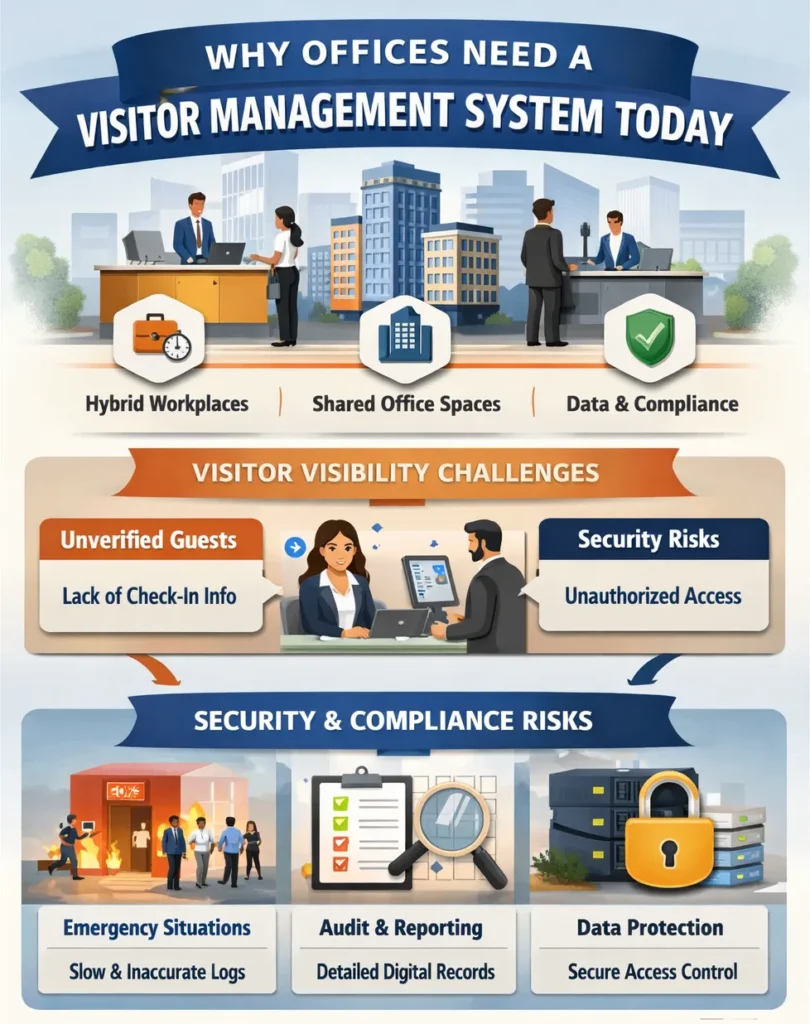
Visitor Visibility Challenges in Modern Offices
The front desk staff at the organization needs a system to access real-time information about guests who arrive at the office. Staff members cannot verify which visitor the host has scheduled or which appointment details for the visitor. This delays the check-in process and creates a poor first impression.
The lack of a visitor tracking system poses a serious security risk. Unauthorized individuals can enter premises unnoticed. As a result, security teams cannot react promptly to potential threats without immediate data.
Security, Compliance, and Audit Risks
Manual logs fail during emergency evacuations or security incidents. You cannot account for all visitors quickly with a paper list. This puts lives at risk and exposes the organization to liability.
For enterprise office visitor management, audit trails are non-negotiable. The regulators demand that organizations demonstrate their compliance through acceptable methods of managing guest access. Digital systems provide immutable, detailed reports instantly for audits.
Data breaches can originate from poor physical access controls. A visitor management system for office buildings uses secure entry points. It integrates with security protocols to protect sensitive information.
How a Visitor Management System for the Office Works
The office visit begins its process before the visitor reaches the office. Hosts can send digital invitations via email to their guests. These invitations provide complete information about the visit and its required procedures.
Next, visitors receive a unique QR code or a personalized registration link. They can pre-submit their information and sign documents digitally. Thus, it uses this process to make the office check-in system more efficient for incoming visitors.

Visitor Pre-Registration and Invitations
Pre-registration saves significant time at the reception desk. It reduces queues and congestion in the building lobby area. The front desk staff is alerted in advance about expected guests.
This function of office visitor management software helps to enhance the visitor experience. Guests receive proper treatment through the professional design that makes them feel expected and welcome. It also allows for screening against watchlists before entry.
Digital Check-In and Identity Capture
Upon arrival, visitors use a tablet or kiosk for a swift check-in. They use a QR code scan or name entry to obtain their personal information. The check-in system for the office has the ability to record either photographic images or identity document scans.
The system produces a tailored visitor badge that shows a professional appearance and custom design. The badge displays the host’s identity, visitor destination, and duration of stay. Complete operation requires less than one minute for execution.
Visitor Tracking and Host Notifications
The system generates an instant notification to the host when a visitor checks in. It allows notifications to be delivered through SMS, email, and Slack. It also prevents phone calls from occurring, which would disturb the host’s work schedule.
A live dashboard shows all signed-in visitors across the office. The visitor tracking system enables security teams to monitor its operations throughout the entire day. It provides a permanent monitoring capability that tracks all individuals present at the location.
Core Features of an Office Visitor Management System
The system includes touchless sign-in that allows users to use their personal devices for entry. Visitors check in by scanning a QR code with their own smartphone. This supports health safety and provides a modern experience.
All data is stored in centralized, cloud-based digital logs. These logs are searchable, exportable, and protected from loss or damage. This capability is central to any office visitor management system.
Touchless Sign-In and Digital Logs
Office sign-in software with touchless options improves traffic flow. Multiple visitors can check in simultaneously without sharing a device. The organization demonstrates its commitment to developing new solutions that improve visitor experience.
The digital logs maintain automatic entry tracking, which generates exact time records for every recorded entry. It prevents “tailgating” because it requires every individual to complete their personal entry process. That said, it creates a trustworthy security review process through its development of an audit trail system.
Visitor Records, Logs, and Reporting
The system keeps unchanging records of all visits to its facility. The logging system allows users to search through records using multiple criteria, which include date, host, visitor name, and company information. It converts unprocessed data into business intelligence, which organizations can use to make decisions.
Organizations need visitor tracking systems that provide them with complete operational reporting capabilities. The system allows you to create compliance audit reports through one simple button press. Facility management teams use visitor traffic patterns to make their operational decisions.
See how Othership transforms your front desk from a bottleneck into a secure, welcoming gateway. Schedule your personalized demo today.
Visitor Management for Hybrid, Enterprise, and Multi-Office Workplaces
Companies with multiple locations need scalable systems to support their business operations. The centralized dashboard enables users to monitor all visitor activities through one unified display. It guarantees that security protocols will be applied uniformly throughout all locations.
Managers can analyze visitor data across all sites from one platform. It enables them to identify patterns while they operate with enhanced efficiency in allocating reception resources. This multi-office visitor management software delivers enterprise-wide insight.

Managing Visitors Across Multiple Office Locations
A global system allows for standardized visitor policies company-wide. A visitor to the New York office follows the same process as in London. The software system improves visitor management operations for organizations that operate multiple locations.
The software system provides IT teams with a single platform that enables them to manage system operations instead of using separate logbooks. It allows organizations to distribute updates and policy changes to all their locations without any time delays.
Multi-tenant buildings require sophisticated access management. A system can separate visitor flows for different
companies on different floors. It directs guests appropriately while maintaining overall building security.
The visitor management system for office spaces needs to integrate with building access systems as its primary requirement. The software has the capability to activate temporary elevator access and unlock doors. The system enables users to travel to the host’s floor through a secure and efficient pathway.
Choosing the Best Visitor Management System for the Office
First, you must examine whether the system can grow together with your business requirements. The team needs to assess both the total number of locations and the anticipated visitor count. The best visitor management system for office growth will adapt easily.
The system needs to provide maximum usability for all three user groups: visitors, hosts, and administrators. User adoption rates will decline because complex systems create frustrating user experiences. The interface design needs to provide users with an easy-to-use system, which requires no more than basic training.

Key Factors to Evaluate in Office Visitor Management Software
The system needs to include essential security measures that must contain data encryption security features. It also needs to validate its compliance with industry-specific certification standards. This goes to show that a reliable office visitor management system protects sensitive visitor data diligently.
Reporting capabilities should be reviewed in depth to understand their full value. The system must generate specific reports required by security and facilities teams. These reports should be clear, accurate, and driven by reliable data processing.
Integrations and Workplace Compatibility
Seamless integration with Google and Outlook calendars allows visitor appointments and meetings to sync automatically. This ensures schedules stay accurate without manual updates.
Connecting communication tools like Teams and Slack adds important functionality to the system. Visitor notifications appear directly in the channels hosts already use. As a result, the entire process fits smoothly into daily workflows.
Visitor Management System Demo and Evaluation
A live demo reveals the actual user experience of the software. You can assess the check-in flow from both visitor and staff perspectives. It is the best way to judge simplicity and efficiency.
Prepare a list of your specific use cases and challenge scenarios. Ask the provider to demonstrate how their system handles your needs. A quality visitor management system demo will address your unique requirements.
The assessment should cover both the implementation process and the support provided after deployment. It must also identify which team members will handle system setup and staff training. Strong vendor support is essential to achieving long-term goals while maintaining high customer satisfaction.
Conclusion: Why Visitor Management Systems Are Essential for Modern Offices
The office needs a modern visitor management system, which is an important part of the building’s infrastructure. The system handles security and compliance and operational efficiency challenges that organizations face. It operates as an essential requirement that organizations use to run their daily business operations.
Aside from that, it provides the necessary visibility and control required by organizations that use hybrid work arrangements. It establishes a secure environment that creates both professional and inviting spaces. That said, organizations should invest in durable office visitor management software to support their business needs in the future.
The system strengthens security measures while protecting your company’s image. It demonstrates a clear commitment to safety standards and operational excellence. As a strategic tool, it helps the organization maintain consistent operational strength throughout each day.
Transform your visitor experience from chaotic to seamless with Othership’s modern visitor management system. Book a demo today to see how it can streamline security, improve compliance, and elevate your front-desk experience, or begin your free trial in just five minutes.
FAQs: Visitor Management System for Office use?
1. What is a visitor management system for office use?
The office visitor registration system functions as a digital platform that handles all guest processes that include registration and identification, and ongoing visitor monitoring. It employs software security measures to replace traditional paper logbooks, which provide less efficient guest tracking.
2. How does office visitor management software improve security?
The software provides real-time visibility of everyone on your premises. The system establishes a dependable digital record system that tracks all visitor movements through the facility. It also enables instant identification of all visitors, which helps decrease the chances of unauthorized access.
3. What’s the difference between office sign-in software and visitor management systems?
Basic sign-in software only captures a name and the time of entry. A full office visitor management system handles pre-registration, notifications, and tracking. It manages the entire visitor lifecycle, not just the initial log.
4. Can visitor management systems support multi-office workplaces?
Yes, the modern systems show their ability to handle multiple locations because of their built-in multi-location support. The system provides one central dashboard that displays all office activities throughout the organization. Moreover, it enables organizations to maintain uniform policy application and efficient company-wide reporting.
5. How does a visitor tracking system work in offices?
The visitor tracking system records visitor information at check-in, together with their selected location. The system then alerts the host about their guest who has just arrived. The security teams use a live dashboard to track all visitors who are currently present in the building.
6. Are visitor management systems compliant with enterprise security standards?
Enterprise security standards require visitor management solutions to meet strict compliance requirements. Enterprise-grade protection is delivered through advanced security features and strong privacy controls. Data is safeguarded using encryption, secure hosting, and complete audit trails. Together, these capabilities help organizations meet compliance obligations and maintain regulatory confidence.
7. What should offices look for in a visitor management system demo?
The visitor management system demonstration should demonstrate its capacity to fulfill office requirements. It needs to show how visitors and reception staff will experience the check-in process and how it will address your operational difficulties.
Yes, visitor management software functions effectively in both office buildings and communal areas. The system is the perfect solution for controlling complex environments with multiple tenant areas. It enables different companies to create separate visitor paths within their shared building space.


You must be logged in to post a comment.