

Implementing visitor management software streamlines your front desk by improving efficiency and directly addressing security and compliance concerns. This comparison highlights the practical advantages each solution brings to your workplace.
Hybrid work brings a daily parade of new faces into your office. Stacks of paper logs can’t keep up, leaving major security gaps. That’s why today’s organizations need smarter, safer ways to know exactly who’s inside their doors.
We promise you an unbiased, straightforward comparison that’s focused on features, applications, and real-world value. By the end, you’ll feel empowered to make a confident, informed decision for your team.
Contents
- 1 What Is Visitor Management Software and Why Do Offices Need It?
- 2 How We Evaluated the Best Visitor Management Software
- 3 Best Visitor Management Software Compared
- 4 #2 Envoy — Best for Enterprise Offices
- 5 #3 Archie — Best for Hybrid Workplaces
- 6 #4 Proxyclick — Best for Compliance-Driven Industries
- 7 Feature Comparison: What the Best Visitor Management Software Offers
- 8 Visitor Management Software Pricing and Cost Considerations
- 9 How to Choose the Best Visitor Management Software for Your Workplace
- 10 Common Use Cases for Visitor Management Systems
- 11 Final Thoughts: Choosing the Best Visitor Management Software
- 12 FAQs About Visitor Management Software
- 12.1 1. How does visitor management software improve workplace security without slowing down entry?
- 12.2 2. What is the difference between visitor management software and a visitor access control system?
- 12.3 3. Can visitor management systems work without kiosks or physical hardware?
- 12.4 4. How do digital visitor management systems handle data privacy and compliance requirements?
- 12.5 5. Is visitor management software suitable for small offices or only large enterprises?
- 12.6 6. What happens to visitor data after a check-in is completed?
- 12.7 7. How does a visitor check-in system integrate with existing office tools and calendars?
- 12.8 8. When should a company replace manual visitor logs with an automated visitor management system?
What Is Visitor Management Software and Why Do Offices Need It?
Visitor management software automates the entire guest check-in process, providing a secure digital platform that replaces paper logbooks. Its core benefit is the quick, accurate collection and management of visitor information, making check-ins faster and more reliable for your team.
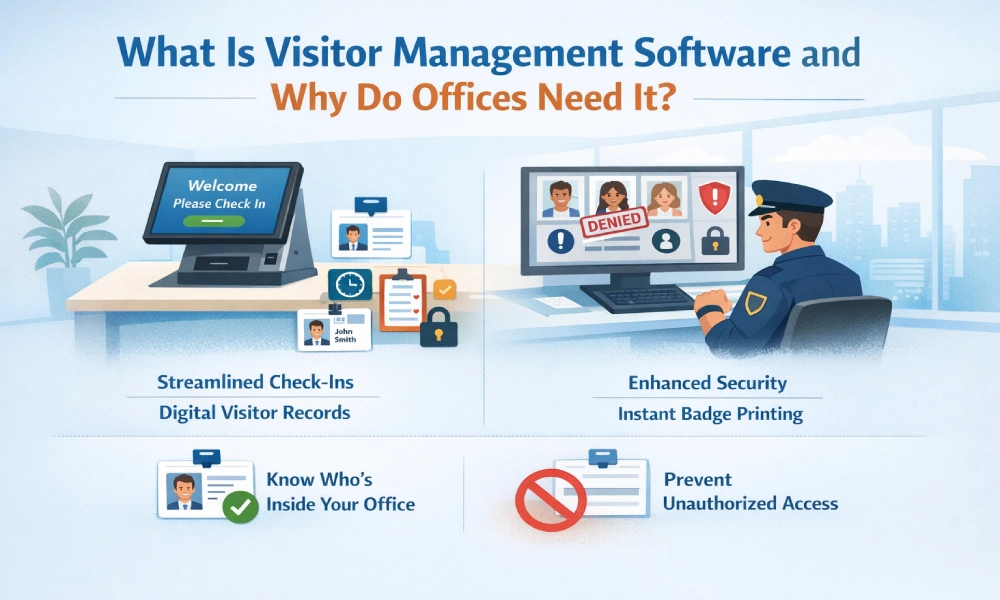
The system creates digital records of visits, including names, contact details, visit times, and host information, securely stored for reference and reporting. Feeling secure starts with knowing who’s inside. With visitor management, not only do you identify guests and print badges instantly, you also prevent unauthorized access with easy-to-spot visual controls.
How We Evaluated the Best Visitor Management Software
Our straightforward evaluation framework puts real-world performance first. We look for rock-solid security features and practical solutions that meet your everyday needs and align with trusted business software best practices.
The best visitor management software is for everyone guests, staff, and administrators alike. We examine not just the ease of setup, but also how effortless it is to use every single day.
Security measures in the form of data encryption, privacy controls, and audit trails, among others, are paramount considerations. The compatibility with existing security systems was also a critical aspect under consideration. These factors are essential in the visitor management software sector.
Best Visitor Management Software Compared
This section compares the top platforms, focusing on how each solution supports different organizational requirements and operational modes. Our analysis clarifies what each software does best, making selection easier based on your workplace’s needs.
Rather than declaring a single winner, our mission is to showcase stand-out features and unique strengths. You’ll see how each tool shines in the right context, so you can match software to your own office’s reality.
#1 Othership — Workspaces & Workplace Management Software
Key Features:
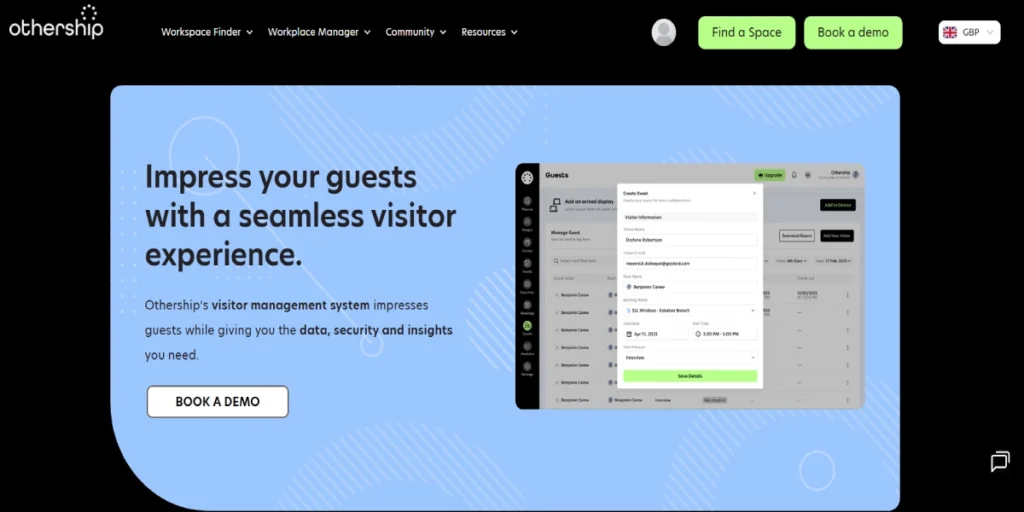
Unified Workplace Platform: The unified platform brings together the management of visitors, booking of desks, reserving meeting rooms, and team scheduling via one interface.
Seamless Visitor Pre-registration: The system for visitor pre-registration enables the hosts to pre-register their guests, who receive a QR code for speedy and contactless check-in in the entrance area.
Real-time Host Notifications: The arrival of the guests triggers the notification to be dispatched to the team member host through Slack, Teams, or email.
Digital Visitor Agreements: During the check-in process, guests can electronically sign non-disclosure agreements, safety waivers, or privacy policy acknowledgments.
Space Utilization Analytics: The analytics provide an overview of visitor counts and the use of desks and meeting rooms by employees.
Pros:
Holistic Office Management: This solution unifies visitor management with workspace features, reducing costs and improving resource use. It is ideal for hybrid offices seeking to simplify operations and maximize value from a single tool.
Exceptional Visitor & Host Experience: This software ensures a smooth check-in and out process, creating a professional impression and reducing wait times for visitors and hosts alike.
Drives Space Efficiency: The system offers actionable data on workspace usage, helping managers optimize office layout, reduce waste, and allocate resources more effectively based on employee and visitor trends.
Highly Scalable: The platform grows easily from a single office to multiple locations, giving organizations seamless control and consistent experiences across all sites.
Cons:
Can Be Feature-Rich for Simple Needs: The companies that only want visitor onboarding may perceive the larger workspace functionalities as an unnecessary expense.
Pricing Model: The pricing may exceed that of point solutions since it is indicative of the more comprehensive platform capabilities.
#2 Envoy — Best for Enterprise Offices

Key Features:
Enterprise-Grade Security: Making it possible to have functionalities like screening of watchlists, setting up of data retention policies by the user, and ushering in excellent compliance tools.
Extensive Integration Hub: Greatly connects with the major identity providers (Okta, Azure AD), HRIS, Slack, Microsoft Teams, and access control systems.
Scalable Multi-Location Management: Gives a single dashboard to control and set visitor policies according to the needs of all global offices.
Customizable Check-in Flows: allows the creation of personalized experiences, as well as the flexibility to modify the questions and steps based on the place or the type of visitor.
Reliable Hardware Kiosks: Supplies the company’s super-durable iPad kiosks that are able to deal with heavy use in reception areas.
Pros:
Proven at Scale: The application has been extensively used by large and complex institutions that have a very high visitor count and have also implemented high security measures.
Deep Ecosystem Connectivity: The robust integrations of the software make it a vital part of the corporate IT and security architecture of big enterprises.
High Customization: It can be configured to align with intricate, established corporate practices and brand standards.
Strong Compliance Focus: The built-in tools ensure that the data privacy and access logging requirements of regulations are continuously met.
Cons:
High Price Tag for Small Businesses: Pricing and structure are mainly aimed at large budget areas and hence may be out of reach for smaller teams.
Setup Could Be Complex: IT might have to engage in collaboration, and consequently, the implementation period might get extended due to the wide range of features and integrations.
Usage May Be Overdefined: Its large feature set might be simply too much for smaller or less complicated offices.
#3 Archie — Best for Hybrid Workplaces

Key Features:
Focus on Simplicity & UX: The very clean and intuitive interface provided for both the administrators and the users results in less training of users.
Smart Pre-registration and Invitations: With all relevant information included, the process for the employees to invite their guests in advance is made very easy.
Flexible Contactless Options: In the case of minimizing touchpoints, guest smartphones’ QR code check-in is the best option.
Visitor Photos and Badges: The process of taking photos of the visitors for the purpose of issuing either printable or digital badges has been created to increase security and improve identification.
Essential Integrations: Google Calendar, Outlook, Slack, and Zapier are among the applications that can be connected for automated workflows.
Pros:
Quick and Easy Adoption: The user-friendly design ensures that most employees will comply with the system, and guests will have a good experience.
Ideal for Dynamic Schedules: Employees who are not always at their desks will feel the benefits of the reliable instant host notifications.
Fast Implementation: Extremely short timeframes can be used for the set-up and going-live process.
Cost-Effective for Core Needs: The modern and efficient companies’ visitor management system made simple is the value proposition.
Cons:
Less Customizable: It has only limited options for thoroughly changing the check-in flows or the policies applied to them in comparison to the enterprise tools.
Limited Advanced Security Features: It is possible that the technology lacks the in-depth screening, reporting, or access control integrations that are required by high-security industries, and, therefore, its security is not on such a high level.
Analytics are Simpler: Reporting is all about the basic visitor metrics with no involvement of advanced workplace analytics.
#4 Proxyclick — Best for Compliance-Driven Industries
Key Features:
Advanced Compliance & Audit Tools: Among its functionalities are detailed audit trails, data purging timelines set by the user, and signing of documents by visitors.
Powerful Reporting Engine: It produces extensive reports on the activities of visitors that can be used internally for auditing purposes or for submission to regulatory bodies in an easily exportable format.
Granular Privacy Controls: It provides highly detailed options for gathering, holding, and controlling consent according to local regulations.
Health & Safety Screening: Provides customizable health questionnaires and logs of temperature checks, which are vital for healthcare and public areas.
Flexible Deployment Options: Accommodates both cloud and on-premise deployment to satisfy certain data sovereignty needs.
Pros:
Audit-Ready at All Times: The system’s extensive logging and reporting features simplify the demonstration of compliance during audits or inspections.
Trusted in Sensitive Sectors: In the case of finance, pharmaceuticals, government, and healthcare industries, this solution is always favored.
Strong Data Governance: It permits the management to exercise its authority over the data’s lifecycle – from gathering to destruction.
Highly Configurable Security: Such precision is available for the definition of the security rules and the granting of the access rights for the different user roles.
Cons:
Steeper Learning Curve: There might be a need for more administrator training because the emphasis on detailed controls and configuration can make it more user-unfriendly.
UX Can Feel Less Polished: The interface might be less visually attractive than the more consumer-oriented tools, as it is mainly focused on functionality.
May Be Overkill for Low-Risk Offices: Organizations that are not under stringent regulations may find that they do not need such a wide array of compliance features.
Feature Comparison: What the Best Visitor Management Software Offers
All major platforms have certain features that are common among them and add value. Visitors management system features comprehension helps to draw a comparison between the different systems. It leads to the operational benefits that are visible rather than the vendors getting the attention.
Major features are digital check-in, tracking, and access control. An integrated visitor management system connects the functions in a very smooth manner. This is the security and experience layer that is combined for the front desk.
A true security visitor management system does more than log names. It screens visitors against watchlists and manages access permissions. This proactive stance is now a standard expectation.

Visitor Check-In, Registration, and Sign-In
Digital visitor check-in software replaces the clipboard and pen. Guests can sign in on a tablet, kiosk, or their own smartphone. This creates a professional first impression and accelerates the process.
A visitor check-in system can guide guests through the necessary steps. This includes signing NDAs, watching safety videos, or printing badges. The front desk check-in software, in this case, releases personnel to engage in tasks of greater value.
Visitor Tracking, Logs, and Monitoring
A digital visitor tracking system maintains a real-time log of all guests. Administrators can see who is on-site instantly from any location, which is crucial for emergency evacuations or security incidents.
Visitor log software creates an auditable trail for compliance and safety. It records timestamps, host names, and visit purposes accurately. The data referred to is extremely useful for investigations or analyses of the utility of space.
Access Control, Passes, and Security
The software for managing visitor access controls, where visitors or non-staff members can be present. It can print temporary badges that expire after the visit. Certain systems have the feature of integrating with door readers to give temporary physical access.
Visitor Management Software Pricing and Cost Considerations
To comprehend the cost of the visitor management system, one has to take into consideration a lot more than just the subscription fees. The total cost consists of possible hardware, setup, and integration costs, besides the subscription fees. A transparent pricing model is a sign of a trustworthy vendor.
Most providers charge a monthly or annual fee per location or user. This makes the visitor management system VMS cost predictable. Do not forget to ask about the restrictions on the number of visitors or the amount of data that can be stored.
How to Choose the Best Visitor Management Software for Your Workplace
Begin by reviewing the existing visitor process and recognizing the issues that arise during the process. Next, point out the features that are inevitable for you against the ones that only add value. This understanding will be your support in discriminating between different visitor management software based on their functionalities.
The best visitor software management feels intuitive for guests and staff. Request a live demo and test the process from both perspectives, because adoption fails if the system is confusing or slows people down.
Othership brings visitor management, desk booking, and team scheduling into one seamless system. Discover how it can streamline operations for your hybrid office.
Common Use Cases for Visitor Management Systems
Various industries are approached for visitor management software. The core need for security and a smooth welcome remains constant. Specific scenarios highlight the versatility of these digital systems.

These environments need efficient visitor registration software for daily guests. They manage client meetings, job candidates, and vendor deliveries. The system must handle steady traffic without creating bottlenecks.
Clinics must manage patient privacy and often screen for health symptoms. That said, a contactless visitor management system is very useful in this case. It reduces the number of physical contacts while still securely recording patient visits.
Final Thoughts: Choosing the Best Visitor Management Software
Choosing a suitable system involves weighing the needs, costs, and ease of use. The most effective visitor management software provides more solutions than it creates problems. It should be integrated into your office’s workflow as an invisible and seamless component.
A powerful electronic visitor management system is a safety investment. Moreover, it presents a contemporary and professional visage to all visitors. The dual advantage of this technology makes it worthwhile to invest time and resources in its implementation.
The right system apropos should align the tools with the unique rhythm and security needs of the team. Othership is here to help you navigate the options with clarity.
FAQs About Visitor Management Software
1. How does visitor management software improve workplace security without slowing down entry?
It pre-screens guests and automates ID capture for faster, more accurate logs. Real-time notifications alert the security personnel about the visitors. In this way, the entry procedure is made to be secure and efficient in comparison to the manual checks.
2. What is the difference between visitor management software and a visitor access control system?
Visitor management software handles the entire check-in, logging, and notification process. An access control system typically just opens doors. Many modern visitor systems integrate with access control for full governance.
3. Can visitor management systems work without kiosks or physical hardware?
Yes. Smartphones can be utilized by the visitors for a contactless check-in process through a QR code. This situation is ideal for both areas with staff and pre-registration. Kiosks are not necessary, but they are a very handy piece of equipment in places with a lot of people.
4. How do digital visitor management systems handle data privacy and compliance requirements?
They encrypt data and provide configurable retention periods to auto-delete logs. Consent capture for data collection is usually a part of the check-in process. This way, organizations can meet the requirements not only of GDPR but also of other privacy regulations.
5. Is visitor management software suitable for small offices or only large enterprises?
It fits all sizes. For small setups, it enhances the professional look and security assurance, affordably. Pricing models that are adaptable to the size of the teams make it possible for even the smallest ones to use the automated visitor logs as a source of convenience.
6. What happens to visitor data after a check-in is completed?
The data are kept safely in the cloud according to the retention policy of the company. The admins are able to make reports or export logs. The system automatically deletes data that is older than the ones set by the rules accordingly.
7. How does a visitor check-in system integrate with existing office tools and calendars?
It syncs with calendars like Google or Outlook to identify team member schedules. It can notify the host through Slack, Teams, or email. So, the host is notified right away and knows that the visitor has arrived.
8. When should a company replace manual visitor logs with an automated visitor management system?
The scenarios in which paper logs lose their effectiveness, become unreadable, or pose a security risk. The transition is also appropriate when expanding operations or adopting hybrid work models. Automation is an option that every office should consider if it regards security, efficiency, and a good professional image highly.


You must be logged in to post a comment.