

The visitor management in modern workplaces has become more complex in the light of increased security expectations, demand on operations, and amplified visitor management requirements in the context of organizations. Manual visitor checks using log books and paper-based processes often delay and can create visibility gaps that conflict with modern workplace requirements.
That’s why many organizations shift toward digital check-in systems that support consistent workflows, real-time records, and policy alignment. In this change, the visitor check-in kiosk stands as a main meeting spot for the office check-in system. It acts as a visible bridge between physical entry and centralized visitor management software.
Contents
- 1 What Is a Visitor Check-In Kiosk?
- 2 What Are the Benefits of Using a Visitor Check-In Kiosk?
- 3 Visitor Kiosk Workflow: Step-by-Step
- 4 How Visitor Check-In Kiosks Integrate with Workplace Security
- 5 How Visitor Check-In Kiosks Support Access Control and Authorization
- 6 Visitor Kiosk Hardware vs Software: What Matters Most
- 7 How Visitor Management Software Fits into the Security Stack
- 8 ROI and Cost Comparison: Kiosk + Software vs Manual Systems
- 9 Compliance, Data Privacy, and Record Retention (Industry Regulations)
- 10 Best Implementation Practices for Visitor Check-In Kiosks
- 11 Real Use-Cases and Case Study Examples
- 12 Future Trends for Visitor Check-In Kiosk Systems
- 13 Choosing the Right Visitor Check-In Kiosk for Your Workplace
- 14 FAQs: Visitor Check-In Kiosk
- 14.1 What is the difference between a visitor check-in kiosk and a visitor management system?
- 14.2 Do visitor check-in kiosks require internet connectivity to function?
- 14.3 Can a visitor check-in kiosk replace a front desk receptionist entirely?
- 14.4 How secure is visitor data collected through a check-in kiosk?
- 14.5 What hardware is typically required for a visitor check-in kiosk?
- 14.6 Are visitor check-in kiosks suitable for small offices and startups?
- 14.7 How does a visitor check-in kiosk handle visitor badges and identification?
- 14.8 Can visitor check-in kiosks integrate with access control and security systems?
- 14.9 What happens to visitor records after check-out, and how long are they stored?
What Is a Visitor Check-In Kiosk?
A visitor check-in kiosk is a self-service point at a workplace entrance. It lets guests digitally sign in. A visitor sign-in kiosk replaces or supports paper sign-in methods by providing a standard interface for visitor registration.

At its core, a kiosk is the front-end access point, not a decision-making tool. A visitor kiosk records information through a guided process and passes that data to a broader system for review. The sign-in kiosk does not decide access rules or policies. Instead, it serves as the visible endpoint in a structured workflow.
What Are the Benefits of Using a Visitor Check-In Kiosk?
Digital kiosks in organizations do more than digitize a process. They enhance operations, administration, and visitor experience. A kiosk-supported check-in process helps workplaces shift away from scattered, informal practices. This shift results in a more structured digital check-in system.
Kiosks reduce the need for manual management at entry points. Instead of staff or handwriting, the office check-in process becomes standardized. This lets front-desk teams focus on more valuable tasks, while the system handles background processing of check-ins.
A kiosk-based check-in system improves record accuracy and completeness. Digital records are clear, time-stamped, and always structured. This minimizes errors usually caused by paper records. As a result, you have trusted data for easier auditing, reporting, and internal review.
With a kiosk, visitors know where to check in and what to do. This matches what is expected from other self-service settings. The kiosk system gives a professional first impression without requiring staff help where guests, contractors, or partners are common.
Visitor Kiosk Workflow: Step-by-Step
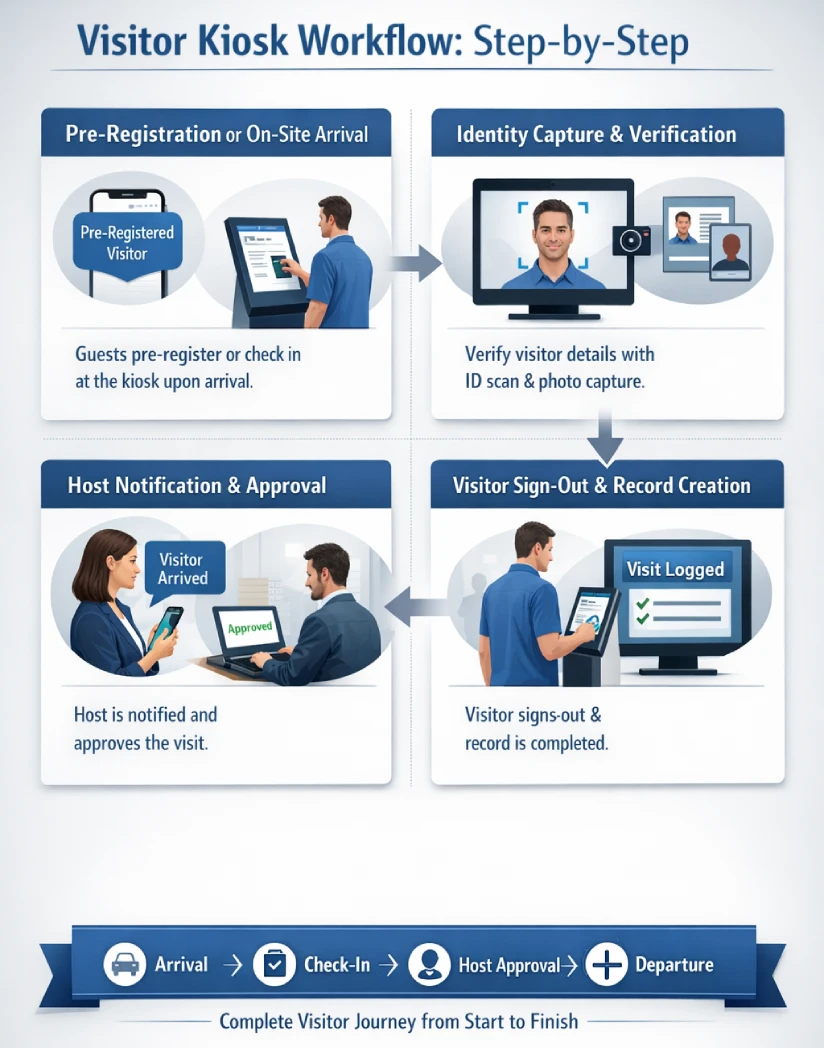
It is necessary to visualize the way kiosks become a part of the overall visitor experience. A kiosk check-in system improves the visitor experience from arrival to departure, to ensure that each step flows accordingly into the next within a unified check-in system.
Visitor Pre-Registration or On-Site Arrival
A visitor’s journey starts with arrival or entry. With pre-registration, visitor details can already be in the system, letting the kiosk recognize expected guests. Walk-in visitors begin the check-in process at the kiosk upon arrival.
Identity Capture and Verification
When the process starts, the kiosk asks the visitor to confirm or enter their details. Consistency is ensured since check-in systems require the same fields. The kiosk is just the interface. The digital system behind it determines what details are needed based on rules.
This interface/logic separation permits policies to be consistent with the increase or decrease of physical kiosks.
Host Notification and Approval
Once identity is captured, the system links the visitor and host. This changes the kiosk from passive input to active workflow participant. Host notification makes sure there is accountability and traces who approved each visit. The main steps are: identity confirmation, notification, and approval in the check-in system.
Visitor Sign-Out and Record Creation
When the visit ends, the visitor signs out using the same kiosk. This makes sure exit times are recorded correctly. It completes the visitor record and creates a full, auditable history from one interaction. Now the system tracks arrival, presence, host linking, and departure.
So far, only the kiosk’s interface has been seen. Visitor Management Software manages workflows, records, and policies. This software manages the logic, data, and controls behind kiosk use.
How Visitor Check-In Kiosks Integrate with Workplace Security
Today’s visitor check-in kiosks are more than just reception substitutes. They act as structured points linking visitor management, access control, authorization workflows, and guest notifications. This article explains how kiosks support workplace security through integration instead of surveillance.
Organizations use kiosks to control entry by set conditions and permissions. Kiosks become valuable when used with broader visitor management. This reduces ambiguity and human error at entry points.
How Visitor Check-In Kiosks Support Access Control and Authorization
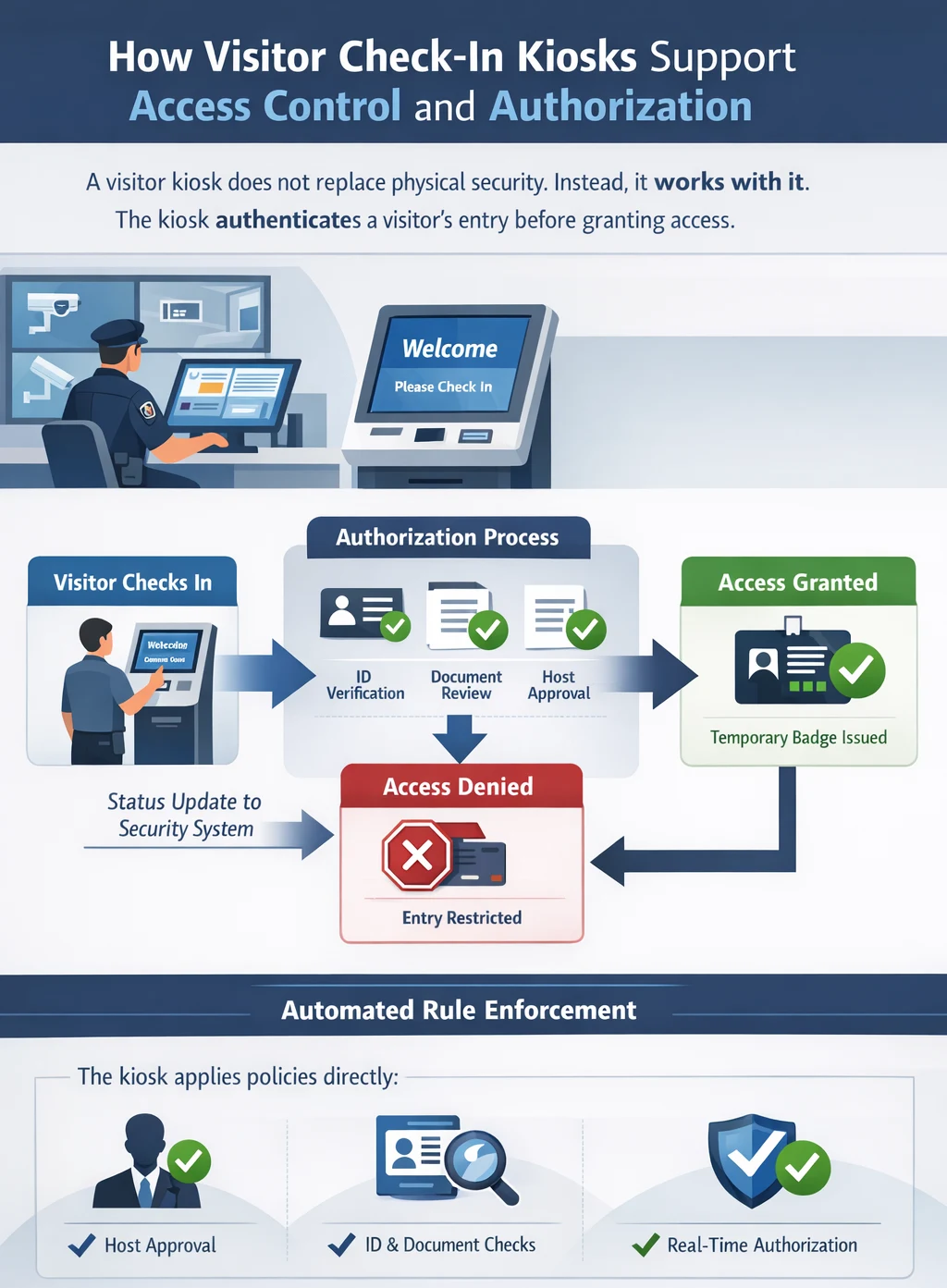
A visitor kiosk does not replace physical security. Instead, it works with it. The kiosk authenticates a visitor’s entry before granting access.
In facilities with electronic access controls, the kiosk sends visitor status updates. After a visitor finishes check-in and is authorized, the kiosk may grant temporary credentials. If approval is absent or rejected, access is denied. This creates real-time authorization, not based on assumptions.
The key is the authorization workflow. Instead of leaving policies to staff, the kiosk manages rule enforcement. Processes can include host approval, document checks, or ID verification. The kiosk applies requirements directly to the check-in process.
Visitor Kiosk Hardware vs Software: What Matters Most
The kiosk platform software provides the main control. It manages data collection, confirmation, storage, and sharing. It builds workflows, permission logic, and tools for access or compliance. Hardware without good software is just an electronic sign-in sheet.
Software provides consistency in kiosk-based visitor management. Policies are written once and applied everywhere. If rules change, updates spread quickly and remove manual flexibility. This makes software the key to scaling visitor management beyond one location.
This role separation builds security. Hardware gives presence; software provides intent. Those considering kiosks should look at the platform’s data, approval, and integration—not just design.
How Visitor Management Software Fits into the Security Stack
Visitor kiosks rarely work alone. They are most effective when connected to a broader system. This system lets data flow among entry points, internal teams, and security tools. Here, the kiosk acts as a structured reception. It standardizes data and makes sure steps are followed before access. Software then sends this info to access, compliance, or audit systems.
This integration supports security traceability. All visitor activity is time-stamped, linked to a host, and centrally stored. These records help with reviews, audits, and incident analysis—no need for paper logs.
ROI and Cost Comparison: Kiosk + Software vs Manual Systems
When organizations evaluate a visitor check-in kiosk, the decision often shifts from operational curiosity to commercial investigation. The most prominent question now arises whether the kiosk-based approach offers a more beneficial long-term value than the visitor logs or a process led by the receptionist. The comparisons are not as much on initial cost as they are on efficiency, reduction of risks, and consistency of policies over time.
The manual systems seem cheap since they utilize the available personnel and simple equipment. They, however, bring about concealed costs. Reception teams are required to check the information, inform the hosts, handle badges, and decode policies as they happen. Every increment of cognitive load and probability of inconsistency.
By contrast, a visitor management kiosk system combines a visitor kiosk with software-driven workflows. The system is automated to enforce policies once they are established. Check-in processes are standardised, the notifications are immediate, and records are kept in a centralised location.
Book a Demo
See real workflows, compliance handling, and automation in action to evaluate how a visitor kiosk solution performs in your environment.
Compliance, Data Privacy, and Record Retention (Industry Regulations)
The issue of compliance and privacy also gains more significance as visitor data is included in the operational record of an organization. A visitor management system connected to a visitor management system kiosk ensures that information collected during visitor check-in is handled consistently, securely, and in line with internal policies and external regulations.
A structured visitor management kiosk system approach governs how information is collected, processed, stored, and eventually removed. During check-in, only necessary data is captured through the check-in system for business, lessening exposure and limiting unnecessary personal information. Then that data is stored in controlled environments where access permissions may be limited by role or department, or compliance requirements.
Various industries may have varied retention durations of visitor records, most of which are for short-term visibility of operations and long-term auditability. Digital systems enable retention policies to be set in a central location and records to be maintained to last a certain period of time, and automatically destroyed once they are not needed. This saves on the aspect of manual control and ensures uniformity across the locations.
A well-managed visitor management system kiosk helps organizations demonstrate process discipline, data accountability, and audit preparedness without increasing administrative burden or relying on informal practices.
Best Implementation Practices for Visitor Check-In Kiosks
A visitor check-in solution, even the most efficient solution, will fail when it is implemented poorly. Successful adoption depends on how the visitor registration kiosk fits into daily operations, physical spaces, and visitor expectations. A well-considered design will also make sure that the kiosk facilitates workflow, but does not interfere with it.
Kiosk Placement and Visibility
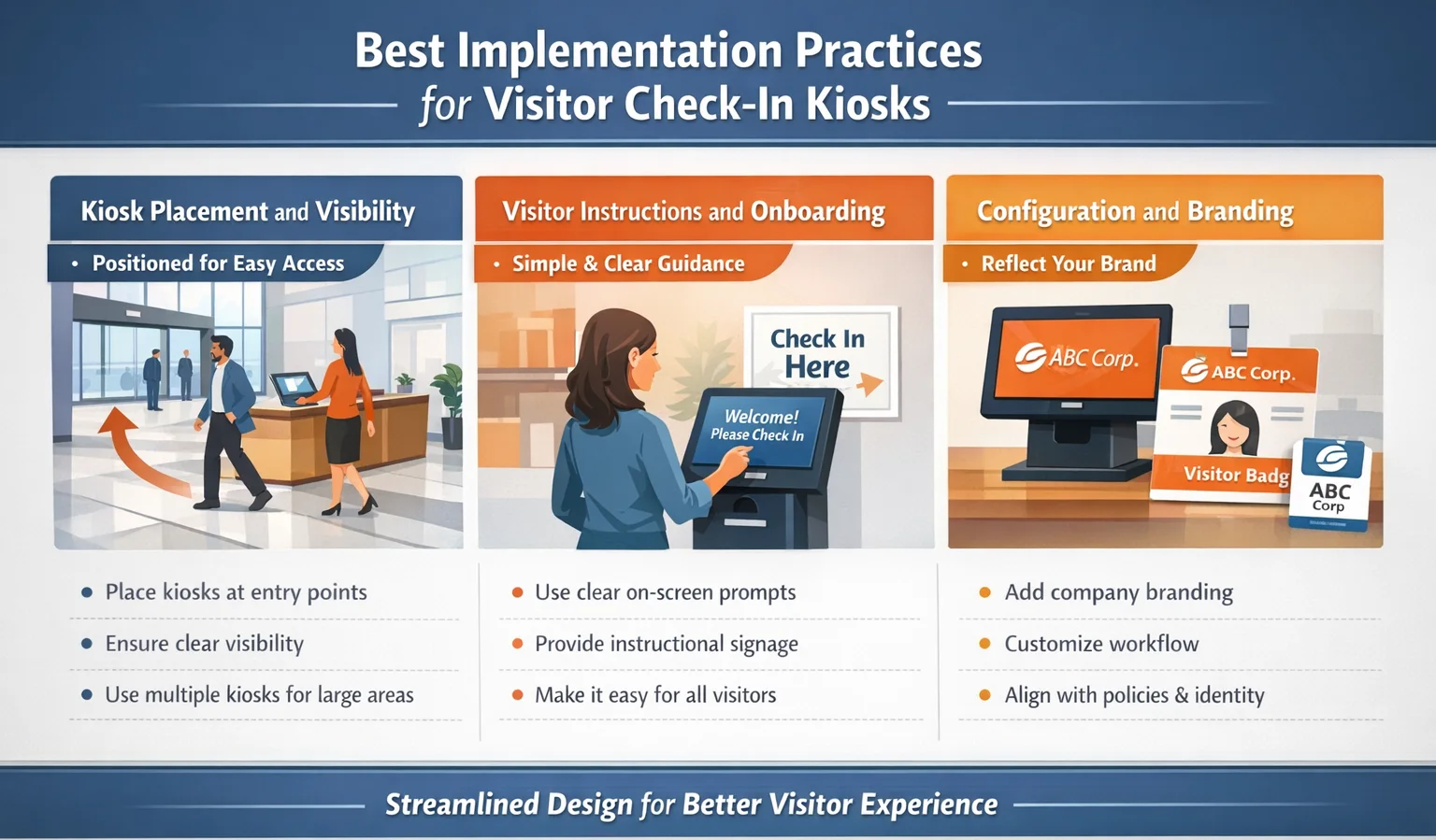
Placement has a direct influence on usability. A front desk sign-in kiosk should be immediately visible upon entry, positioned where visitors naturally pause when arriving. In case the kiosk is obscured or located too distant to exit, a visitor can completely skip it. In larger environments, multiple kiosks or clearly marked directions may be required to ensure consistent visitor check-in.
Visitor Instructions and Onboarding
Friction is lessened through clear instructions. Whether through on-screen prompts or nearby signage, visitors should understand how to use the sign-in kiosk without staff assistance. First-time visitors enjoy the use of simple language and easy flow, whereas repeat visitors enjoy the speed and consistency.
Configuration and Branding
Configuration identifies the kiosk with the organization’s identity and policies. A visitor badge kiosk configured with company branding, terminology, and workflow rules feels like an extension of the workplace rather than a generic device. This also builds trust, and the visitors will be more willing to interact with systems that seem to be official and integrated well into the environment.
Real Use-Cases and Case Study Examples
Visitor check-in kiosks are used differently depending on the workplace context. Understanding these variations helps organizations align the visitor management kiosk with their specific operational needs.
Corporate Offices
In corporate environments, the office check-in system often prioritizes professionalism, security, and efficiency. Visitors can be clients, partners, or candidates, and each of them may have different authorization levels. Here, the kiosk supports structured visitor check-in while minimizing front desk workload and maintaining a consistent arrival experience.
Coworking Spaces
Coworking spaces focus on volume and flexibility. A customer check-in system must handle frequent short-term visitors, members, and guests without creating bottlenecks. That said, the visitor kiosk system supports rapid turnover and visibility while accommodating varying access rules across shared spaces.
Enterprises and Regulated Environments
Big companies and managed places of work demand stricter control. Visitor check-in must align with internal approvals, security teams, and audit processes. A centrally managed visitor management kiosk ensures consistency across locations while providing visibility into who is on-site at any given time.
Future Trends for Visitor Check-In Kiosk Systems

Visitor check-in technology is an ongoing phenomenon where the working environment is changing in line with new demands. Modern kiosk-based visitor management system designs increasingly combine physical kiosks with mobile and cloud-based systems, creating flexible entry experiences without removing structure.
Touchless visitor management is becoming a natural extension of this trend, driven by increased hygiene awareness and the need for faster entry experiences. By using QR codes, mobile pre-registration, and contactless identity confirmation, workplaces reduce reliance on shared touchscreens. When integrated into a broader visitor kiosk platform, these touchless interactions streamline check-in while maintaining security and operational control.
The role of artificial intelligence and automation is also increasing. While not replacing human decision-making, AI can support pattern recognition, anomaly detection, and workflow optimization across visitor management kiosk systems. Combined with a digital check-in system, these trends point toward more adaptive, responsive visitor management without sacrificing compliance or oversight.
Choosing the Right Visitor Check-In Kiosk for Your Workplace
Selecting the best visitor kiosk for a workplace is not a matter of choosing a screen size or hardware brand; it is a systems decision rooted in how visitor access, security, compliance, and operational workflows are managed together. A visitor check-in kiosk should be evaluated as one component within a broader entry-management ecosystem, not as a standalone device.
The first one is the conformity to organizational policies. There are various requirements regarding authorization, identity verification, and the scope of access in every place of work. A check-in kiosk must support these rules consistently, ensuring that visitors are processed according to predefined workflows rather than ad hoc decisions. In this context, the visitor kiosk functions as a policy enforcement point, translating internal rules into a standardized visitor experience.
The other determining factor is scalability. Organizations evolve, teams expand, office plans are redesigned, and compliance requirements are enforced. A kiosk solution must be flexible without the need to be physically reconfigured on a regular basis. This is why decision-makers increasingly prioritize systems where the intelligence resides behind the kiosk, allowing the same visitor check-in kiosk to support multiple use cases over time.
Lastly, short-term convenience should be given precedence over long-term value. Although manual processes might seem to be flexible, they are associated with inconsistency and risk. A smooth-flowing kiosk system produces more predictable results, dependable documentation, and calculable operational enhancements.
Book a Demo
Experience real visitor workflows, automation, and compliance handling in action. Explore how the software layer powers an effective visitor check-in kiosk system.
FAQs: Visitor Check-In Kiosk
What is the difference between a visitor check-in kiosk and a visitor management system?
A visitor check-in kiosk is the physical or digital interface where visitors interact during arrival and departure. A visitor management system is the software layer that defines workflows, stores records, enforces policies, and manages data behind the kiosk. The kiosk takes inputs; the system operates on the results.
Do visitor check-in kiosks require internet connectivity to function?
A majority of recent kiosks depend on internet connectivity to keep data in sync and inform hosts in addition to keeping accurate records. There are business check-in systems that may run in limited offline modes, but usually require regular network connectivity.
Can a visitor check-in kiosk replace a front desk receptionist entirely?
A visitor check-in kiosk can replace many transactional tasks traditionally handled at reception, such as sign-in, badge printing, and host notification. Nevertheless, human personnel might still be needed with concierge services, exception handling, or the high-touch visitor experiences.
How secure is visitor data collected through a check-in kiosk?
Security depends on how the visitor management system kiosk handles data storage, access controls, and retention policies. Effective systems encrypt information, control access by the administration, and keep audit trails to ensure that visitor information remains confidential even on its lifecycle.
What hardware is typically required for a visitor check-in kiosk?
They can be commonly used with a touchscreen device, a mount or stand, an optional badge printer, and a camera or ID scanner. The hardware supports interaction, while the visitor kiosk system software determines how data is processed and stored.
Are visitor check-in kiosks suitable for small offices and startups?
Yes. Many small offices use simplified office check-in systems to replace paper logs and improve visibility. The trick lies in ensuring that a kiosk setup is chosen based on scale and complexity, and it does not carry unneeded overhead.
How does a visitor check-in kiosk handle visitor badges and identification?
A visitor badge kiosk typically prints temporary badges after successful check-in. Identification data is associated with the visitor record in the system, ensuring traceability during the visit and proper record creation at sign-out.
Can visitor check-in kiosks integrate with access control and security systems?
Yes. Many kiosks function as part of an access control kiosk setup, integrating with door systems, authorization workflows, and guest notification systems to ensure visitors only access approved areas.
What happens to visitor records after check-out, and how long are they stored?
After sign-out, records are archived according to predefined retention rules within the best visitor management software. The retention time can be organizational policy and regulatory requirements, at the end of which data can be made anonymous or destroyed.


You must be logged in to post a comment.