

A visitor notification system is a structured digital workflow that instantly alerts hosts when a guest arrives on the site. In today’s office, this system functions as the fundamental component of a broader visitor management system. It ensures that hosts receive real-time updates the moment a visitor checks in, via available mobile devices, email, Slack, or Microsoft Teams.
Compared to manual reception processes, the visitor notification system operates through trigger-based automation. As soon as the visitor completes check-in, the system will automatically display notification rules, alert the assigned host, and record the interaction in the central platform. This will reduce communication barriers, save time, and enhance visibility into workplace security.
This blog will emphasize how the visitor notification system is more than just a feature. It is an operational layer within an integrated visitor management system that creates efficiency, maintains coordination, and organizes compliance. Platforms like Othership automate visitor alerts at check-in via tablets, mobile devices, Slack, and Microsoft Teams, distinguishing themselves as among the best visitor management software solutions available for growing offices.
Contents
- 1 What Is a Visitor Notification System?
- 2 Why Real-Time Visitor Alerts Matter in a Modern Office
- 3 How a Visitor Notification System Works (Step-by-Step Process)
- 4 Notification Types in a Visitor Notification System
- 5 Visitor Notification System for Tablet, iPad, and Mobile Devices
- 6 Industries That Benefit Most from Visitor Notification Systems
- 7 Conclusion: Why Othership Is the Best Visitor Notification System for Modern Workplaces
- 8 FAQ’s: Visitor Notification System
- 8.1 What is a visitor notification system?
- 8.2 Why are visitor notifications important for modern workplaces?
- 8.3 How does Othership notify employees when a visitor arrives?
- 8.4 Do visitor notifications work for pre-registered visitors?
- 8.5 Can Othership send visitor notifications to Slack or Microsoft Teams?
- 8.6 Can visitor notifications be customized by workplace or team?
- 8.7 Do visitor management systems support multi-host notifications?
- 8.8 Which industries benefit most from host notification features?
What Is a Visitor Notification System?
A visitor notification system automatically notifies the host when a guest checks in at a workplace via digital alerts. It functions as a part of visitor notification software embedded within a larger visitor management system. It makes it easy to achieve real-time communication among reception, security, and employees.

Visitor Notification System Definition
A visitor notification system sends automated alerts to designated employees as soon as the guest completes check-in through a software-driven process. It functions as a guest notification system without going through manual follow-ups.
In simpler terms, it is a conversion of physical arrival to a digital trigger. After it has been activated, it alerts notifications via set-up mediums such as smartphone push alerts, SMS, email, or collaboration systems.
How It Works Inside a Visitor Management System
Inside a visitor management system, the notification process is triggered by a change of status, which typically occurs when a visitor is checking in digitally. The system authenticates the host, consults the data on pre-registration, and implements automatic messaging policies.
This automation makes sure that the alerts are standard, time-stamped, and recorded. Because of this, the arrival of visitors turns into a trackable event in the dashboard of a centralized system instead of an isolated front office communication.
Why Real-Time Visitor Alerts Matter in a Modern Office
A Visitor Notification System for the Office directly impacts operational speed and workplace coordination. Today, many employees are working in meeting rooms, remote desks, or hybrid schedules, which makes it essential to have Instant visitor alerts at check-in to prevent delays and confusion.
Back in the time, the guests tended to spend time in the lobbies as the receptionist manually called out to hosts. Today, an office can have a digital office notification system, which makes it easy for visitors to check in, triggers an alert to the staff, and the host responds in a shorter time, making the visitor experience better.

Reducing Lobby Wait Times
When visitor alerts at check-in are automated, hosts receive immediate notifications on their devices. This removes the need to have the reception staff make calls or send manual messages.
The result is measurable. There is a quicker reception of guests, schedules remain within the time frame, and the amount of work in the front desks is reduced. Quick response time is an indicator of structured activities.
Improving Security and Visitor Tracking
A notification is not only a message, but it is also an accounted event in a visitor tracking system. Every alert identifies the visitor, with whom they are meeting, and at what time they arrived.
This visibility enhances compliance and audit readiness. Security teams will be able to track real-time visitor status and record an ordered digital history.
See How Othership Automates Visitor Management Software
How a Visitor Notification System Works (Step-by-Step Process)
The Visitor Notification system clarifies why the visitor notification software must be established inside an integrated visitor management system instead of using a standalone tool.

Pre-Registration and Notification Triggers
Pre-registration entails a procedure of a host inviting the visitor in advance. This invitation forms a data log including the name of the guest, company, the reason why they are visiting, and their host.
In the case of pre-registration, the triggers of notification are prepared beforehand by the system. The reason is a planned visit; the consequence of automated alert preparedness when check-in has been completed.
Visitor Check-In at Tablet or Front Desk
After the arrival, the visitor will be registered on a front desk interface, whether on a digital kiosk, tablet, or through the Internet. This step verifies identity and confirms visit details inside the visitor management system.
The moment check-in is completed, the system activates the visitor notification software. The alert does not require any receptionist action to be sent.
Automatic Host Alerts and Acknowledgment
Once the trigger is activated, the host gets a notification through the channels that have been chosen. This can be a mobile push notification, SMS, email, or collaboration tools.
The host can respond to the alert and affirm that they are coming. The recognition of this completes the communication loop and records a response time to operational transparency.
Notification Types in a Visitor Notification System
Various workplaces require different types of notifications. A structured mobile visitor notification system makes sure that alerts are flexible and aligned with employee workflows.
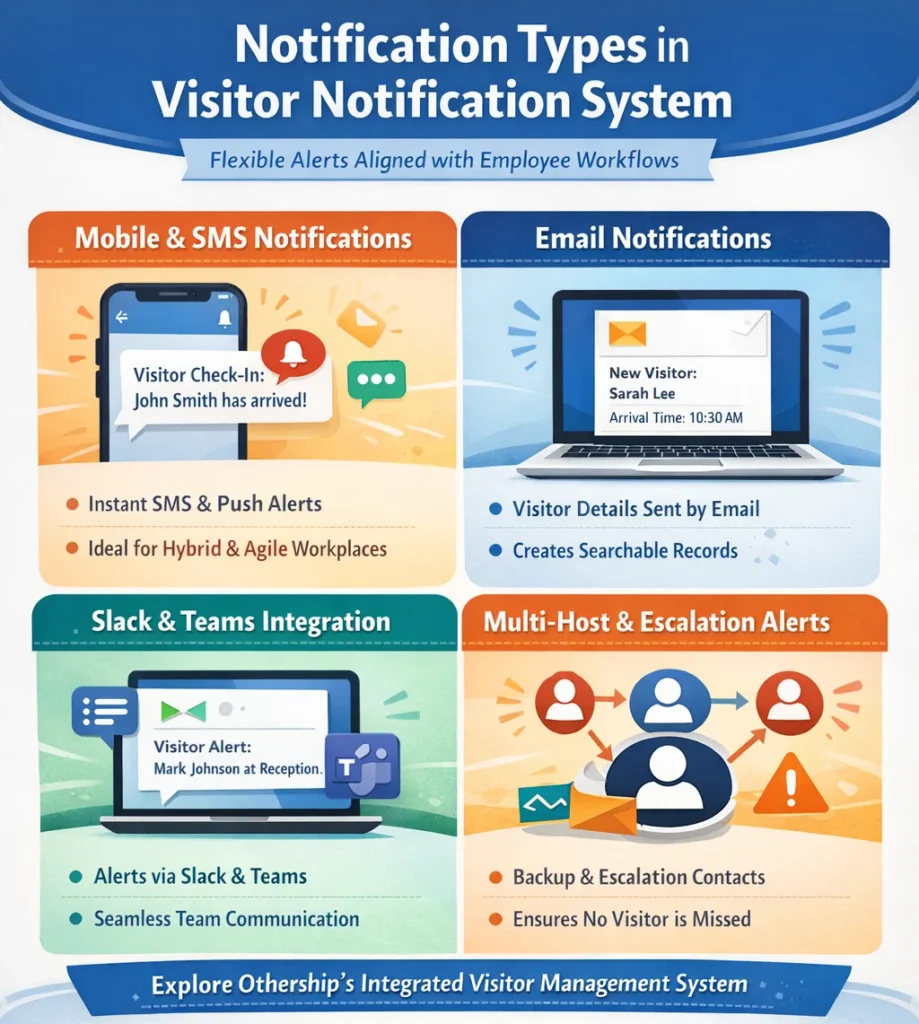
Mobile & Smartphone Notifications
A visitor notification system will alert the hosts directly through SMS alerts and push notifications from their mobile phones. This guarantees that employees are notified even when they are not at their workstations.
Mobile notifications support hybrid and Agile working environments. Since they are immediate and place independent, they minimize lost arrivals.
Email Notifications
Email notifications are formal, written communication. These alerts usually contain the name of the visitor, the company, the time of arrival, and the check-in point.
While Email notifications are somewhat less urgent than push alerts, they generate searchable records. They are more effective in compliance-wise industries.
Slack & Microsoft Teams Integration
Integration with collaboration platforms connects the visitor notification system to internal communication workflows. Alerts can be sent either in the team channels or in individual messages.
As an example, the notifications can be directed to Slack or Microsoft Teams. This maintains communications among the visitors within the same tools that the employees use on a daily basis.
Multi-Host & Escalation Alerts
Multi-host notifications enable sending notifications to backup contacts in case the main host is not responding. Escalation policies mean that no visitor will be left unattended.
Explore Othership’s Integrated Visitor Management System
Visitor Notification System for Tablet, iPad, and Mobile Devices
A visitor notification system for tablet devices makes the physical reception desk into a digital check-in point. Instead of relying on paper logs or manual calls, you can now utilize a tablet as a trigger device inside an online front desk visitor notification system.
Hardware issues are also important in modern workplaces, as they define the starting point of automation. Whether using a visitor notification system for iPad setups or a mobile visitor notification system, the device initiates the check-in trigger that activates alerts across the organization.
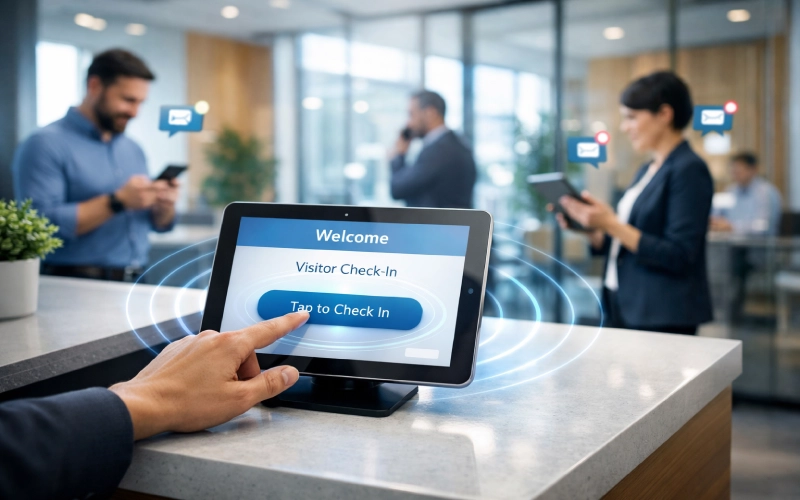
Tablet-Based Front Desk Setup
An electronic reception system based on tablets replaces the paper-based visitor log with a web-based system in the means of the tablet that displays the check-in form, captures visitor information, verifies pre-registration data, and confirms arrival status inside the visitor management system.
Actions like tapping the check-in become system triggers once the visitor has tapped the check-in. That trigger activates the visitor notification software, which then distributes host alerts automatically without receptionist intervention.
The tablet in this workflow is not only hardware. This is the starting point of the operation of the automated notification chain.
Mobile-First Visitor Alerts for Hybrid Teams
Hosts do not necessarily have to be at a fixed desk in hybrid environments. A mobile visitor notification system ensures alerts reach employees regardless of location—whether they are in a meeting room, working remotely, or seated in a shared workspace.
Mobile-first notification mitigates reliance on fixed resources. When the visitor notification system for smartphone devices sends push notifications instantly, the host can acknowledge the arrival from anywhere in the building.
If this is continued in even flexible teams, the visitor experience will be structured and predictable. Upgrade Your Office Notification System with Othership
Industries That Benefit Most from Visitor Notification Systems
The operational value of a visitor notification system changes slightly depending on the industry. However, across all sectors, automation improves coordination, accountability, and security within a modern office.
Organizations evaluating the best visitor management software often compare how well notification workflows adapt to their specific operational risks and traffic patterns.

Corporate & Hybrid Offices
Corporations normally handle large numbers of planned meetings and outside suppliers. In these settings, a visitor management system ensures that pre-registered guests are automatically matched to their hosts.
Hybrid offices complicate the situation. The staff can operate at any time, and thus, real-time communication helps to make sure that the hosts are alerted even when they are not close to the reception.
The advantage is coordination in distributed teams. Automated notifications minimize the amount of friction between visitor arrival and meeting time.
Healthcare & Regulated Environments
Healthcare and regulated industries focus on compliance and security. Here, a visitor management system must provide documented timestamps and controlled access tracking.
A visitor notification system strengthens this process by logging alert delivery and acknowledgment. The reason is check-in verification; its outcome is a traceable security record associated with host confirmation. This is a systematic record that contributes to audits and risk management.
Coworking spaces have active visitor flows and various possible hosts. Multi-host alerts and escalation rules are important in this scenario.
A visitor notification system ensures that the correct member or tenant receives the alert immediately. In case no response is detected, it is escalated to secondary contacts via escalation logic.
The outcome is a decrease in confusion in common places with high traffic. It stops guests by issuing automated alerts when they wait.
Conclusion: Why Othership Is the Best Visitor Notification System for Modern Workplaces
A visitor notification system is best when embedded within an integrated visitor management system. Othership operates as check-in triggers, visitor alerts at check-in, mobile and tablet notifications, and collaboration platform integration into one operational system.
It also enables the facilities and operations teams to track the visitor trends and ensure that resources are allocated in the most appropriate way possible. Moreover, real-time notifications improve the overall coordination of the workplace by making sure that hosts are ready to communicate with each visitor.
The benefits of this operation are clear:
- Quick notices on hosts save time.
- Approved alerts enhance security and compliance.
- Hosts receive multi-channel alerts at any location.
- Integration makes alerts actionable and measurable.
Therefore, Othership transforms visitor management as a reactive reception process into a structured operational layer, which facilitates coordination, security, and efficiency in the workplace. Book a Demo and See Othership in Action
FAQ’s: Visitor Notification System
What is a visitor notification system?
A visitor notification system is a software that automatically alerts employees when a guest checks in. It is part of a visitor management system that sends real-time alerts via mobile phones, tablets, email, or collaboration platforms to improve efficiency and security.
Why are visitor notifications important for modern workplaces?
They save waiting time in the lobby, enhance host processing, and offer a record of visitor arrivals. Real-time visitor alerts at check-in create improved coordination, safety, and operational transparency.
How does Othership notify employees when a visitor arrives?
Othership uses a variety of notification methods, such as mobile push notifications, email, Slack, and Microsoft Teams. Alerts will auto-activate when visitors check in, and hosts can respond through live-time alerts.
Do visitor notifications work for pre-registered visitors?
Yes, pre-registration information generates automatic warning messages. Once a visitor checks in, the visitor notification system verifies their details and directly informs the host.
Can Othership send visitor notifications to Slack or Microsoft Teams?
Absolutely. Connection to Slack and Microsoft Teams would be used to provide notifications in internal communication processes.
Can visitor notifications be customized by workplace or team?
Yes, alerts may be configured on visitor type, host available, department, or on the basis of an escalation rule. This enables the flexibility of workflows within multi-team or multi-location offices.
Do visitor management systems support multi-host notifications?
Othership supports multi-host and backup notifications through integrated systems. Escalation rules are used to make sure that, in case the first host fails to respond, secondary hosts are automatically alerted.
Which industries benefit most from host notification features?
This is beneficial to corporate offices, hybrid workplaces, coworking spaces, healthcare, and regulated environments. Automation minimizes wait times, improves compliance, and optimizes visitor management across industries.


You must be logged in to post a comment.