

Meetings are an essential part of modern organisations, and choosing the right meeting room booking software is critical to keeping them organised and efficient. With many solutions now available, businesses often struggle to determine which room booking system best supports their workplace structure.
To help you make an informed decision, we’ve compiled a list of the best meeting room booking software tools available in 2026. These platforms provide simple ways to reserve conference rooms, coordinate shared spaces, and manage workplace resources across offices or hybrid environments.

By using a reliable room booking system, teams can avoid scheduling conflicts while office managers gain clear visibility into how meeting spaces are being used. In this guide, we’ll explore how these systems work, what features to look for, and which platforms are worth considering.
Contents
- 1 What Is a Meeting Room Booking System?
- 2 How a Room Booking System Works in Modern Workplaces
- 3 Room Scheduling Software vs Full Meeting Room Management Systems
- 4 Key Features to Look for in Meeting Room Booking Software
- 5 Conference Room Booking Systems for Hybrid and Enterprise Teams
- 6 Meeting Room Booking Apps vs Desktop-Based Booking Systems
- 7 Meeting Room Booking Software Comparison Table
- 8 Use Cases – How Different Workspaces Book Meeting Rooms
- 9 Meeting Room Booking Systems for Hotels and External Rentals
- 10 How to Choose the Right Meeting Room Booking Software
- 11 Common Mistakes When Implementing a Room Booking System
- 12 Conclusion
- 13 FAQs About Meeting Room Booking Systems
- 13.1 How does meeting room booking software improve space utilization?
- 13.2 What is the best meeting room booking software for hybrid workplaces?
- 13.3 Can meeting room booking systems integrate with calendars and workplace tools?
- 13.4 What features should a conference room booking system include?
- 13.5 What is the best way to implement a room booking system for large teams?
What Is a Meeting Room Booking System?
A meeting room booking system is a centralized solution used to manage the reservation, availability, and usage of meeting spaces across an organization. Instead of relying on informal calendars or manual coordination, teams can now use a structured room booking system to check for room availability, reserve spaces, and avoid scheduling conflicts.
Modern meeting room booking systems provide access that can be shared among employees, physical spaces, and workplace rules. Employees can find rooms by capacity, location, or availability, and administrators have control over access permissions, booking policies, and usage visibility. In many organizations, this system is used to replace separated methods such as email coordination, spreadsheets, or unmanaged calendar invites.

At a broader level, a room reservation system supports operational consistency by ensuring that meeting spaces are booked intentionally, used efficiently, and users abide by workplace policies. As organizations adapt to hybrid work models, the centralized approach is critical to keeping everyone in the organization clear of the others on the different teams and in different locations.
How a Room Booking System Works in Modern Workplaces
Understanding how a meeting room booking software functions in practice requires examining the full routine of the booking, starting from discovery to reporting. However, interfaces may vary; most room booking software follows a consistent workflow that supports both employees and workplace administrators, such as:
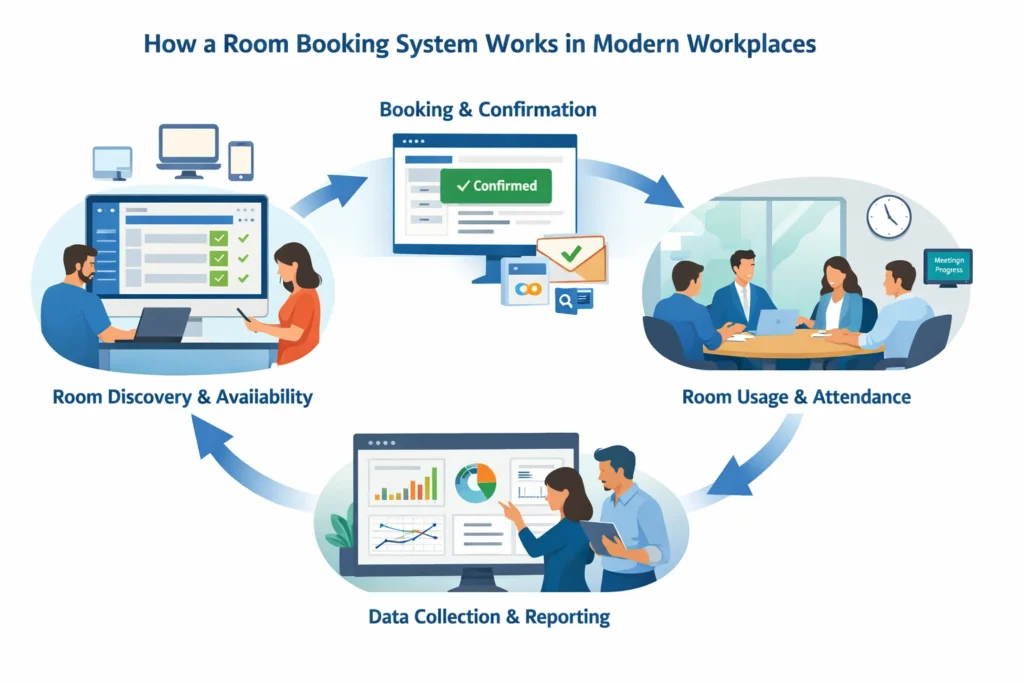
- Room Discovery and Availability
Starting by accessing an online meeting room booking system using a web interface, mobile experience, or a workplace dashboard. The system shows real-time availability of rooms according to predefined rules regarding capacity, equipment, and access permissions. This step of discovery removes guesswork and eliminates double bookings.
- Booking and Confirmation
After the selection of rooms, the room booking application processes the reservation and confirms availability instantly. Booking rules – for example, maximum duration, approval, or buffer times – are also automatically enforced. Confirmations are reflected across connected calendars or workplace systems, so visibility to all stakeholders is ensured.
- Room Usage and Attendance
During the scheduled meeting, the system monitors room usage passively or via check-ins or workplace tool integrations. This step ensures that reserved rooms are actually being used and helps organizations identify unused spaces without manually monitoring them.
- Data Collection and Reporting
After meetings end, usage information is now being reported to the dashboards. The teams will now analyze demand patterns, optimize space allocation, and refine booking policies. Over time, this data-driven loop works to improve efficiency in the workplace and aid in long-term planning decisions of space.
Taking control of this end-to-end process, modern booking platforms are no longer merely an enabler for scheduling but a backbone of operations of shared workplace resources. For start-ups navigating hybrid work models and space coordination challenges, investing in startup consulting can provide tailored strategies to structure workflows and implement the right tools including meeting room booking systems that support growth and operational efficiency.
Room Scheduling Software vs Full Meeting Room Management Systems
Understanding the difference between room scheduling software and full meeting room management systems is important when evaluating meeting room booking software. While both help teams reserve meeting spaces, they operate at different levels of complexity and workplace scale. This distinction helps organizations choose the right system for managing shared meeting rooms effectively.
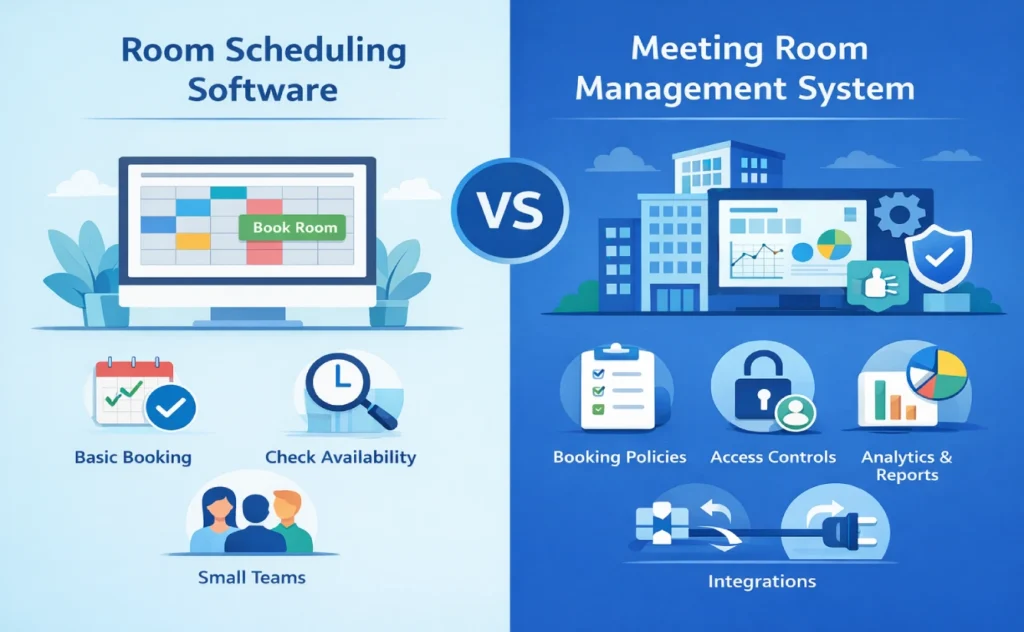
Basic room scheduling software typically works like a shared calendar where employees can quickly check availability and reserve rooms. In contrast, a meeting room management system is designed for larger organizations and includes features like booking policies, permissions, analytics, and integrations. Within the broader ecosystem of meeting room booking software, these advanced systems provide better visibility and control over how meeting spaces are used across teams and locations.
For example, hybrid teams working across several days and across multiple departments need to see how rooms are used over time – and not just when rooms are booked. Multi-floor offices benefit from centralized oversight that ensures equitable access and efficient utilization across departments. In these situations, full management systems bring the structure and intelligence that basic schedulers cannot provide.
Key Features to Look for in Meeting Room Booking Software
Organizations need a clear evaluation framework before comparing tools. The most effective meeting room booking software supports structured coordination across people, spaces, and policies—without adding friction to daily workflows.
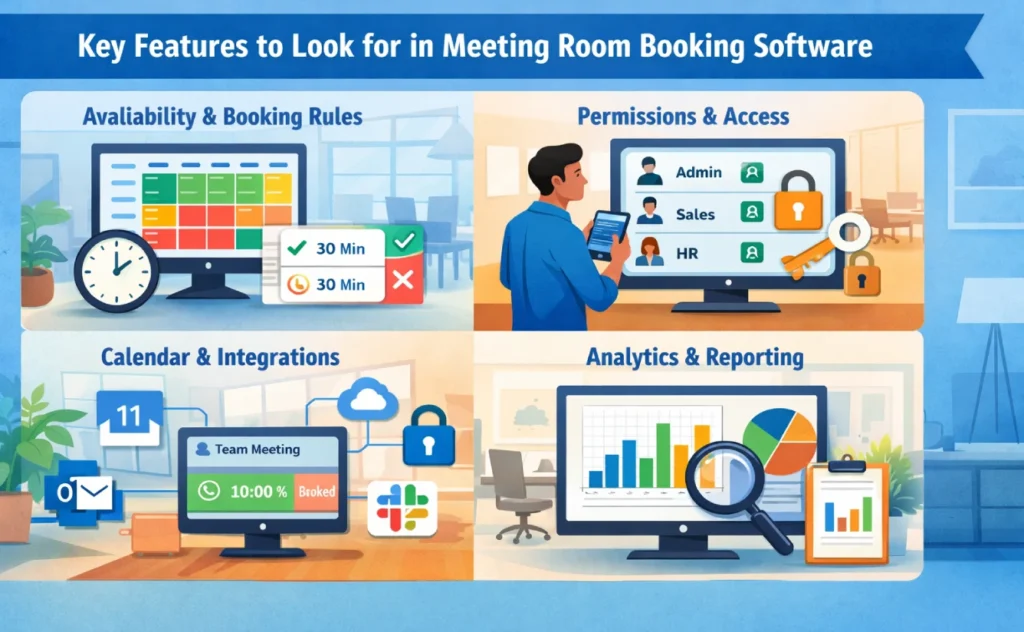
- Availability and Booking Rules
A reliable meeting room booking system should show real-time availability and automatically enforce booking rules such as time limits or buffer periods. This ensures rooms are scheduled fairly while reducing conflicts.
- Permissions and Access
Meeting room booking software should allow administrators to manage access based on roles or departments. Clear permission structures help organizations control how meeting spaces are reserved and used.
- Integration of Calendar and other Workplace tools
Modern meeting room booking software integrates with tools like Google Calendar, Outlook, and workplace collaboration platforms. These integrations ensure bookings reflect real meetings and remain visible across teams.
- Analytics and Reporting
Beyond scheduling, organisations benefit from insights into how meeting rooms are used. Reporting tools within meeting room booking software help identify underused spaces, peak demand times, and booking patterns.
Conference Room Booking Systems for Hybrid and Enterprise Teams
Hybrid work has introduced a new level of complexity to how organisations manage shared spaces. A conference room booking system must now accommodate fluctuating office attendance, cross-team collaboration, and distributed schedules. As a result, conference room scheduling software has become a critical component of hybrid workplace infrastructure.

For enterprise teams, shared conference rooms are frequently reserved by many different departments with different priorities. A scalable conference room management software solution provides centralized oversight while supporting local flexibility. This ensures rooms are accessible, visible, and aligned with organizational policies.
A modern conference room reservation system also supports recurring meetings and long-term planning. Hybrid teams are dependent on predictable access to shared spaces, especially in organising in-person collaboration days. By adding clarity and consistency, these systems reduce friction and enhance the overall meeting experience without driving sales of any particular products.
Meeting Room Booking Apps vs Desktop-Based Booking Systems
Organizations must also consider how employees access meeting room booking software. Some systems are designed primarily for mobile use, while others provide more advanced administrative tools through desktop platforms. Understanding these differences helps teams choose the right access model for their workplace.
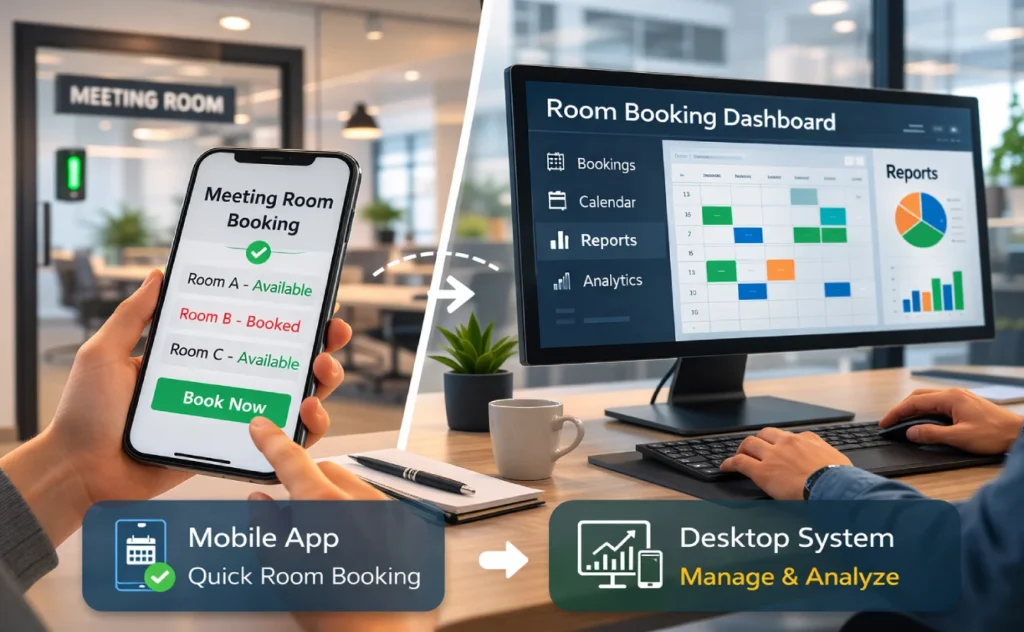
Mobile meeting room booking apps allow employees to reserve rooms quickly while on the move. Desktop platforms, on the other hand, often provide deeper visibility, reporting, and management features. Many organizations adopt both to balance convenience with administrative control.
Meeting Room Booking Software Comparison Table
When evaluating meeting room booking software, structured comparisons help organizations identify the right platform more quickly. A comparison table highlights key features, pricing, and capabilities across multiple tools. This approach allows decision-makers to shortlist solutions before exploring them in more detail.
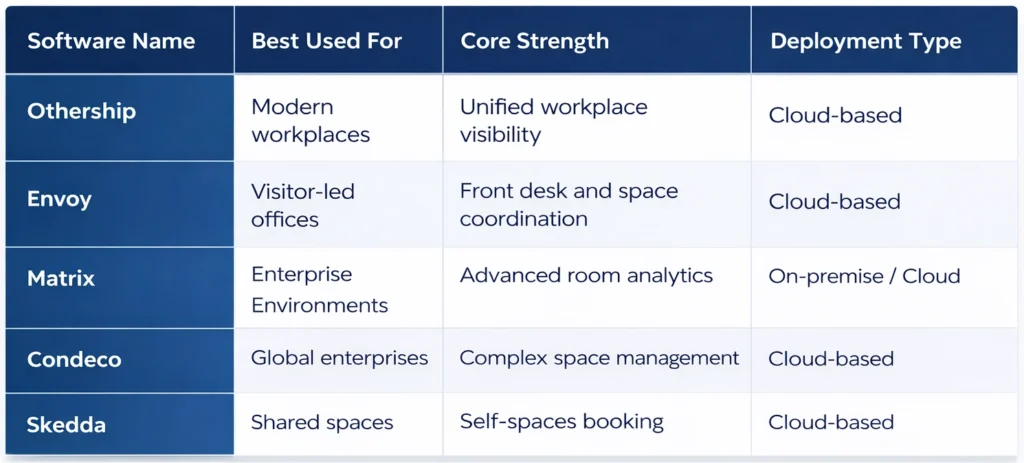
This table focuses on the high-level capabilities of conference room booking software. The feature breakdowns are detailed in the tools’ sections to ensure that pricing and descriptions remain the same. For organizations comparing meeting rooms booking software, this view supports faster shortlisting before deeper evaluation.
#Othership: Best meeting room booking software
Othership is a workspace management platform that provides a range of solutions for flexible working. One of these solutions is a meeting room booking app, which allows users to book and invite others to meeting rooms from their phone, calendar, browser, or entry tablet.
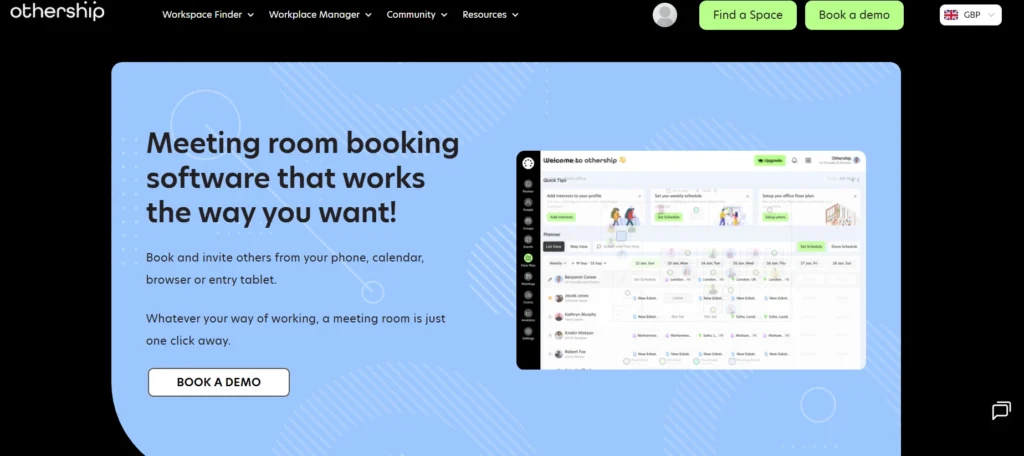
The software also provides reports that can be quickly read, downloaded, and integrated to review meeting room layouts and amenity needs. Othership’s meeting room booking software can be integrated with existing solutions in just one click. The software also includes in-built automations and roles to help set up policies to best practice.
If you need something custom, Othership’s success team can build tailored solutions based on your needs. The software can manage spaces, meeting rooms, communal and event spaces, desks, visitors, and any hybrid need all in one place. Othership also offers other solutions such as workplace scheduler, on-demand workspaces, fixed workspaces, desk booking software, and visitor management software.
Features: Meeting room booking, desk booking, multi-location management, remote scheduling, visitor management, team collaborations, calendar integrations
Pricing: Free to £4 per month per team member
| Pros | Cons |
|---|---|
| ☑️ Easy to use platform and high end-user adoption. | ❌ You generally need to speak to an expert to understand the right packages for you. |
| ☑️ Manage a hybrid policy with data from in and out the office. | ❌ Limited availability for additional languages. |
| ☑️ Additional Othership solutions are available to buy extra or sell empty space. |
Book a demo
#Envoy
Envoy Rooms is a smart conference room scheduling software that helps you find and book the right room for the task at hand. It frees up unused space and makes it easy to find the right room. You can use green, yellow, and red indicators outside of each room to easily find an available meeting space or use the Envoy mobile app to search and find the closest available room.
You can book a room using Envoy Mobile, Google Calendar, Office 365, or the display by the door. With check-in reminders and nudges to book smaller rooms, you can ensure everyone can find and book the rooms they need onsite. You can turn analytics about room usage and scheduling into insights that help you make smart decisions about space management, workplace design, and costs
Where Envoy often falls down is its maps. Users, including us, find them cumbersome to use and nowhere nearly as sleek as the newer solutions in the market. So if you ar looking for something people won’t winge about over the water cooler this might not be the one for you.
Features: Meeting room booking, desk booking, multi-location management, visitor management, deliveries
Pricing: Basic plan for $3 per user per month, Premium plan for $5 per user per month.
#Matrix Booking
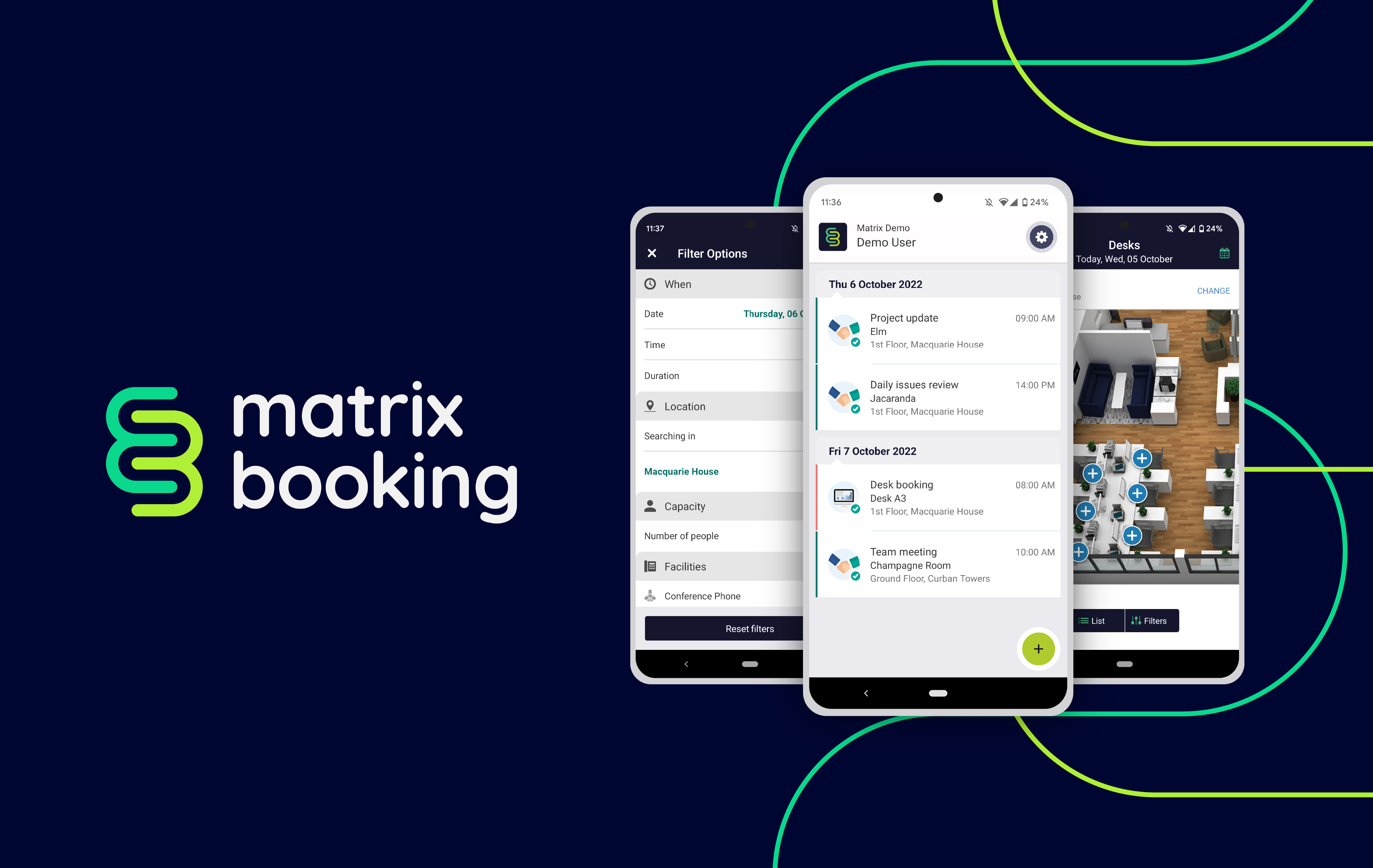
Matrix Booking provides functionality for desk booking, meeting room booking, visitor management, and flow management. The software is mobile-first and supports all major browsers and mobile formats. It also offers interactive maps, desk occupancy status, and easy QR code check-in to Zoom device-enabled desks.
While Matrix Booking’s meeting room booking feature is regularly updated and eliminates the need for manual scheduling, the software’s interface may take some time to get used to. The software’s user interface is not as intuitive as some of its competitors, which can be frustrating for users who are new to the software. Additionally, some users have reported issues with the software’s customer support team, which can be slow to respond to inquiries.
Features: Meeting room booking, desk booking, multi-location management, visitor management, deliveries
Pricing: Pricing starts from £5 per resource per month.

#Condeco
Our experience testing Condeco’s meeting room booking software revealed some notable drawbacks. While the interface is generally user-friendly, it may lack the depth of customization required for some organisations. This limitation can be particularly frustrating when trying to tailor the software to meet unique workplace management needs.
Another significant concern is the high cost associated with Condeco. This premium solution might be prohibitive for many smaller businesses or organisations with budget constraints, potentially limiting its accessibility to a broader user base.
Condeco can provide some valuable insights into space utilisation, helping make informed decisions about your office resources. They also have a mobile app, as do many other providers now but proves a valuable asset, allowing users to book rooms on the go. Something which is increasingly essential in today’s flexible work environment.
it is worth noting we found reviews reporting some compatibility issues with existing systems and hardware which can pose a challenge for users seeking a seamless integration with their current technology stack. In conclusion, while Condeco offers valuable features, the high cost, limited customization, inconsistent support, and compatibility issues are important considerations when evaluating its suitability for your organization.
Features: Meeting room booking, desk booking, multi-location management, visitor management
Pricing: $45 per user per year for companies of up to 1000 employees, $35 per user per year for companies with more than 1000 employees

#Skedda
Skedda is a user-friendly and cost-effective meeting room and space booking software, making it an attractive option for smaller businesses, nonprofits, and educational institutions. Its straightforward interface is easy to navigate, encouraging quick adoption, and it offers flexibility in setting up booking rules and permissions to align with various organizational needs. Moreover, its transparent pricing structure can be budget-friendly, particularly for organizations with limited resources.
However, Skedda may not be the best fit for larger enterprises or those with complex space management requirements, as it lacks some advanced features and comprehensive reporting and analytics. While it provides core booking and scheduling functionality, organizations seeking in-depth data analysis might find it somewhat limited. Customer support experiences have also been mixed, with some users reporting less responsive assistance. To make an informed decision, it’s advisable to assess the latest features and user feedback, particularly if your organisation has intricate space management needs or plans for scalability.
Features: Meeting room booking, desk booking, visitor management, payments
Pricing: $49 per meeting room per month for small businesses, $150 per meeting room per month for larger businesses
#Zoom Workspace Reservation
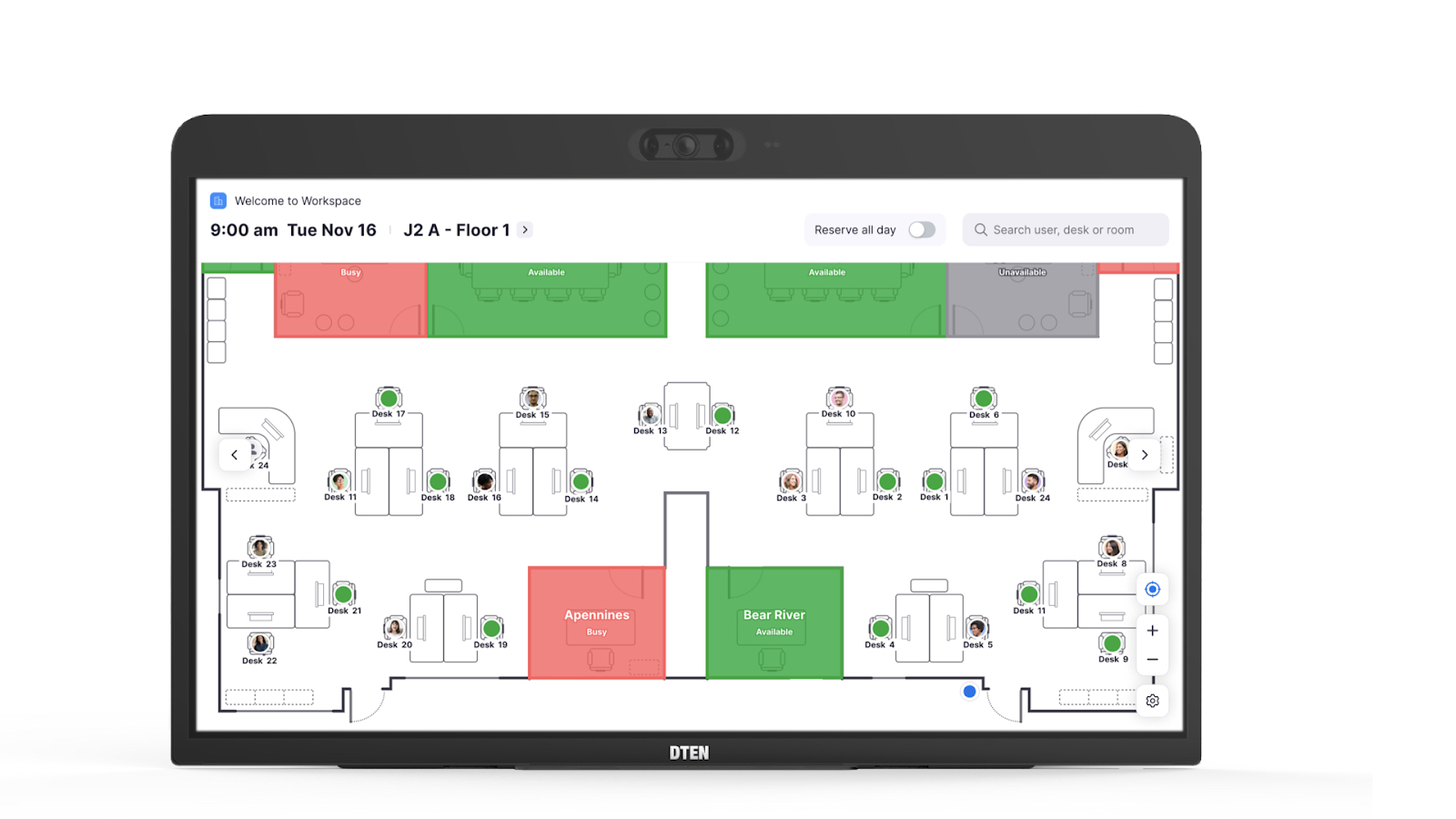
Zoom Workspace is the Zoom offering for Zoom Rooms users. Workspace Reservation provides easy QR code check-in to Zoom device-enabled desks, interactive maps, and desk occupancy status. Additionally, Zoom Phone Appliances (ZPA) support the Zoom Workspace Reservation user flow. When creating a workspace reservation for a Zoom Room that includes a new Zoom meeting, a meeting passcode will be automatically generated. You can also edit the meeting passcode.
Users can reserve ZPAs or Zoom Rooms through the reservation system. ZPA displays status indicators if the device is reserved or available. Workspace Reservation allows users to view floor maps, see where their coworkers are sitting and reserve available desks. Workspace Reservation expands on Zoom’s already robust hybrid work offerings and helps employees have access to the tools they need to do their best work on a given day. The latest resource will enable workers to pre-book office workspaces, know who else is coming, and get recommendations about where to sit.
Where does Zoom fall down, well it can be kind of pricey. At £399.00 a month for each meeting room you add, this is probably the priciest solution on the market and it isn’t exactly feature-rich outside of Zoom integrations. If you already use Zoom Rooms this may be one you want to contemplate, but if you you Google Meets or Outlook / Microsoft Teams as an enterprise, don’t even think about it.
Features: location management with space booking, event management, communities, organizational charts, interest maps
Pricing: £399.00 per room per month.
#Kadence
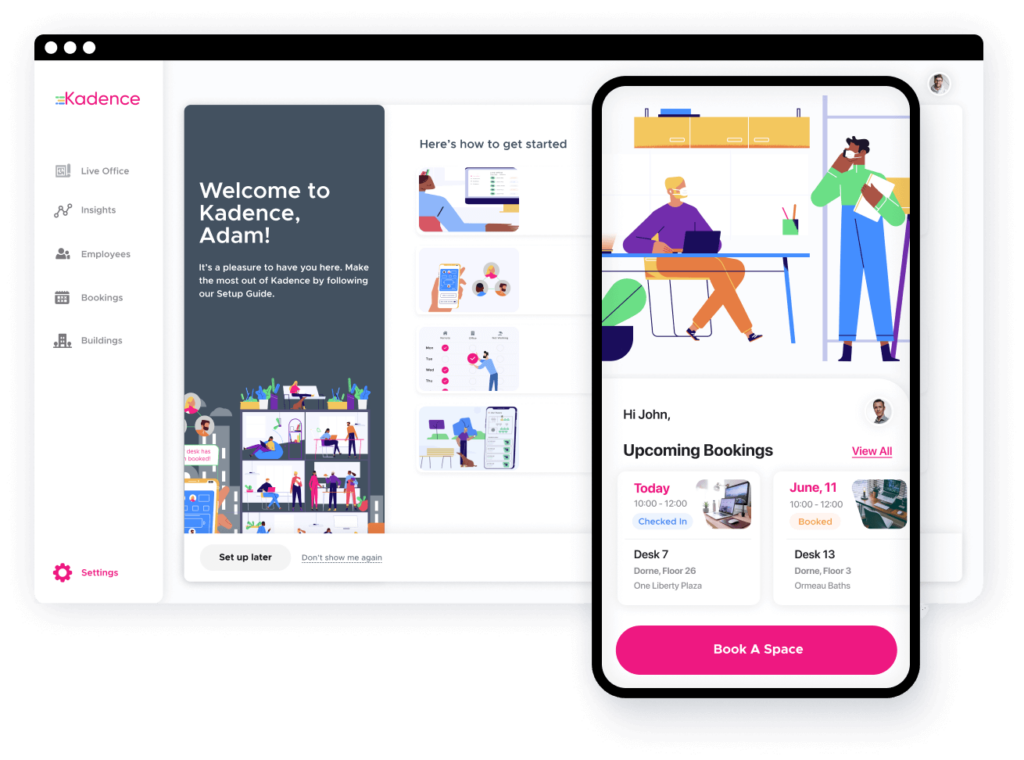
Kadence, the hybrid workplace management software, has a user-friendly way to manage meeting room bookings. The user-friendly space management capabilities, which became increasingly crucial during the pandemic, ut may not be so relevant now. The system streamlined contact tracing and interaction tracking, simplifying an otherwise complex process.
Kadence shines alongside Othership as a hybrid workplace management solution that also simplifies space management and offers excellent user accessibility. Its recognition as a high performer in the industry underscores its effectiveness. However, some refinements, such as improved labelling for desk bookings, may enhance its utility further. The suitability of Kadence for larger organizations should also be evaluated based on specific requirements and budget considerations.
Features: Meeting room booking, desk booking, scheduling
Pricing: $4 per active user per month, billed annually

#Eden
Employee experience is at the core of Eden, which is an integrated platform combining all HR, IT, and workplace experience needs. As such, the meeting booking software integrates well with tools like Microsoft Teams, Slack and G-Suite allowing you to automate processes. As well as room scheduling, Eden is a solution for desk booking and visitor management and includes a modern ticketing system.
Features: Engagement surveys, internal ticketing, performance management, deliveries, visitor management, desk booking
Pricing: desk booking plans start at $2.25 per desk per month, visitor management and room scheduling are free up to a certain company size, further plans are available for ticketing and surveys

#Deskbird
Deskbird is an office management software built around users instead of buildings. In a few clicks, employees can book a meeting room, space or desk. You can easily search for the best room for your needs based on availability, type, date, and time.
The analytics within Deskbird provide insights into desk usage, space utilisation and which days are the most popular. It is available in English, German, French, Italian, Spanish and Ukrainian.
Features: Floor plans, desk booking, integrations with communication platforms and calendars, weekly planning
Pricing: Starts at €3.80 per user per month
#WeWork Workplace
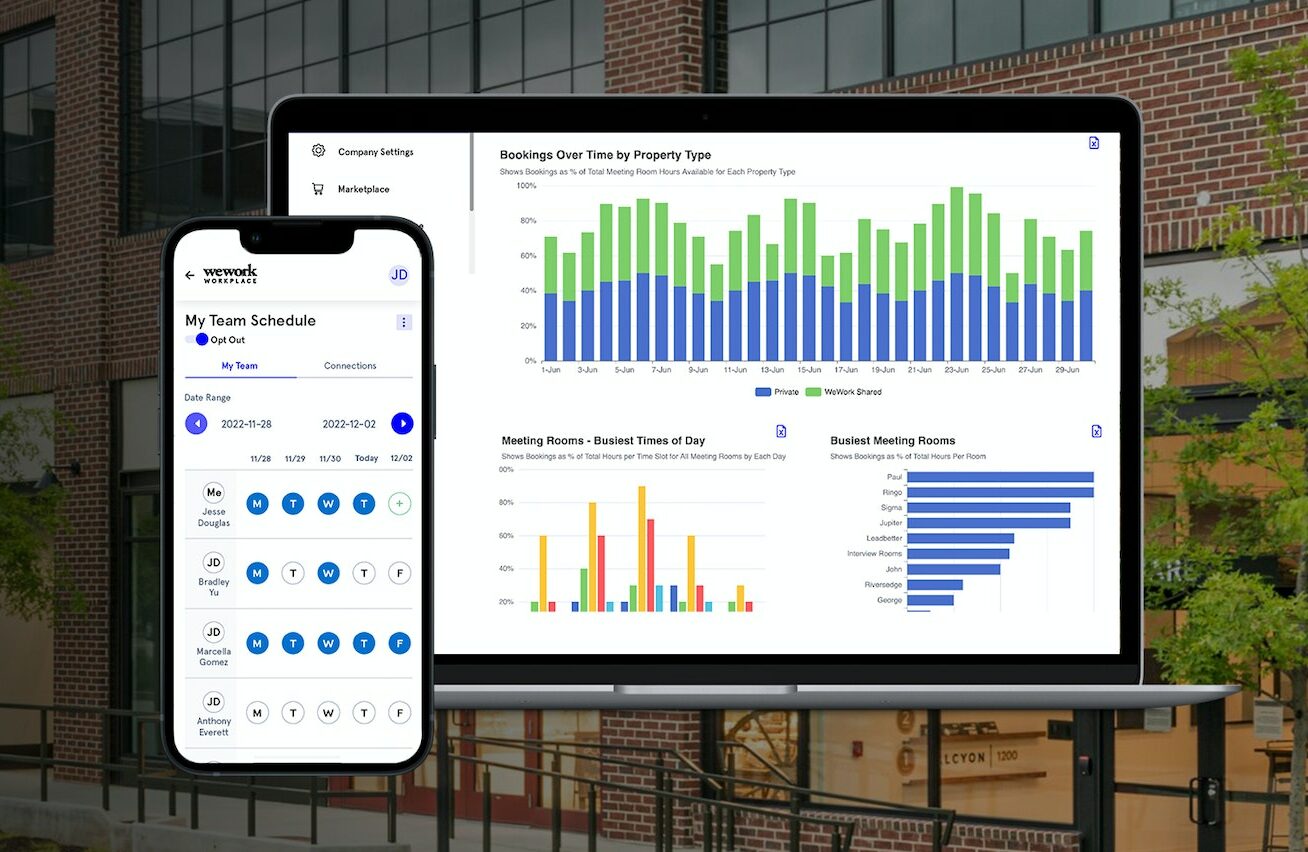
The well-known coworking space provider WeWork has also ventured out into the world of office management. Its solution WeWork Workplace has been developed to allow you to manage who is working from your office or any WeWork space. This makes WeWork Workplace and Othership two of the only solutions in the world able to book a meeting room in and out of the office. The only problem we found with the WeWork offer was it has to be in a WeWork, handy until you find you aren’t near one.
Features: meeting room booking, desk booking, remote working
Pricing: Depends on company size

#Cobot
Cobot is a coworking space management solution to organize workspace resources, automate billing, grow a community and meeting scheduling. It is whitelabel coworking software to facilitate the administration of coworking spaces and office hubs. It combines desk booking with financial solutions and analytics and is available in English, French, German, Hungarian, Japanese, Portuguese and Spanish. Nexudus integrates with a wide range of business software,
Features: Invoicing, billing and payments, bookings and calendars, multi-location management, access control, event planning
Pricing: starts at €59 per month

#Nexudus
Nexudus is a white-label platform for flexible working and coworking spaces. Most space management tasks can be automated in one single platform: billing, accounting, community management, event ticketing and secure access management. This desk booking software is available in English, German, French, Italian, Portuguese and Spanish. Nexudus integrates with a wide range of business software from Wi-Fi solutions to accounting software.
Features: meeting room booking, desk booking. event planning, digital signage, visitor management, community management, billing and payments
Pricing: £125 per month per location
Use Cases – How Different Workspaces Book Meeting Rooms
Meeting rooms are used differently depending on the type of workplace environment. Understanding these use cases helps organizations determine which meeting room booking software capabilities are most important. Different industries and workspace models require different levels of coordination and visibility.
- Corporate Offices
Corporate offices rely on structured scheduling for team meetings and executive discussions. Meeting room booking software helps maintain visibility and enforce policies across departments.
- Hybrid Teams
Hybrid workplaces experience changing demand for meeting spaces throughout the week. Centralised booking systems help manage these fluctuations and ensure fair access to rooms.
Coworking environments share meeting rooms between multiple companies. Meeting room booking software provides transparent availability and clear usage rules to reduce conflicts between members.
Meeting Room Booking Systems for Hotels and External Rentals
Moreover, the internal office applications and meeting spaces are external and revenue-generating assets of many organizations and other venues. In this case, a meeting room reservation system must support both internal coordination and customer-facing booking logic.
Hotels and venues offering hotel meeting room rental options demand systems that handle hourly or daily reservations, variable pricing, and external approvals. Compared to internal booking processes, external reservations include contracts, money transactions, and availability assurances.

Conference room reservation use cases extend to business centers and shared office providers. Spaces such as Regus meeting rooms emphasise how external users interact with booking systems differently from internal teams. These settings require transparency, regularity, and dependability of scheduling to ensure credibility and efficiency in their functioning.
Modern booking platforms can help organizations coordinate their approach to managing meeting spaces as a whole instead of in fragmented systems by supporting internal and external workflows.
How to Choose the Right Meeting Room Booking Software
Selecting the right meeting room booking software requires evaluating how the system fits your workplace structure and future needs. Organisations should assess factors such as team size, meeting room complexity, integrations, and reporting capabilities. Aligning these factors ensures the system supports both daily scheduling and long-term workplace planning.
Common Mistakes When Implementing a Room Booking System
Even powerful meeting room booking software can fail if implementation does not match workplace habits. Organizations often overlook adoption strategies, clear booking policies, or user training. Avoiding these common mistakes ensures booking systems deliver their intended operational benefits.
Conclusion
As workplaces become more flexible and hybrid collaboration continues to grow, managing shared meeting spaces has become an operational necessity. The right meeting room booking software helps organisations maintain visibility, enforce booking policies, and ensure meeting spaces are used efficiently.
When choosing a solution, businesses should consider team size, workspace complexity, integration requirements, and long-term reporting needs. A well-implemented room booking system not only simplifies scheduling but also improves how teams collaborate and use office resources.
If you’re looking for a reliable solution, Othership’s meeting room booking software provides a flexible platform designed for modern workplaces. With tools for room booking, desk scheduling, visitor management, and hybrid workplace coordination, it helps organisations simplify scheduling and maximise workspace efficiency.
FAQs About Meeting Room Booking Systems
How does meeting room booking software improve space utilization?
Meeting room booking software offers live information of the usage of the room and records no-shows, peak booking times, and under-utilized rooms. These can assist organizations to maximize layouts, change policies, and use space more effectively in the long run.
What is the best meeting room booking software for hybrid workplaces?
The best meeting room booking software for hybrid workplaces provides real-time availability, booking policies, analytics, and integrations with workplace tools such as Google Calendar or Microsoft Outlook. These systems help teams coordinate shared spaces while maintaining visibility across departments and locations.
Can meeting room booking systems integrate with calendars and workplace tools?
Yes, the contemporary meeting room reservation systems are interconnected with such tools as Google calendar, Microsoft Outlook, and collaborative tools. This makes sure that bookings indicate actual meetings that are visible throughout the organization and do not have duplicating workflows.
What features should a conference room booking system include?
A conference room booking system must also have live availability and booking regulations, authorizations, calendar connectors, and analytics. The characteristics make sure to provide equity, policy implementation, and long-term transparency regarding space utilization.
What is the best way to implement a room booking system for large teams?
Large teams are advised to use a room booking system with well-defined policies, role-based access, and high integration. Simple workflows, onboarding and alignment with the current work practices are also the way to successful adoption.


You must be logged in to post a comment.